
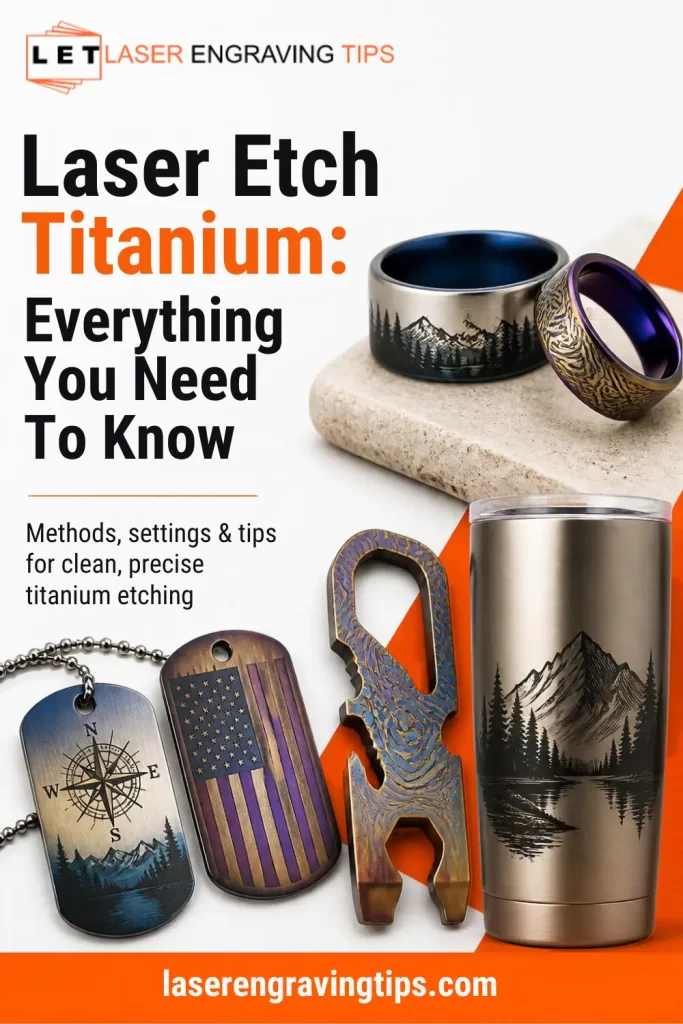
Laser etching titanium is a popular way to add permanent designs, logos, serial numbers, and decorative finishes to titanium products.
From custom jewelry and watches to medical components, aerospace parts, and outdoor gear, laser technology makes it possible to mark titanium with high precision and repeatability.
One of the biggest advantages of laser etching titanium is its versatility. Depending on the laser type and processing parameters, you can create dark marks, bright surface marks, colored finishes, or deeper engraved designs.
Titanium is also valued for its strength, low weight, and corrosion resistance, making it useful for both industrial and consumer products.
However, getting the best results requires choosing the right laser, understanding how titanium reacts to laser energy, and adjusting the settings to suit the material and desired finish.
Table of Contents
In this guide, we’ll explain how laser etching titanium works, which lasers are best for different applications, how to create color marks, and what to consider when selecting a laser engraver.
Can You Laser Etch Titanium?
Yes. Titanium can be laser etched, marked, and engraved using several types of laser systems. The best method depends on the titanium grade, surface finish, laser wavelength, pulse characteristics, and the appearance you want to achieve.
Laser processing can produce several different results on titanium:
- Surface marking: Creates a visible mark with minimal material removal.
- Dark marking: Produces dark gray or black markings under suitable conditions.
- Color marking: Creates colors such as blue, purple, gold, and bronze by controlling the surface oxide layer.
- Laser engraving: Removes material to create a recessed design.
- Deep engraving: Removes more material through repeated passes and carefully controlled processing.
These results are not interchangeable. A colored or dark surface mark may require little material removal, while a deep engraved design needs enough laser energy to remove material without causing excessive heat buildup or unwanted surface damage.
Titanium’s ability to develop a controlled oxide layer makes it particularly interesting for decorative laser marking.
With the right equipment and parameters, manufacturers and hobbyists can create detailed designs without applying conventional inks or paints.
What Is Laser Etching on Titanium?
Laser etching uses a focused laser beam to modify a material’s surface. On titanium, the process can change the surface appearance through localized heating, oxidation, or material removal.
The exact mechanism depends on the laser and its settings.
For example, a laser may heat the titanium surface enough to form a thin oxide layer. This layer changes how light reflects from the metal, creating a visible color.
Alternatively, a more aggressive process can remove material to produce a textured or recessed mark.
Although the terms laser etching, laser marking, and laser engraving are often used interchangeably, they describe different levels of surface modification.
Process | How it works | Typical result |
|---|---|---|
Laser marking | Changes the surface appearance | Text, logos, identification marks |
Laser etching | Usually creates a shallow surface change | Fine lines, textures, decorative designs |
Color marking | Controls oxide formation | Blue, purple, gold, and other colors |
Laser engraving | Removes material | Recessed lettering and designs |
Deep engraving | Removes material over multiple passes | Deeper grooves and durable identification features |
Terminology varies between manufacturers, so it’s worth checking how a particular laser system defines each process.
Which Laser Is Best for Titanium?
Several laser technologies can process titanium, but they differ in how effectively they mark bare metal and how much control they offer over the finished appearance.
1. Fiber Laser
A fiber laser is one of the most widely used options for marking titanium. It is particularly suitable for industrial identification, product personalization, and precision metal processing.
Fiber lasers operate at a wavelength that is well suited to processing many metals, including titanium. They can produce fine details, repeatable marks, and, with appropriate power and parameters, material-removing engravings.
Common applications include:
- Engraving serial numbers and QR codes
- Marking titanium tools and components
- Personalizing jewelry and accessories
- Creating logos on metal products
- Producing dark or bright surface marks
A standard pulsed fiber laser can be an excellent choice for general-purpose titanium marking. However, the quality and appearance of the mark depend on more than rated power alone.
Pulse duration, pulse energy, frequency, scanning speed, focus, and hatch spacing all affect the result.
We recommend The Gweike G2 Max 50W Fiber Laser Engraver

- INDUSTRIAL-GRADE ENGRAVING SPEED: The GWEIKE G2 Max 50W Fiber Laser Engraving Machine Is Equipped With A High-Speed Precision Galvanometer, Achieving An Engraving Speed Of Up To 15000 mm/s And An Accuracy Of 0.001 mm. Its Powerful Performance Significantly Enhances Work Efficiency. Supporting HD 8K Engraving Resolution, It Precisely Captures Every Detail, Delivering An Exceptional Engraving Experience.
Why the Gweike G2 Max 50W Fiber Laser Is a Great Budget Option to Laser Etch Titanium
- High Value at an Affordable Price
Priced competitively, the Gweike G2 Max 50W offers industrial-grade fiber laser performance without the premium cost typically associated with such capability. - Efficient Power for Titanium Marking
The 50W fiber laser delivers sufficient energy density to create crisp, permanent deep engravings on titanium. - Ideal for Small Business & Hobbyists
Its compact footprint and plug-and-play design make it accessible for startups, home shops, and small businesses aiming to produce durable product markings such as serial numbers, logos, or QR codes. - Superior Mark Quality
Capable of producing clean, high-contrast marks directly on bare titanium—no need for special coatings or sprays—this laser achieves professional end results on a budget. - Minimal Ongoing Costs
Unlike mechanical etching tools with consumables, the G2 requires no replacement parts beyond routine lens maintenance and power usage, keeping long-term costs low. - Expandable for Future Use
Should your business grow, the G2 can be integrated into automation setups or paired with software upgrades, making it a sustainable entry investment into laser marking workflows.
2. MOPA Fiber Laser
A MOPA fiber laser is a type of fiber laser that allows the user to adjust pulse duration across a defined range. This added control makes it useful for applications where surface appearance matters as much as marking speed.
MOPA lasers are particularly popular for decorative metal marking because their adjustable pulse characteristics provide more flexibility when developing different finishes.
On titanium, a suitable MOPA system can be used to experiment with:
- Color marking
- Dark surface marks
- Fine decorative patterns
- High-contrast logos
- Detailed jewelry designs
- Controlled surface texturing
However, a MOPA laser does not automatically produce better results than every standard fiber laser. The available pulse-duration range, optical output, beam quality, scan lens, and material condition all matter.
For users who want to create decorative titanium products or explore color marking, a MOPA fiber laser is often worth considering.
We recommend the xTool F2 Ultra 60W MOPA

- All-Metal Capability: The 60W MOPA fiber laser engraver handles diverse metal tasks—3D embossing, deep engraving, color engraving, and cutting 2mm metal—even combined processes. It also supports black marking on aluminum, laser cleaning, and thin metal welding, delivering exceptional results on gold, silver, stainless steel, brass, titanium, and more.
Why the xTool F2 Ultra 60W MOPA Is a Great Option to Laser Etch Titanium
- 60W MOPA fiber laser power: Provides the capability to mark and engrave titanium for applications such as jewelry, knife scales, watch components, metal tags, and industrial parts.
- Adjustable pulse duration: Offers greater control over how laser energy interacts with titanium, helping users fine-tune marking results for different materials and finishes.
- Titanium color marking: Can produce decorative colors such as blue, purple, and gold under suitable conditions by controlling the formation of a thin oxide layer on the titanium surface.
- Dark, high-contrast marks: Allows users to develop dark or black-looking marks on compatible titanium surfaces by adjusting laser parameters.
- Precise detail: Suitable for engraving fine text, intricate logos, serial numbers, and detailed decorative patterns.
- Versatile marking capabilities: Supports a range of applications, from surface marking and decorative finishes to material-removing engraving, depending on the selected parameters.
- Suitable for custom products: A practical option for businesses producing personalized titanium jewelry, accessories, branded products, and small-batch metal components.
- Parameter flexibility: Power, scanning speed, frequency, and pulse duration can be adjusted to help achieve the desired marking appearance.
- Repeatable production results: Once the right settings are established and validated, they can be documented and reused for consistent marking across production batches.
- Test-grid optimization: Testing different parameter combinations on a sample of the same titanium grade and surface finish helps identify the best settings before processing finished products.
Laser Comparison for Titanium
Laser type | Typical suitability | Best use case |
|---|---|---|
Standard fiber | Excellent for many metal-marking tasks | Logos, serial numbers, general engraving |
MOPA fiber | Excellent versatility on suitable systems | Color marking, decorative finishes, detailed marks |
UV | Specialized precision applications | Fine features and selected surface-marking tasks |
Green | Specialized metal processing | Applications requiring specific wavelength characteristics |
Blue diode | Not Recommended | |
CO2 | Not Recommended |
For most users working with bare titanium, a fiber laser is the best starting point. Choose a MOPA model if adjustable pulse duration and decorative marking flexibility are important requirements.
How Does Titanium Laser Color Marking Work?
Color marking is one of the most distinctive uses of laser processing on titanium.
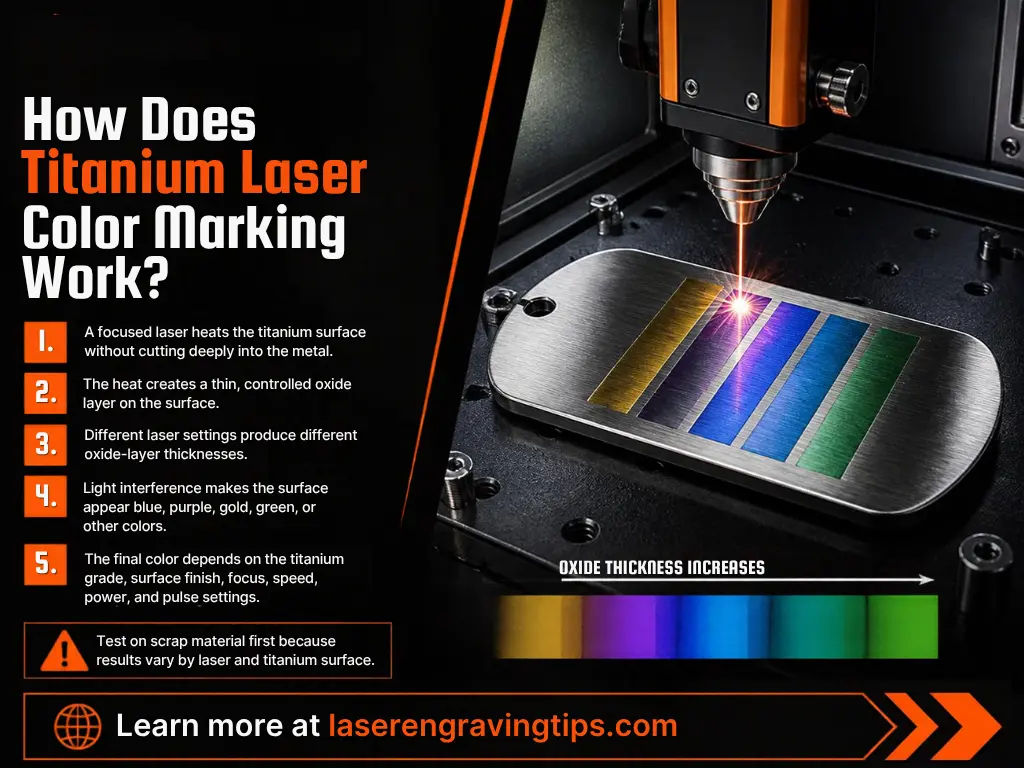
Unlike conventional printing, laser color marking does not necessarily rely on adding pigment to the surface. Instead, the laser can create a thin oxide layer whose optical properties change the way light reflects from the metal.
This phenomenon is related to thin-film interference.
When light hits the oxide layer, some light reflects from the outer surface while other light reflects from the boundary between the oxide and the underlying titanium.
The reflected light waves interact. Depending on the oxide layer’s thickness and optical properties, some wavelengths are reinforced while others are reduced, creating a visible color.
The resulting appearance may include blue, purple, gold, bronze, or other shades.
The exact color depends on several factors:
- Laser wavelength and pulse characteristics
- Average power and pulse energy
- Pulse frequency
- Scanning speed
- Hatch spacing
- Number of passes
- Titanium grade and surface finish
- Surface cleanliness and oxide condition
- Heat accumulation during marking
Color marking is sensitive to small parameter changes. A setting that produces blue on one titanium sample may produce a different shade on another sample with a different finish or alloy.
For this reason, color marking usually requires systematic testing rather than relying on a universal settings chart.
Can You Laser Engrave Rainbow Colors on Titanium?
Yes. Rainbow-style finishes can be produced on titanium by creating controlled oxide layers across different areas of a design.
This is useful for decorative products such as jewelry, knife scales, watch components, keychains, and custom accessories.
To create a multicolor design, users typically develop separate parameter combinations for different colors and apply them to different regions of the artwork.
Some laser software and workflows make this easier by allowing different processing layers or parameter assignments.
However, the colors should be tested on the actual titanium material before production. Surface preparation, alloy composition, and heat distribution can all affect the final result.
It is also important to distinguish color marking from a deeply engraved design. A colorful oxide layer can create an attractive appearance, but it does not necessarily mean that the laser has removed significant material.
How to Laser Etch Titanium: Step-by-Step Guide
The best workflow depends on the laser system and the intended finish, but the following process provides a practical starting point.
Step 1: Identify the Titanium Grade
Titanium is available in several commercially pure grades and alloys. Grade 1 and Grade 2 are examples of commercially pure titanium, while Grade 5 is a widely used titanium alloy containing aluminum and vanadium.
Different grades can respond differently to laser processing. Their composition, surface condition, and manufacturing history may influence the final appearance.
If possible, confirm the grade and obtain a small test sample from the same material batch as your production pieces.
Step 2: Clean the Surface
Oil, fingerprints, dust, and polishing compounds can affect marking consistency.
Clean the titanium with a material-compatible cleaner, then allow it to dry completely before processing. Follow the manufacturer’s instructions for any cleaning chemicals used.
We recommend using Breakthrough Clean Technologies Suppressor Cleaner which is a laser safe option.
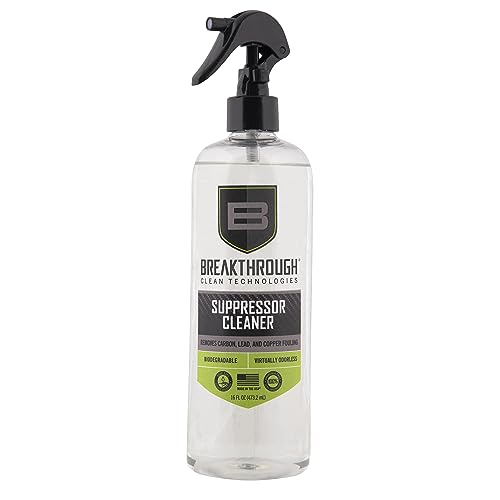
- SUPPRESSOR CLEANING SUPPLIES: Our carbon remover is a water-based cleaner that dissolves heavy carbon and lead deposits on a firearm's suppressor. It neutralizes all corrosive residues and temporarily protects against rust and corrosion. American Made.
Avoid touching the prepared area with bare fingers before marking, especially when creating decorative color finishes.
Step 3: Secure the Workpiece
Position the titanium item securely on the work surface. Small jewelry components, thin plates, and curved objects may require a fixture to prevent movement.
Accurate positioning is especially important for small lettering, fine logos, and designs that need to align with existing features.
For cylindrical products, use a suitable rotary attachment if the machine supports one. Check the manufacturer’s guidance for curved or reflective workpieces.
Step 4: Set the Focus
Correct focus helps the laser deliver energy to the intended area. An incorrectly focused beam can reduce detail, change mark appearance, or produce uneven results.
Use the machine’s recommended focusing method and verify that the workpiece is positioned correctly under the scan lens.
If you are processing curved titanium objects, remember that the focus distance may change across the surface.
Step 5: Create a Test Grid
Before engraving a finished product, create a parameter test on a spare piece of the same titanium grade and surface finish.
Change one or two variables at a time, such as scanning speed, power, frequency, pulse duration, or hatch spacing. Record the settings and evaluate the results.
For color marking, a test grid is particularly useful because small parameter changes can produce noticeable color differences.
For deep engraving, evaluate both the appearance and the depth of the mark. A dark surface mark is not necessarily a deep engraving.
Step 6: Choose the Right Processing Strategy
Your parameters should reflect the intended result.
For example:
- Dark marking: Focus on producing a uniform, high-contrast surface change without unwanted discoloration.
- Color marking: Control the heat input and oxide formation carefully.
- Bright marking: Adjust the process to achieve the desired contrast and surface texture.
- Deep engraving: Use a material-removal strategy with suitable passes, spacing, and heat management.
There is no single set of laser settings that works for every titanium grade, machine, and finish.
Step 7: Inspect the Result
After processing, inspect the mark for consistency, legibility, and unwanted surface changes.
For industrial components, check whether the marking method meets the relevant engineering, traceability, or regulatory requirements. For decorative products, assess color uniformity, edge definition, and overall appearance.
If the result is uneven, review the focus, surface preparation, workpiece positioning, and parameter choices before changing several settings at once.
Step 8: Clean and Document the Finished Part
Remove any residue using a method suitable for the titanium item and its intended application. For post laser cleaning Weiman Royal Sterling Silver Polish Tarnish is an excellent option.
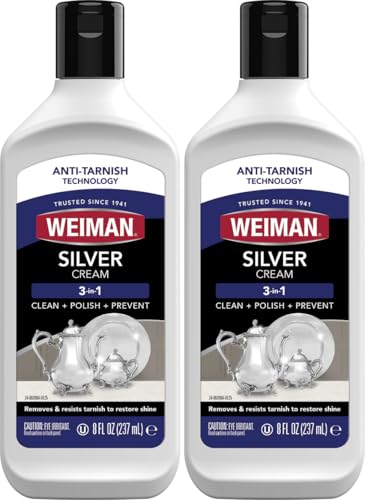
- LONG LASTING SHINE: The finest ingredients keep silver & other metals beautiful for years to come. Bring back the beauty and say goodbye to tarnish!
For production work, document the material grade, surface finish, laser model, lens, parameters, and cleaning process. This makes it easier to reproduce a successful result on future batches.
Titanium Laser Engraving Settings: What Should You Know?

Laser settings are among the most common questions when working with titanium.
However, copying settings from another machine can lead to disappointing results because machines with the same rated power may have different pulse characteristics, beam quality, and optical configurations.
The most important variables include the following.
Laser Power
Power affects how much energy the laser delivers over time. Higher power may improve processing speed or increase material removal, but excessive energy can cause unwanted heating, rough edges, or inconsistent surface effects.
For color marking, more power is not necessarily better. The goal is controlled surface modification, not simply maximum energy.
Scanning Speed
Scanning speed determines how quickly the laser moves across the workpiece.
Slower scanning generally increases the energy delivered to a given area, while faster scanning reduces the exposure time. The result depends on the combination of power, pulse characteristics, and other settings.
Pulse Frequency
For pulsed fiber lasers, frequency affects how often pulses are delivered.
Changing frequency can alter pulse energy, overlap, and heat distribution. Its effect also depends on the laser’s pulse-generation method and other settings.
Pulse Duration
Pulse duration is especially important when using a MOPA laser. It influences how energy is delivered during each pulse and can affect the balance between surface heating and material removal.
The ideal pulse duration depends on the desired finish and the capabilities of the machine.
Hatch Spacing
Hatch spacing controls the distance between adjacent scan lines when filling an area.
Closely spaced lines can increase coverage and overlap, while wider spacing may leave gaps or create a different texture. Excessive overlap can also increase heat buildup.
Number of Passes
Multiple passes can help create deeper engravings or develop a particular surface finish. However, each pass adds energy, so additional passes should be tested carefully.
For color marking, repeated passes can alter the oxide layer and change the color or uniformity.
A Practical Approach to Settings
Instead of relying on universal power and speed values, start with the machine manufacturer’s recommended parameters for titanium, if available. Then create a test grid using material from the same batch.
Record each test and change only a small number of variables at a time. This makes it easier to identify which adjustments improve the result.
What Types of Titanium Can Be Laser Marked?
Most common titanium grades can be processed with a suitable laser, but the best parameters may differ.
Commercially Pure Titanium
Commercially pure titanium is used in applications where corrosion resistance, low weight, and biocompatibility are important.
It is found in jewelry, outdoor equipment, selected medical products, and industrial components. Laser marking can provide identification and decorative finishes, depending on the application.
Grade 5 Titanium
Grade 5 titanium, also known as Ti-6Al-4V, is a widely used titanium alloy valued for its strength-to-weight ratio.
It appears in aerospace components, performance equipment, and various industrial products. Its alloy composition can influence how it responds to laser processing, so test samples are recommended.
Anodized Titanium
Anodized titanium has an intentionally formed oxide layer that can create a range of colors.
Laser processing may alter or remove portions of that layer, depending on the laser and parameters. If preserving the original anodized finish is important, test on a sample first.
Polished Titanium
Polished titanium can be used for decorative marking, but its surface finish affects the way light reflects from the finished mark.
A highly reflective surface may make some marks easier to see from certain angles and less visible from others. Cleaning and consistent focusing are important for repeatable results.
Brushed or Matte Titanium
Brushed and matte finishes can provide a different visual contrast from polished surfaces.
The direction of the surface grain, roughness, and existing texture may affect how a design looks after marking. Matching the test sample to the production finish is particularly important.
Common Applications of Titanium Laser Etching
Titanium combines low weight, strength, and corrosion resistance, making it useful in many industries. Laser marking adds identification, personalization, and decorative value.
1. Titanium Jewelry
Laser etching is used to personalize titanium rings, pendants, bracelets, and other jewelry.
Typical designs include names, dates, initials, symbols, fingerprints, and short messages. Decorative color marking can also be used to create distinctive finishes.
For rings and other curved items, accurate positioning and suitable rotary or fixture setups help maintain consistent alignment.
2. Watches and Accessories
Titanium is used in watch cases, buckles, clasps, and other accessories.
Laser marking can add logos, model information, serial numbers, and decorative graphics. Fine details are possible when the laser, lens, and focus are appropriate for the part size.
3. Knives and Outdoor Equipment
Titanium components appear in some knives, multitools, camping equipment, and performance accessories.
Laser marking can add brand logos, product names, and custom artwork. If the titanium component has a colored anodized finish, test the process carefully to avoid damaging the existing surface treatment.
4. Aerospace Components
Aerospace manufacturers use titanium alloys in selected structural and engine-related applications.
Laser marking may support part identification, traceability, and manufacturing workflows. These applications often require specific marking procedures, inspection standards, and documentation.
A decorative result is not enough when a component must meet engineering or regulatory requirements.
5. Medical and Dental Components
Titanium is used in various medical and dental products because of its useful mechanical properties and biocompatibility.
Laser marking can support identification and traceability, but the process must be validated for the specific component and intended use.
Surface changes, contamination, corrosion performance, and cleaning requirements may need to be evaluated.
Do not assume that every laser marking method is suitable for an implant or other regulated medical device.
6. Industrial Parts and Tools
Titanium parts may require serial numbers, QR codes, data matrix codes, or other identification marks.
Laser systems can create small, repeatable markings that support inspection and traceability. For these applications, code readability and durability should be tested under the expected service conditions.
Advantages of Laser Etching Titanium
Laser processing offers several advantages over conventional marking methods.
High precision: A focused laser can create fine lettering, detailed logos, and complex graphics.
No conventional engraving tool required: Laser marking avoids the need for a cutting tool to contact the surface during processing.
Repeatability: Once a suitable process is validated, the same design and settings can be reused for production.
Flexible finishes: Depending on the system, titanium can receive dark, bright, colored, textured, or recessed markings.
Minimal added material: Many laser marks do not require inks, labels, or applied pigments.
Suitable for automation: Laser systems can be integrated into production lines and used for repeatable part identification.
However, these benefits depend on the application. Laser processing is not always the fastest or least expensive option for every job, and some surface treatments require specialized equipment or validation.
Limitations and Challenges of Titanium Laser Marking
Although titanium is well suited to many laser applications, there are several challenges to consider.
Color Consistency
Color marking can be sensitive to small changes in material condition and processing parameters. Producing the same shade across a large batch may require careful process control.
Heat Effects
Excessive heat can cause unwanted discoloration, uneven marking, or surface changes. Thin parts may be particularly sensitive to heat accumulation.
Material Variability
Different titanium grades, suppliers, finishes, and manufacturing processes can respond differently. A process developed for polished Grade 2 titanium may not produce the same result on a brushed Grade 5 component.
Initial Setup
Creating a reliable process may require test grids, fixtures, suitable software, and repeated inspection. This is especially true for multicolor designs and deep engraving.
Equipment Cost
Fiber and MOPA laser systems can require a larger initial investment than entry-level diode engravers. The right choice depends on production volume, desired finish, working area, and the value of the products being marked.
Safety Considerations When Laser Etching Titanium

Laser marking equipment can cause serious eye and skin injuries if used incorrectly.
Follow the laser manufacturer’s safety instructions and operate the system with the required enclosure, interlocks, and wavelength-appropriate protective measures.
Important precautions include:
- Use a properly enclosed laser system whenever possible.
- Never look directly at the laser beam or specular reflections.
- Use protective eyewear rated for the laser’s wavelength and optical configuration when required by the safety assessment.
- Provide appropriate extraction and ventilation for fumes and airborne particles.
- Keep flammable materials away from the processing area.
- Follow the manufacturer’s guidance for cleaning agents and handling chemicals.
- Avoid processing unknown coatings or contaminated materials without first evaluating the hazards.
Titanium dust and fine particles can present fire risks under certain conditions, particularly during material removal or machining.
Do not allow combustible dust to accumulate in the machine or extraction system. Use extraction equipment suitable for the process and the materials involved.
If you are marking medical, aerospace, or other safety-critical components, follow the applicable workplace procedures and process-validation requirements.
How to Choose a Laser Engraver for Titanium
Choosing a laser engraver involves more than comparing wattage. Consider the types of titanium products you plan to process and the finish you need.
Choose a Fiber Laser for General Metal Marking
A fiber laser is a practical choice for logos, serial numbers, QR codes, and general engraving on bare titanium.
Look for a machine with suitable optical power, a scan lens that matches your required working area, reliable focusing, and software that supports your workflow.
Choose a MOPA Laser for Decorative Flexibility
If you want to create color effects, dark marks, and different surface finishes, consider a MOPA fiber laser with a pulse-duration range suited to your application.
Before buying, check whether the manufacturer provides validated titanium marking examples or parameters for materials similar to yours.
Consider a UV Laser for Specialized Fine Marking
A UV laser may be worth evaluating when fine details, small components, or controlled surface modification are central to the application.
Compare the machine’s marking speed, field size, maintenance needs, and overall cost against a fiber laser before making a decision.
Check the Working Area and Accessories
The marking field should accommodate your largest parts without compromising detail. Small jewelry pieces may need a different lens and fixture arrangement from larger plates or industrial components.
Rotary attachments, autofocus, camera positioning, and compatible design software can also improve productivity.
Test Before Buying
If possible, ask the supplier to mark a sample made from the exact titanium grade and finish you plan to use.
Evaluate the contrast, color, detail, depth, and consistency. A successful sample is more useful than a general claim that a machine can mark titanium.
Final Thoughts
Laser etching titanium is a versatile process for producing identification marks, custom jewelry, decorative color finishes, and industrial engravings.
The best results come from matching the laser technology to the desired finish and understanding how the titanium grade and surface condition affect the process.
For general marking and engraving on bare titanium, a fiber laser is usually the best starting point. If color marking and decorative effects are important, a suitable MOPA fiber laser offers additional control over the process. UV lasers may also be useful for specialized fine-marking applications.
Regardless of the machine you choose, test the exact material before production, document successful parameters, and inspect the finished mark for consistency and durability.
With the right equipment and a controlled workflow, laser technology can produce precise, repeatable results on a wide range of titanium products.
Frequently Asked Questions
Can titanium be laser etched?
Yes. Titanium is one of the best metals for laser etching because of its ability to form a stable oxide layer when exposed to a focused laser beam. This allows you to create permanent, high-contrast marks such as text, logos, barcodes, or even colored patterns without damaging the structural integrity of the metal.
Is laser etching titanium permanent?
Yes. Laser etching titanium creates marks that are permanent, heat-resistant, and corrosion-proof. Unlike surface printing, the etching process modifies the oxide layer or removes material directly, ensuring the design or code won’t fade, chip, or wear off over time—even in extreme conditions.
What watt laser to engrave titanium?
A 50W fiber laser is sufficient for engraving titanium with black marks, while a 60W MOPA fiber laser is ideal if you want faster processing or colored engravings.
Can you laser etch titanium with a diode laser?
Some diode lasers may alter certain titanium surfaces under specific conditions, but standard blue diode lasers are generally less suitable for reliable direct marking on bare titanium than fiber lasers. A fiber system is usually the better option for repeatable metal marking.
Can you laser mark titanium black?
Yes. Suitable laser systems can produce dark or black-looking marks on titanium under the right conditions. The result depends on the surface finish, laser parameters, and marking mechanism.
Can you create colored titanium with a laser?
Yes. Laser color marking can form a thin oxide layer that changes how light reflects from titanium. Blue, purple, gold, bronze, and other colors may be possible, depending on the material and processing conditions.
Does laser etching damage titanium’s corrosion resistance?
It depends on the process and application. Controlled marking may preserve the properties required for many products, but aggressive material removal, contamination, or unsuitable processing can affect surface condition. For critical components, evaluate the process against the relevant engineering requirements.
Can you deeply engrave titanium?
Yes. A suitable fiber laser can remove material from titanium through controlled processing. Deep engraving usually requires multiple passes and careful heat management. The required time depends on the desired depth, area, material grade, and laser specifications.