
Choosing the best computer to use a laser engraver is an important step for anyone working with laser cutting or engraving machines.
Whether you’re a hobbyist, small business owner, or professional maker, the right computer ensures your laser software runs smoothly, designs load quickly, and engraving jobs complete without errors.
Table of Contents
In this guide, you’ll learn what computer specs you need, the best types of computers for laser engraving, and tips for choosing the right system for your setup.
Why Your Computer Matters for Laser Engraving
Laser engravers rely on software to process designs and control the machine. Programs such as LightBurn, LaserGRBL, and xTool Creative Space convert your designs into instructions that guide the laser.
A computer that is too slow or outdated can cause problems like:
- Slow image processing
- Software crashes
- Interrupted engraving jobs
- Delayed machine communication
Using a computer with the right specifications ensures smooth workflow, faster engraving preparation, and reliable machine performance.

What Specs Does My Computer Need to Use a Laser Engraver?
Most laser engraving software does not require extremely powerful hardware, but certain specs are recommended.
Processor (CPU)
A modern processor ensures smooth design processing.
Recommended:
- Intel Core i5 or higher
- AMD Ryzen 5 or higher
For heavy graphic work, an Intel Core i7 or Ryzen 7 is ideal.
RAM (Memory)
RAM helps process large design files and photos.
Recommended:
- Minimum: 8GB RAM
- Ideal: 16GB RAM
More memory is especially helpful when engraving large images or complex vector designs.
Storage
Laser design files can accumulate quickly.
Recommended:
- 256GB SSD minimum
- 512GB SSD or higher preferred
Solid-state drives (SSD) load software and files much faster than traditional hard drives.
Graphics Card
Most laser engraving software does not require a dedicated GPU. However, graphic design programs like Adobe Illustrator or CorelDRAW benefit from stronger graphics performance.
Integrated graphics are usually sufficient for most users.
Operating System
Most laser engravers support:
- Windows 10 / Windows 11
- macOS
- Linux (for some software)
For example:
- LightBurn works on Windows, macOS, and Linux
- LaserGRBL works on Windows only
Always check your laser engraver’s software compatibility before buying a computer.
Recommended Computer Specs for Laser Engaving
Here is a balanced setup that works well for most laser engravers:
Component | Recommended Specification |
|---|---|
CPU | Intel Core i5 / AMD Ryzen 5 |
RAM | 16GB |
Storage | 512GB SSD |
Graphics | Integrated graphics |
OS | Windows 10/11 or macOS |
This configuration runs laser control software and design programs smoothly.
Best Computer To Use a Laser Engraver Comparison Table
Computer | Type | Processor | RAM | Storage | Display | Best For |
|---|---|---|---|---|---|---|
Dell Tower Desktop ECT1250 | Desktop Tower | Intel Core Ultra 7-265 | 32GB | 1TB SSD | External monitor required | Professional engraving workstations |
Apple iMac 24-inch (M4, 2024) | All-in-One Desktop | Apple M4 (10-core CPU / 10-core GPU) | 16GB | 512GB SSD | 24″ 4.5K Retina | Designers and creative studios |
HP 24 inch All-in-One Desktop PC (24‑cr0032) | All-in-One Desktop | AMD Ryzen 7 7730U | 16GB | 512GB SSD | 24″ FHD | Home workshops and small businesses |
Lenovo V15 Laptop (Ryzen 5 5500U) | Laptop | AMD Ryzen 5 5500U | 16GB | 512GB SSD | 15.6″ FHD | Budget-friendly laser engraving setups |
Apple MacBook Air 15-inch (M4, 2025) | Laptop | Apple M4 | 16GB | 512GB SSD | 15.3″ Liquid Retina | Portable professional engraving workflows |
HP 15.6″ Business Laptop (Ryzen 5 5500U, 2024) | Laptop | AMD Ryzen 5 5500U | 16GB | 512GB SSD | 15.6″ FHD Anti-Glare | Affordable laptop for hobbyists and small businesses |
Quick Buying Guide
- Best Overall Desktop: Dell Tower Desktop ECT1250
- Best Display for Design Work: Apple iMac 24-inch (M4, 2024)
- Best Laptop Overall: Apple MacBook Air 15-inch (M4, 2025)
- Best Budget Laptop: Lenovo V15 Laptop (Ryzen 5 5500U)
Best Computer To Use a Laser Engraver Reviews
There are several good computer options depending on your workspace and budget.
Desktop Computers (Best Performance)
Desktop PCs are often the best choice for dedicated laser engraving workstations.
Benefits include:
- More powerful hardware
- Larger monitors for design work
- Easier upgrades
- Better cooling for long engraving sessions
A desktop setup works well for workshops or studios where the laser machine stays in one place.
Our Recommended Desktop Computers:
1. Dell Tower Desktop ECT1250
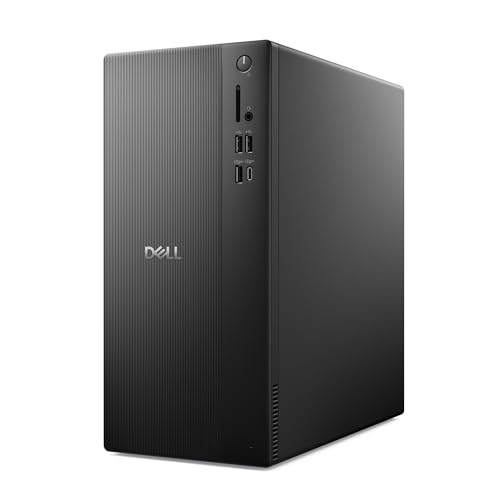
- Speed up your tasks with AI: Unlock new levels of productivity and creativity by upgrading to Intel Core Ultra processors with built-in AI.

The Dell Tower Desktop ECT1250 is a powerful workstation that works exceptionally well for laser engraving workflows, especially if you regularly use design software alongside engraving programs.
Powered by the Intel Core Ultra 7-265 processor, this desktop offers excellent speed and responsiveness, making it ideal for running engraving software like LightBurn or LaserGRBL while handling large design files.
With 32GB of RAM and a 1TB M.2 SSD, the system easily manages complex vector graphics, photo engraving projects, and multitasking between design programs.
The built-in Intel UHD Graphics are more than sufficient for most laser design work, and the ability to connect multiple monitors makes it easier to manage design windows, control panels, and engraving previews simultaneously.
Another highlight is the tool-less case design, which allows easy upgrades or maintenance. Security features like a hardware TPM chip and lock slot make it suitable for professional workshops or office environments. Dell also includes 1-year onsite service, which adds peace of mind if hardware issues arise.
Pros
- Powerful Intel Core Ultra 7 processor for fast performance
- 32GB RAM and 1TB SSD handle large engraving files easily
- Supports multiple monitors for improved workflow
- Tool-less upgrade design for easy hardware access
- Reliable Dell build quality and onsite service support
Cons
- Integrated graphics may limit advanced 3D design work
- Larger tower design requires more desk space
- Higher price compared to basic laser engraving PCs
The Dell Tower Desktop ECT1250 is one of the best desktop computers for laser engraving, offering excellent speed, strong multitasking capability, and reliable performance for both hobbyists and small businesses running engraving software and design tools.
2. Apple iMac All-in-One Desktop Computer

- BRILLLLLLIANT — iMac is the ultimate all-in-one desktop computer, powered by the M4 chip and built for Apple Intelligence.* With a stunning 24-inch Retina display, iMac gives you the space you need in an iconic, colorful design that livens up any room.
The Apple iMac 24-inch (2024) is a powerful and stylish all-in-one desktop computer that works exceptionally well for laser engraving setups.
Equipped with the Apple M4 chip featuring a 10-core CPU and 10-core GPU, it delivers fast performance for running engraving software like LightBurn and creating detailed designs in Adobe Illustrator or other creative applications.
One of its biggest strengths is the stunning 24-inch 4.5K Retina display, which supports 1 billion colors and 500 nits of brightness. This large, ultra-sharp screen makes it easy to edit engraving designs, preview artwork, and manage laser projects with excellent clarity and color accuracy.
With 16GB of unified memory and a 512GB SSD, the iMac handles multitasking smoothly and stores large design files without slowing down. The all-in-one design also keeps your workspace clean by eliminating bulky towers and extra cables—perfect for home studios, workshops, or creative offices.
Pros
- Powerful Apple M4 chip (10-core CPU/GPU)
- Beautiful 24-inch 4.5K Retina display with excellent color accuracy
- 16GB unified memory for smooth multitasking
- All-in-one design saves desk space
- Quiet operation and premium build quality
Cons
- Limited upgrade options compared to traditional desktops
- Higher price than many Windows PCs
- Some laser software may be more optimized for Windows
The Apple iMac 24-inch (M4) is one of the best desktop computers for laser engraving, offering outstanding performance, a large high-resolution display, and a sleek all-in-one design that’s perfect for creators, designers, and laser engraving businesses.
3. HP 24 inch All-in-One Desktop PC

- CONNECT AND COLLABORATE ON YOUR TERMS - Built with all the features to keep you connected like a tiltable pop-up privacy camera, HP Video Controls, dual array microphones and advanced noise reduction technology.
The HP 24-inch All-in-One Desktop PC is a great choice for anyone looking for a clean, space-saving computer to run a laser engraver.
Powered by the AMD Ryzen 7 7730U processor and 16GB of RAM, it delivers strong performance for laser engraving workflows, easily handling design software and machine control programs like LightBurn and LaserGRBL.
The 24-inch Full HD display provides plenty of workspace for designing engraving files, editing images, and managing machine settings. Thanks to its ultra-slim micro-edge screen, the display feels large and immersive while keeping the overall footprint compact—perfect for small workshops or home studios.
With a 512GB SSD, the system boots quickly and loads design files fast, which helps streamline engraving projects. Built-in features like the pop-up privacy camera, dual microphones, and noise reduction also make it useful for creators who host online classes, tutorials, or video calls with clients.
Pros
- Powerful AMD Ryzen 7 processor for smooth multitasking
- 16GB RAM ideal for design and engraving software
- Large 24-inch Full HD display for detailed work
- 512GB SSD offers fast performance and good storage capacity
- All-in-one design saves desk space and reduces cable clutter
Cons
- Limited upgrade options compared to traditional desktops
- Integrated graphics may struggle with heavy 3D design work
- Screen resolution is FHD rather than 4K
The HP 24-inch All-in-One Desktop PC is one of the best computers to use with a laser engraver, offering strong performance, a large display, and a sleek space-saving design that works well for hobbyists, makers, and small laser engraving businesses.
Laptop (Best for Flexibility)
Laptops are a popular option for hobbyists and small businesses because they are portable.
Advantages include:
- Easy to move around the workspace
- Useful for craft fairs or pop-up events
- Compact design
Many modern laptops easily run laser software like LightBurn without issues.
Our Recommended Laptops:
1. Lenovo V15 Laptop

- 【High Speed RAM And Enormous Space】16GB high-bandwidth RAM to smoothly run multiple applications and browser tabs all at once; 512GB PCIe NVMe M.2 Solid State Drive allows to fast bootup and data transfer
The Lenovo V15 Laptop is a powerful yet affordable option for users looking for a reliable laptop to run a laser engraver. Powered by the AMD Ryzen 5 5500U hex-core processor, it delivers solid performance for engraving software such as LightBurn and LaserGRBL, as well as common design programs.
With 16GB of RAM, the laptop handles multitasking smoothly, allowing you to run design tools, manage engraving files, and operate your machine without slowdowns. The 512GB NVMe SSD ensures fast boot times and quick file loading, which is helpful when working with large image engravings or vector designs.
The 15.6-inch Full HD display provides clear visuals and enough screen space for editing engraving layouts. Connectivity is another strong point, featuring USB-A, USB-C, HDMI, and RJ45 Ethernet, making it easy to connect laser engravers, external drives, or additional monitors.
Pros
- AMD Ryzen 5 5500U processor with strong multitasking performance
- 16GB RAM ideal for design and engraving software
- 512GB SSD offers fast storage and file access
- Multiple ports including USB-C, HDMI, and Ethernet
- Numeric keypad useful for data entry and settings adjustments
Cons
- Basic design and build compared to premium laptops
- Integrated graphics not ideal for heavy 3D rendering
- Display color accuracy is average for professional design work
The Lenovo V15 is one of the best budget-friendly laptops for running a laser engraver, offering excellent performance, plenty of RAM, and solid connectivity—making it a great choice for hobbyists, makers, and small laser engraving businesses.
2. Apple MacBook Air 15-inch Laptop

- SPEED OF LIGHTNESS — MacBook Air with the M4 chip lets you blaze through work and play. With Apple Intelligence,* up to 18 hours of battery life,* and an incredibly portable design, you can take on anything, anywhere.
The Apple MacBook Air 15-inch with the M4 chip is one of the best laptops to use with a laser engraver, combining powerful performance with excellent portability.
Powered by the Apple M4 chip and 16GB of unified memory, it handles laser engraving workflows smoothly, whether you’re running engraving software like LightBurn or creating designs in tools such as Adobe Illustrator.
The 15.3-inch Liquid Retina display is an excellent feature, offering sharp detail, excellent brightness, and support for 1 billion colors.
This makes it ideal for editing engraving designs, photos, and vector graphics with high clarity. The 512GB SSD provides fast storage and plenty of space for project files and design libraries.
Another major advantage is its exceptional battery life—up to 18 hours, allowing creators to run engraving machines at workshops, craft fairs, or studios without constantly searching for a power outlet.
With Thunderbolt 4 ports, Wi-Fi 6E, and support for external displays, the MacBook Air also integrates easily into professional creative setups.
Pros
- Powerful Apple M4 chip for smooth multitasking
- 16GB unified memory handles design and engraving software easily
- Large 15.3-inch Liquid Retina display with excellent color quality
- Up to 18 hours of battery life for all-day productivity
- Thin, lightweight, and highly portable
Cons
- Higher price compared to many Windows laptops
- Limited ports compared to traditional workstations
- Some laser software is more optimized for Windows
The MacBook Air 15-inch (M4) is one of the best premium laptops for laser engraving, offering outstanding performance, a stunning display, and incredible battery life—perfect for designers, makers, and small businesses running laser engraving machines.
3. HP 15.6″ Business Laptop
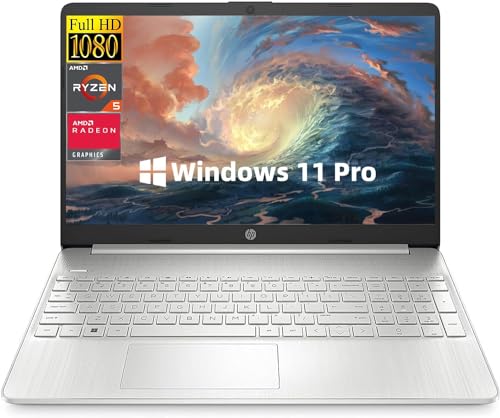
- 【High-Performance】The HP Business Laptop is engineered to deliver unparalleled gaming performance. Equipped with AMD Ryzen 5 5500U, Up to Turbo Boost 4.0 GHz, 6 cores, 12 threads. This powerful processing performance delivers reliable performance for everyday computing tasks, ensures smooth multitasking and responsiveness. Experience seamless operation for all your computing needs.
The HP 15.6″ Business Laptop (2024) is a dependable and affordable choice for anyone looking for a laptop to run a laser engraver and design engraving files.
Powered by the AMD Ryzen 5 5500U processor with 6 cores and 12 threads, it delivers smooth performance for everyday tasks and laser engraving software such as LightBurn and LaserGRBL.
With 16GB of RAM, the system handles multitasking well, allowing you to run engraving software alongside design tools and web applications.
The 512GB SSD provides fast boot times and plenty of storage for engraving files, photos, and vector graphics.
The 15.6-inch Full HD anti-glare display offers clear visuals and wide viewing angles, which is useful when editing detailed engraving designs.
Its thin and portable design with long battery life makes it a practical option for makers who move between home workshops, offices, or craft events.
Pros
- AMD Ryzen 5 5500U processor provides reliable performance
- 16GB RAM supports smooth multitasking
- 512GB SSD offers fast storage and quick boot times
- Anti-glare Full HD display improves visibility during long design sessions
- Thin, lightweight design with good battery life
Cons
- Integrated graphics not suited for heavy 3D design tasks
- Standard build quality compared to premium laptops
- Display color accuracy is average for professional graphic work
The HP 15.6″ Business Laptop is one of the best budget laptops for using a laser engraver, offering strong multitasking performance, good storage capacity, and portability—making it ideal for hobbyists, small business owners, and laser engraving beginners.
Tips for Choosing the Right Computer to Use a Laser Engraver

Choose SSD Storage
SSDs significantly improve performance when loading large engraving files.
Use a Large Monitor
A 24-inch or larger monitor helps when editing detailed vector designs.
Check Software Compatibility
Always verify that your laser software supports your operating system.
Consider Future Upgrades
Buying a computer with extra RAM slots or storage capacity ensures it can handle future projects.
Do You Need a Powerful Computer for Laser Engraving?
For most users, laser engraving software is not extremely demanding. Even mid-range computers can handle typical engraving jobs.
However, if you frequently work with:
- Large photo engravings
- Complex vector artwork
- Batch engraving production
then a more powerful computer will save time and improve efficiency.
Final Thoughts
The best computer to use a laser engraver doesn’t need to be extremely expensive, but it should have reliable performance, sufficient RAM, and fast storage. A system with an Intel i5 or Ryzen 5 processor, 16GB RAM, and SSD storage is more than capable of handling most engraving projects.
Whether you choose a desktop for power, a laptop for portability, the right computer will help you run engraving software smoothly and create professional-quality laser projects with ease.
Frequently Asked Questions
What type of computer do I need for a laser engraver?
Most laser engravers work well with a mid-range computer that has at least an Intel Core i5 or AMD Ryzen 5 processor, 8GB of RAM, and SSD storage. This setup can run common engraving software like LightBurn and LaserGRBL smoothly for most projects.
Can I use a laptop to run a laser engraver?
Yes, laptops are commonly used with laser engravers. Many users prefer laptops because they are portable and easy to connect to machines in workshops, garages, or craft fairs. Just make sure the laptop has enough RAM (preferably 8GB or more) and a reliable USB or Wi-Fi connection.
Is a powerful graphics card required for laser engraving?
No, most laser engraving software does not require a dedicated graphics card. Integrated graphics are usually enough. However, if you frequently use design software such as Adobe Illustrator or CorelDRAW, a stronger GPU can improve performance when editing complex designs.
Which operating system works best with laser engravers?
Both Windows and macOS work well with many laser engraving machines. However, some programs—like LaserGRBL—are Windows-only, while others like LightBurn support Windows, macOS, and Linux. Always check the compatibility of your engraver’s software before choosing a computer.
How much storage do I need for laser engraving projects?
A 256GB SSD is usually enough to start, but many users prefer 512GB or more because image engravings and design files can take up a lot of space. External storage or cloud backups are also helpful for storing older project files.