
Laser engraver camera kits have quickly become one of the most valuable upgrades for hobbyists, makers, and small businesses. If you’ve ever struggled with material alignment, wasted blanks due to misplacement, or slow batch setup, a camera system can completely change how you work.
Table of Contents
In this guide, we’ll break down what laser engraver camera kits do, why they matter, how they work with LightBurn, and why the AlgoLaser Laser Engraver Camera (5MP, 550×800mm work area) is one of the best options available today.
What is a Laser Engraver Camera Kit?

A laser engraver camera kit is a top-mounted camera system that integrates with laser software (most commonly LightBurn) to give you a real-time view of your laser bed. Instead of guessing placement or using jigs for everything, you can:
- See your material directly inside the software
- Drag and drop designs exactly where you want them
- Preview engravings before firing the laser
- Align multiple objects for batch engraving
Think of it as adding “eyes” to your laser engraver.
Why Camera Kits Matter for Laser Engraving
Without a camera, laser engraving relies heavily on:
- Manual measurements
- Physical jigs
- Trial-and-error test burns
A camera kit dramatically reduces mistakes and setup time.
Key Benefits
- Precise positioning (often under 1mm accuracy)
- Faster setup for single and batch jobs
- Less wasted material
- Better workflow for odd-shaped or pre-made items
- Visual previews before engraving or cutting
For production work, camera kits aren’t just convenient—they’re a profit-saving tool.
How a Laser Engraver Camera Kit Works with LightBurn
Most laser engraver camera kits are designed specifically for LightBurn, the industry-standard laser control software.
Once installed, the camera:
- Mounts above your laser work area
- Connects via USB to your computer
- Is calibrated once inside LightBurn
- Displays a live image of your work surface
From there, you can overlay your design directly onto the camera image and engrave with confidence.
Important: LightBurn software is required and not usually included with camera kits
Recommended Laser Engraver Camera Kit: AlgoLaser Laser Engraver Camera (5MP)

If you’re looking for the best balance of price, precision, and compatibility, the AlgoLaser Laser Engraver Camera is an excellent choice—especially for diode laser users.
Why the AlgoLaser Camera Stands Out
Exceptional Precision & Clarity
- 5MP HD camera delivers sharp, real-time visuals
- Sub-millimeter alignment accuracy
- Ideal for detailed designs, logos, and text
- Large 550 × 800mm working area covers most desktop diode lasers
This makes it especially useful for engraving pre-cut items, wood blanks, leather patches, and acrylic pieces.
Wide-Angle Lens & HD Recording
- Industrial-grade wide-angle lens
- Captures the full bed in one view
- Supports HD video recording of the engraving process
This is a huge bonus if you:
- Create content for social media
- Want process documentation
- Share engraving videos with customers

Seamless LightBurn Integration & Auto Positioning
- Designed specifically for LightBurn compatibility
- Real-time preview inside the workspace
- Auto positioning with under 1mm accuracy
- Works well even on slightly curved or uneven materials
Once calibrated, design placement becomes fast and intuitive.
Efficient Batch Engraving
- One-time calibration enables repeatable batch jobs
- Automatically aligns multiple objects
- Great for:
- Keychains
- Tags
- Coasters
- Nameplates
- Small business production runs
Batch engraving alone can pay for the camera upgrade very quickly.
Versatile Mounting & Broad Compatibility
- Fits most open-frame diode laser engravers on the market
- Adjustable mounting system for flexible placement
- 6-foot USB cable for easy routing
- Plug-and-play on Windows and macOS
This makes it a strong option for home workshops and professional setups alike.
Installation Overview
The kit includes the camera module, adjustable stand, C-clamp, USB cable, calibration paper, and documentation. Assembly involves mounting the stand to the clamp, attaching the camera, routing the USB cable, and connecting it to a Windows or Mac computer. Camera height is adjustable to match the engraving area:
- 35 cm for a 400×400 mm workspace
- 50 cm for a 550×800 mm workspace
The camera is plug-and-play with no additional drivers required.
Operation with LightBurn
The camera works through LightBurn’s camera tools and requires two calibration steps:
- Lens Calibration – Uses the provided dot-pattern calibration paper. Multiple captures (about nine) across the workspace ensure accurate distortion correction.
- Camera Alignment – Engraves a sample pattern and aligns reference points to map the camera view precisely to the laser workspace.
Once calibrated, the camera enables real-time material preview, accurate design placement, batch processing, image tracing, and video recording of engraving sessions.
Maintenance
Routine care includes cleaning the lens with a soft cloth, checking stand and clamp tightness, inspecting the USB cable, and storing the camera in a clean, dry environment away from heat and sunlight.
Troubleshooting
Common issues include camera detection problems, blurry images, or inaccurate positioning. These are typically resolved by checking USB connections, cleaning the lens, ensuring proper lighting, and repeating calibration without moving the camera or engraver.
AlgoLaser Laser Engraver Camera Kit Vs. Other Kits

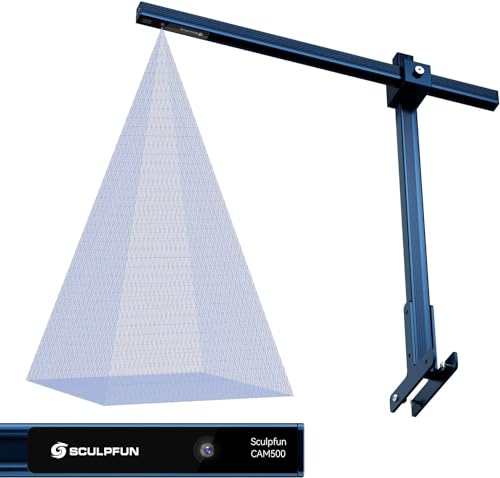
Feature | AlgoLaser Laser Engraver Camera | Longer New LightBurn Camera Kit | SCULPFUN CAM500 LightBurn Camera |
|---|---|---|---|
Camera Resolution | 5MP HD | 5MP HD | 5MP HD |
Working Area Coverage | 550 × 800mm | 560 × 740mm | 400 × 400mm |
Positioning Accuracy | Sub-millimeter (<1mm) | Sub-millimeter (<1mm) | High precision (<1mm) |
LightBurn Compatibility | Yes (designed for LightBurn) | Yes (designed for LightBurn) | Yes (LightBurn optimized) |
Auto Positioning / Area Detection | Yes | Yes | Yes |
Real-Time Preview | Yes | Yes | Yes |
Batch Engraving Support | Yes | Yes | Yes |
Video Recording | Yes (HD recording) | Yes (HD + time-lapse) | Yes (HD + time-lapse) |
Image Tracing Support | Yes (via LightBurn) | Yes (via LightBurn) | Yes (built-in LightBurn tracing) |
Wide-Angle Lens | Yes | Yes (industrial wide-angle) | Yes |
Mounting Style | Adjustable stand + C-clamp | Adjustable stand + clamp | Fixed stand mount |
USB Cable Length | 6 ft USB 2.0 | Standard USB | Standard USB |
OS Compatibility | Windows & macOS | Windows & macOS | Windows & macOS |
Best For | Large beds, batch jobs, diode lasers | Large layouts, multi-material production | Compact engravers & smaller work areas |
Quick Buying Recommendations
Choose the AlgoLaser Camera if you want:
- The largest vertical coverage (550 × 800mm)
- Strong batch engraving support
- Broad compatibility with diode laser engravers
- Simple plug-and-play setup with long USB reach
Choose the Longer LightBurn Camera if you want:
- The widest horizontal coverage (740 × 560mm)
- Excellent auto positioning and time-lapse recording
- Efficient multi-material and production workflows
- A polished LightBurn-focused experience
Choose the SCULPFUN CAM500 if you want:
- A compact and affordable LightBurn camera
- Reliable precision for 400 × 400mm workspaces
- Built-in image tracing and batch engraving
- A good match for smaller desktop engravers
Who Should Use a Laser Engraver Camera Kit?
Camera kits are especially useful for:
- Small business owners
- Etsy and craft sellers
- Batch production workflows
- Users engraving pre-made items
- Anyone tired of wasting materials
If accuracy and efficiency matter to you, a camera kit is one of the best upgrades you can make.
Is a Laser Engraver Camera Kit Worth It?
For most users—yes.
While a camera kit isn’t required to engrave, it:
- Saves time
- Reduces errors
- Improves confidence
- Speeds up production
For batch engraving and alignment-heavy work, it’s a game changer.
Final Thoughts: Best Laser Engraver Camera Kit for LightBurn Users
The AlgoLaser Laser Engraver Camera (5MP) checks all the right boxes:
- High-resolution imaging
- Large work area coverage
- Seamless LightBurn integration
- Reliable batch engraving support
- Broad compatibility with diode lasers
If you’re ready to take your laser engraving workflow to the next level, adding a camera kit—especially this one—is a smart move.
Frequently Asked Questions
Do I really need a camera kit for my laser engraver?
A camera kit isn’t required to engrave, but it can dramatically improve accuracy and workflow. It allows you to visually position designs directly on your material, reduce setup time, minimize wasted material, and handle batch engraving more efficiently. If you engrave often or run production-style jobs, a camera kit quickly becomes worth it.
Are laser engraver camera kits compatible with all lasers?
Most camera kits are software-dependent rather than machine-specific. Many popular kits are designed to work with LightBurn, making them compatible with a wide range of diode, CO₂, and some fiber laser engravers. However, you should always check mounting compatibility, bed size coverage, and operating system support (Windows or macOS) before purchasing.
How accurate are laser engraver camera kits?
When properly calibrated, camera kits can achieve sub-millimeter positioning accuracy (often under 1 mm). Accuracy depends on factors such as camera resolution, mounting stability, lens quality, and calibration quality. A 5MP or higher camera typically provides excellent precision for most engraving applications.
Can I use a camera kit for batch engraving?
Yes. One of the biggest advantages of a laser engraver camera kit is batch engraving. After a one-time calibration, the camera can automatically align designs across multiple objects in a single job, making it ideal for engraving name tags, keychains, serial numbers, and other repeated designs with consistent spacing.
Is LightBurn required to use a laser engraver camera?
In most cases, yes. LightBurn is currently the most widely supported software for laser camera integration, offering features like real-time preview, camera alignment, auto positioning, and batch workflows. Some proprietary laser software supports cameras, but functionality is usually more limited compared to LightBurn.