
The xTool F2 dual-laser engraver is designed for creators who demand portability, precision, and professional-grade results.
Combining a 15W diode laser with a 5W 1064nm infrared (IR) laser, the F2 unlocks engraving and cutting across 300+ materials, from wood and acrylic to metal and plastics.
Table of Contents
Whether you’re running a small business, attending craft fairs, or creating at home, the xTool F2 delivers unmatched versatility in a compact, travel-ready design.
xTool F2 Dual-Laser Versatility: One Machine, Endless Possibilities

Check Amazon Price Below
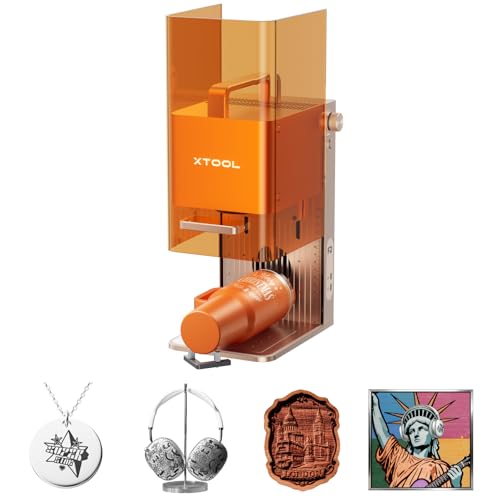

The standout feature of the xTool F2 is its dual-laser system, which dramatically expands what you can create.
15W Diode Laser
- Ideal for wood, leather, acrylic, rubber, and coated metals
- Capable of 3D embossing and cutting thick materials
- Cuts up to 15mm basswood and 12mm acrylic with multiple passes
5W Infrared (IR) Laser (1064nm)
- Designed specifically for metal and plastic engraving
- Produces deep, dark, high-contrast markings on metal
- Enables color engraving on stainless steel
- Excellent for marking electronics, tools, jewelry, and tags
This combination eliminates the need for multiple machines, making the F2 a true all-in-one laser engraver.
xTool F2 Materials Compatibility Table
Material | Engrave | Cut | Best Laser | Notes |
|---|---|---|---|---|
Wood (Softwood) | Yes | Yes (multi-pass) | 15W Diode | Basswood, pine, plywood |
Wood (Hardwood) | Yes | Thin only | 15W Diode | Engraves well, slower cutting |
MDF | Yes | Thin only | 15W Diode | Strong smoke—use ventilation |
Plywood | Yes | Thin only | 15W Diode | Glue layers affect cutting |
Leather (Veg-tan) | Yes | Thin only | 15W Diode | Clean dark engraves |
Paper & Cardstock | Yes | Yes | 15W Diode | Use low power |
Cardboard | Yes | Yes | 15W Diode | Fire risk—monitor closely |
Cork | Yes | Thin only | 15W Diode | Engraves easily |
Rubber (Laser-safe) | Yes | Thin only | 15W Diode | Use laser-safe rubber only |
Fabric (Cotton, Denim) | Yes | Thin only | 15W Diode | Synthetic fabrics may melt |
Felt (Wool) | Yes | Thin only | 15W Diode | Natural felt recommended |
Acrylic (Opaque / Dark) | Yes | Thin only | 15W Diode | Clear acrylic cuts poorly |
Acrylic (Black / Dark) | Yes | Thin only | 15W Diode | Best acrylic results |
Clear Acrylic | No | No | — | Not recommended |
Glass | Yes (Coated) | No | 15W Diode | Surface engraving only |
Ceramic / Tile | Yes (Coated) | No | 15W Diode | Works well with coatings |
Anodized Aluminum | Yes | No | 15W Diode | Removes anodized layer |
Bare Aluminum | Yes | No | 5W IR | Best for marking |
Stainless Steel | Yes (Color) | No | 5W IR | Deep, dark marking |
Carbon Steel | Yes | No | 5W IR | Excellent contrast |
Brass | Yes | No | 5W IR | Clean marking |
Copper | Yes | No | 5W IR | High reflectivity—IR required |
Titanium | Yes | No | 5W IR | Color engraving possible |
Gold / Silver (Plated) | Yes | No | 5W IR | Marking only |
Plastic (ABS) | Yes | No | 5W IR | Sharp text & logos |
Coated Metals | Yes | No | 5W IR | Removes coating cleanly |
Precision Redefined with a 50MP Smart Camera
Accuracy is where the xTool F2 truly shines. The built-in 50MP smart camera provides a fully visualized workspace and ensures near-perfect alignment.
- Up to 0.1mm positioning accuracy on small items
- 0.00199mm motion accuracy for ultra-fine details
- Auto-focus and live preview eliminate guesswork
- Ideal for small text, intricate designs, and repeat jobs
This camera system dramatically reduces material waste and is especially valuable for on-the-spot customization.
Ultra-Fast Performance for High Productivity
Speed matters—especially for business use. The xTool F2 delivers industry-leading speeds up to 6000mm/s, allowing you to:
- Engrave a business card in as little as 3 seconds
- Complete batch jobs efficiently
- Achieve the same quality as larger machines in less time
With the Slide Extension accessory, batch processing of items like coasters, phone cases, earrings, and tags becomes effortless.
Compact, Portable, and Perfect for On-Site Customization
At just 10.14 lbs (4.6kg) and roughly the size of a shoebox, the xTool F2 is built for portability.
- Integrated carry handle for easy transport
- Fully enclosed, leak-proof safety design
- Built-in fan with optional air purifier for indoor use
- Ideal for craft fairs, pop-ups, workshops, and retail stores
This makes the F2 one of the best portable laser engravers available today.
Working Area and Expandability
- Standard working area: 4.53″ × 4.53″ (115mm × 115mm)
- With Slide Extension: 15.75″ × 4.53″ (400mm × 115mm)
- Max processing height: 4.72″ (120mm)
- Rotary compatible for tumblers, glasses, and cylindrical items
Despite its small footprint, the expandable workspace significantly increases project flexibility.
User-Friendly Software and Setup
The xTool F2 arrives fully assembled and ready to use within minutes.
- Powered by xTool Studio (free software)
- Built-in material presets for fast setup
- Supports SVG, DXF, JPG, PNG, BMP, and more
- Connect via Wi-Fi, USB, or IP
The software includes tools like material test grids, making it easy to dial in perfect settings for any material.
Real-World Performance Highlights

- Wood engraving: Deep, clean engraves with minimal passes
- Wood cutting: 1.5mm plywood earrings cut in ~25 seconds
- Metal engraving: Crisp text and vivid color on stainless steel
- Plastic marking: Clear, fast, and durable results
- Stone engraving: Excellent depth control with multiple passes
The galvo-based system ensures consistent accuracy between sessions—perfect for production work.
What’s Included
- xTool F2 Dual Laser Engraver
- xTool Slide Extension
- User documentation
Technical Specifications
- Laser Type: 15W Diode + 5W 1064nm IR
- Max Speed: 6000mm/s
- Motion Accuracy: 0.00199mm
- Camera: 50MP Smart Camera
- Max Input Power: 150W
- Dimensions: 6.89″ × 9.33″ × 13.15″
- Weight: 10.14 lbs (4.6kg)
Pros and Cons
What We Love
- Dual-laser versatility
- Exceptional camera accuracy
- Ultra-fast engraving speeds
- Compact and portable design
- Excellent xTool Studio software
Room for Improvement
- A locating hold-down for the slide extension would improve alignment ease
xTool F2 vs xTool F1 Comparison Table
Feature | xTool F2 | xTool F1 |
|---|---|---|
Laser Type | 15W Diode + 5W IR (1064nm) | 10W Diode + 2W IR (1064nm) |
Max Engraving Speed | 6000 mm/s | 4000 mm/s |
Engraving Accuracy | 0.00199 mm | 0.01 mm |
Laser Spot Size (Diode) | 0.08 × 0.06 mm | 0.08 × 0.08 mm |
Laser Spot Size (IR) | 0.03 × 0.03 mm | 0.03 × 0.03 mm |
Working Area (Standard) | 115 × 115 mm (4.53″ × 4.53″) | 115 × 115 mm (4.53″ × 4.53″) |
Working Area (With Extension) | 400 × 115 mm (15.75″ × 4.53″) | Not supported |
Built-in Camera | 50MP Smart Camera | None |
Camera Positioning | Camera + Framing | Framing only |
Auto Focus | Yes | No |
Max Processing Height | 120 mm (4.72″) | 120 mm (4.72″) |
Metal Engraving | Excellent (IR laser, darker & deeper marks) | Good |
Plastic Engraving | Excellent (IR laser) | Good |
Wood & Acrylic Cutting | Stronger & Faster (15W diode) | Moderate |
Portability | Very Portable (10.14 lb / 4.6 kg) | Very portable (≈4.6 kg) |
Enclosure | Fully enclosed | Fully enclosed |
Safety Class | Class 4 (enclosed system) | Class 4 (enclosed system) |
Connectivity | Wi-Fi / USB / IP | USB |
Software | xTool Studio | xTool Studio |
Best For | Power users, batch work, precision, businesses | Beginners, hobbyists, portability |
Price Range |

Key Differences Explained
Why Choose xTool F2
- Built-in 50MP camera for precise positioning
- Faster engraving speeds (up to 50% faster)
- Slide Extension support for long items
- Stronger diode laser for cutting
- Better metal & plastic engraving with 5W IR
Why Choose xTool F1
- More affordable entry point
- Extremely portable
- Simple, reliable engraving for small projects
- Ideal for beginners and occasional use
Quick Recommendation
- Choose xTool F2 if you want speed, accuracy, camera alignment, and batch processing
- Choose xTool F1 if you want a compact, budget-friendly laser for small custom items
xTool F2 Quick Start Guide

Step 1: Unbox & Inspect
- Remove all packaging materials
- Confirm included components:
- xTool F2 machine
- Baseplate
- Power cable
- Exhaust pipe
- Safety key
- Remove all protective films, especially the field lens protector
Step 2: Set Up the Machine
- Open the protective enclosure
- Install the baseplate in the direction shown on the machine
- Remove the field lens protector (required before every use)
- Release the emergency stop button
- Rotate it clockwise until it pops up
- Insert the safety key fully
- Attach the exhaust pipe (connect to a purifier if available)
- Plug in the power cable
Step 3: Power On
- Press the power button
- Wait for the indicator light to turn solid blue (ready state)
Never use the emergency stop button to power the machine on or off
Step 4: Install & Connect Software
- Download xTool Studio from the official xTool website
- Connect the xTool F2 to your computer using USB (Wi-Fi optional)
- Open xTool Studio and select xTool F2 from the device list
Step 5: Load Your Material
- Place your material flat on the baseplate or slatted panel
- Use the L-shaped positioning piece (if available) for repeat jobs
- Ensure material height is under 120 mm
Step 6: Focus the Laser (Manual Focus)
- Turn the focus adjustment knob
- Watch the red and blue dots
- When both dots overlap, focus is set correctly
Proper focus is critical for clean engraving and cutting
Step 7: Prepare Your Design
- Import or create your design in xTool Studio
- Select the correct laser:
- 15W Diode: wood, leather, acrylic, paper
- 5W IR: metal, plastic, coated materials
- Choose a material preset or run a test grid
Step 8: Frame & Preview
- Click Frame to preview the engraving area
- Adjust position if needed using camera or framing tools
Step 9: Start Engraving
- Close the enclosure
- Click Start in the software or press the Start button
- Monitor the first few seconds of operation
Step 10: After the Job
- Wait for the green indicator (task completed)
- Remove material once fully cooled
- Clean residue if needed
Safety Tips
- Always operate with the enclosure closed
- Keep the exhaust system connected
- Never leave the machine unattended during cutting
- Use the emergency stop button only in emergencies
Maintenance Basics
- Clean the field lens if engraving depth decreases
- Clean the fan module if smoke buildup occurs
- Lubricate enclosure rails if movement becomes stiff
Final Verdict: Is the xTool F2 Worth It?
The xTool F2 5W IR & 15W Diode Dual Laser Engraver is one of the most capable portable laser engravers on the market today. It’s perfect for makers who want professional results without dedicating space to a full-size machine.
Whether you’re engraving metal jewelry, cutting wood earrings, or customizing products live at events, the F2 delivers speed, precision, and versatility in a compact package.
If you want a powerful, expandable, and travel-ready laser engraver—the xTool F2 is an outstanding choice.
Check Amazon Price Below
Frequently Asked Questions
What materials can the xTool F2 engrave and cut?
The xTool F2 can engrave and cut 300+ materials thanks to its dual-laser system. The 15W diode laser works best on wood, leather, acrylic, rubber, coated metals, and some plastics, while the 5W 1064nm infrared (IR) laser is ideal for engraving bare metals, stainless steel, anodized aluminum, and hard plastics.
Can the xTool F2 engrave metal?
Yes. The 5W infrared laser is specifically designed for metal engraving. It produces deep, dark, high-contrast engravings on stainless steel, aluminum, brass, and other metals, and it also supports color marking on stainless steel.
Is the xTool F2 suitable for small businesses and on-site customization?
Absolutely. The xTool F2 is lightweight, fully enclosed, and highly portable, making it perfect for craft fairs, pop-up shops, retail personalization, and workshops. Its 50MP smart camera allows precise positioning, so customers can preview designs before engraving.
What is the working area of the xTool F2?
The standard working area is 4.53″ × 4.53″ (115mm × 115mm). With the optional Slide Extension, the working area expands to 15.75″ × 4.53″ (400mm × 115mm), making batch processing and longer designs possible.
Does the xTool F2 require assembly or advanced setup?
No. The xTool F2 arrives fully assembled and ready to use. Setup takes only a few minutes using xTool Studio, which includes built-in material presets, camera-based positioning, and automatic focusing—making it beginner-friendly while still powerful enough for experienced users.