
Engraving curved, round, and irregular objects used to be one of the biggest challenges for laser hobbyists and small businesses. Uneven rotation, slipping objects, alignment issues, and distorted designs were all too common—until the xTool RA3 Rotary arrived.
Designed for precision and effortless setup, the RA3 unlocks professional-level engraving on rings, tumblers, bottles, ornaments, glasses, pens, goblets, and more.
Table of Contents
Whether you’re a beginner or advanced creator, this guide covers everything you need to know about the xTool RA3 rotary, including features, specs, compatible machines, best projects, and pro tips.
What Is the xTool RA3 Rotary?
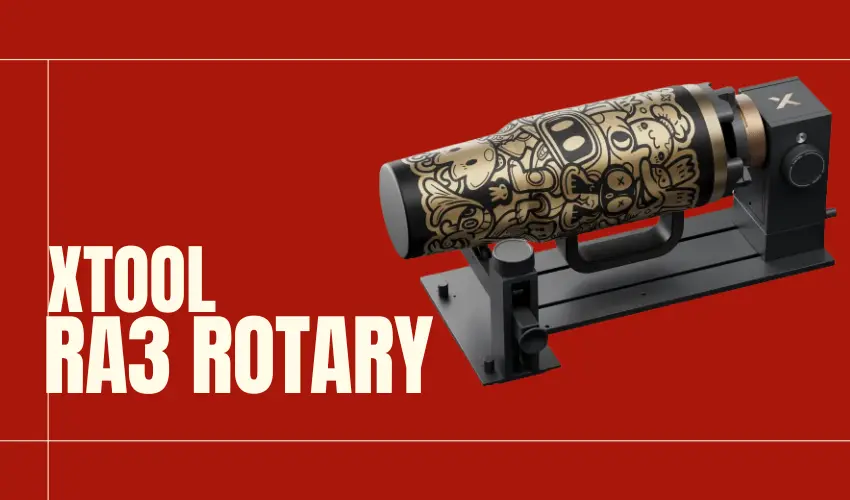
The xTool RA3 is an advanced, high-precision rotary attachment that allows your laser machine to engrave 360° around cylindrical, conical, spherical, and ring-shaped objects. By intelligently adjusting rotation and grip strength, it ensures smooth, distortion-free engraving on objects as small as a ring or as large as a travel tumbler.
It is the upgraded successor to the RA2 Pro, featuring:
- Higher precision
- Automatic diameter adjustment
- Better grip
- Smarter alignment
- Faster switching between modes
- Improved stability
If you want to engrave drinkware, jewelry, ornaments, or rounded crafts—this is the attachment made for the job.
Key Features of the xTool RA3 Rotary
Check Amazon Price Below
360° LiDAR Mapping™ + 3D Modeling Preview
See exactly how your final engraving will look before you start.
RA3’s 360° LiDAR Mapping™ scans your object and generates a precise 3D model, giving you a detailed real-time preview. Confirm placement and alignment visually—no more guesswork or wasted materials.
Master Complex Curves with Full-Wrap Vase Engraving
Previously impossible due to uneven contours, full-wrap engraving on curved vases is now effortless. LiDAR Mapping™ calculates the object’s geometry automatically, enabling flawless wraps on highly irregular shapes.
Automatic Rotary Mode Detection
The built-in camera analyzes your setup—roller, chuck, sphere, or ring—and syncs the software instantly. If the wrong mode is selected, the system alerts you, preventing costly mistakes and ruined projects.
MagSwap™ Design — Switch Modes in Seconds
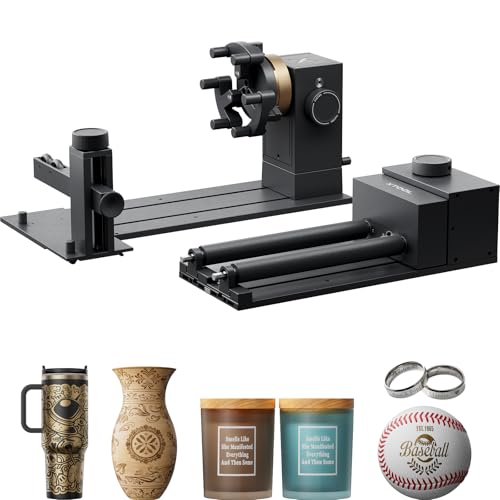
Designed for speed and simplicity, RA3’s tool-free MagSwap™ system allows instant module changes.
- Assemble in seconds: Snap components together effortlessly—no tools required.
- Adjust instantly: Reconfigure jaws and clamping diameters with a quick twist.
- Swap modes instantly: Move from chuck to roller mode in a heartbeat.
Your workflow becomes faster, smoother, and dramatically more efficient.
Engraves Micro-to-Macro Sizes
Perfect for:
- Tiny rings
- Large tumblers
- Ornaments (round, flat, or irregular)
- Conical cups
- Travel mugs & YETI-style cups
- Pens & small cylindrical items
Stronger Grip for Bigger Items
The upgraded T-type jaw design increases grip strength and contact points, securely holding rims up to 130 mm. Your high-value tumblers, mugs, bottles, and vases stay perfectly stable—no slipping, no errors.
One-Step Inner Ring Positioning
Achieve the ideal 26° inner ring engraving angle instantly. No complicated adjustments—just align and engrave.
Accelerate Large Custom Orders
With engraving speeds up to 1200 mm/s, RA3 dramatically shortens production time. Combine that speed with multi-item batch processing, and fulfilling large personalized orders becomes easier—and more profitable.
- Roller Batch Mode: Use up to three roller sets for high-volume runs
- Chuck Batch Mode: Perfect for mixed-shape, custom-item batches
Smarter Alignment & Positioning
The RA3 pairs with xTool Creative Space software (XCS) for:
- Diameter auto-input
- Real-time preview
- Engraving path checking
- Reduced test passes
This eliminates the guessing game of rotary engraving.
Slip-Resistant Roller Design
Upgraded rubber wheels and tension control ensure objects stay stable—even powder-coated tumblers and aluminum bottles.
Quiet, Stable Operation
The RA3 uses a direct-drive stepper motor, making it:
- Smooth
- Quiet
- Highly accurate
- Less prone to vibration
Compatible With:
Works with:
- xTool P3, F2 Ultra, F1 Ultra, and F2
What Can You Engrave With the xTool RA3 Rotary?


The versatility of the RA3 makes it ideal for:
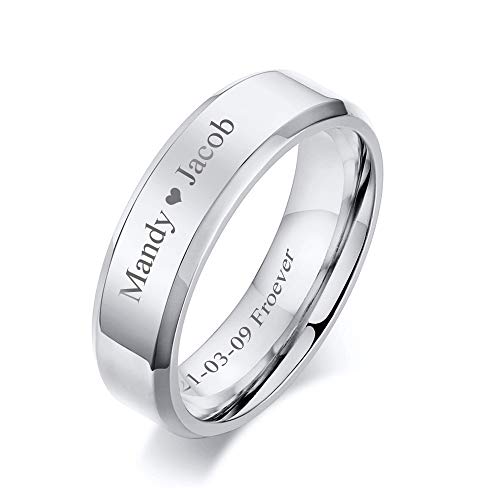
Rings
- Wedding bands
- Stainless steel rings
- Wood rings
- Resin rings
- Pet tag rings
Engravings include names, coordinates, dates, icons, and QR codes.
Tumblers & Bottles
- YETI tumblers
- Stanley cups
- Hydro Flask bottles
- Powder-coated drinkware
- Stainless steel mugs
Perfect for small business production.
Ornaments
- Christmas baubles
- Acrylic spheres
- Wood ornaments
- Glass globes
- Ceramic ornaments
Great for seasonal craft shops.
Curved Glassware
- Wine glasses
- Champagne flutes
- Beer mugs
- Whiskey glasses
The chuck mode prevents slipping—a huge improvement over simple roller rotaries.
Tools, Pens & Cylinders
- Pencils
- Leather punches
- Pens & metal markers
- Flashlights
- Craft tubes
Irregular Objects
- Rolling pins
- Handles
- Cylinder-shaped packaging
- Candle jars
If it’s round, the RA3 can likely engrave it.
Why Choose the xTool RA3 Rotary Over the RA2 Pro?

Feature / Spec | xTool RA3 | xTool RA2 Pro |
|---|---|---|
360° LiDAR Mapping™ (3D Preview) | ✓ | ✗ |
Rotary Mode Auto Recognition | ✓ | ✗ |
Chuck Rotary | ✓ | ✓ |
Roller Rotary | ✓ | ✓ |
Sphere Rotary | ✓ | ✓ |
Ring Rotary | ✓ | ✓ |
Inner Ring Engraving | ✓ | ✓ (extra purchase) |
Batch Processing | ✓ (extra purchase) | ✗ |
Full-Wrap Vase Engraving | ✓ | ✗ |
Chuck Engraving Diameter | 0–130 mm | 0–100 mm |
Roller Engraving Diameter | 3–198 mm | 3–198 mm |
Sphere Engraving Diameter | 25–100 mm | 25–100 mm |
Ring Engraving Diameter | 11–70 mm | 11–70 mm |
Product Size | 324 × 187 × 148 mm | 321 × 138 × 105 mm |
Product Weight | 2.26 kg | 1.96 kg |
Compatibility | P3, F2 Ultra, F1 Ultra and F2 | All xTool Lasers |
Check Price |

The RA3 is built for creators who want:
- Professional engraving quality
- Fewer test runs
- Easier alignment
- Faster project turnaround
Who Is the xTool RA3 Rotary For?
Perfect for:
- Laser business owners
- Tumbler artists
- Wedding and event creators
- Personalized gift shops
- Etsy sellers
- DIY makers
- Jewelry crafters
- Ornament creators
If you want to expand your product line into rings, drinkware, ornaments, or curved items, the RA3 is one of the most valuable add-ons you can buy.
Tips for Perfect Results With the xTool RA3 Rotary
Use chuck mode for glass
It prevents slipping.
(Glass is very slippery on roller-only rotaries.)
Measure diameter precisely
Input exact size into XCS for distortion-free rotation.
Use masking tape for coated cups
Helps avoid scorch marks.
Lower power for glass
Start at 10–18% power (diode) or 5–10% (CO₂).
Level your cup
Use the included leveling feet and spacer tools.
Pros & Cons of the xTool RA3 Rotary
Pros
- Extremely versatile
- High precision
- Beginner-friendly setup
- Ideal for business-grade tumblers and ornaments
- Intelligent control reduces mistakes
- Superb grip stability
Cons
- Costs more than basic rotaries
- Some large 40 oz Stanley cups may need risers
- Not compatible with non-xTool lasers
How to use the xTool RA3 Rotary

Before You Start
- Place the RA3 inside your laser machine and make sure it sits flat on the bed.
- Connect the rotary cable to the machine’s rotary port.
- Enable Rotary Mode in xTool Creative Space (XCS).
- Make sure your object can rotate freely during engraving.
- Double-check laser focus and framing before hitting START.
Mode 1: Jaw Chuck Mode (Most Common)
Use this mode for:
- Tumblers
- Mugs
- Bottles
- Cylinders
- Spheres (with support)
- Rings (with studs)
- Conical cups (angled engraving)
How to Use Jaw Chuck Mode
1. Assemble the Jaw Chuck
- Select cylindrical jaws (standard) or T-shaped jaws (for large or smooth items).
- Attach jaws to the chuck and tighten securely.
2. Mount Chuck to the Power Module
- Insert the chuck into the power module.
- Rotate until you hear a click (locks into place).
3. Clamp Your Object
- Position the object on a table.
- Move the chuck around it, aligning the jaws.
- Turn the knob to tighten.
4. Add the Support Module (if needed)
Use support when engraving:
- Spheres
- Long tumblers
- Heavy items
- Vases
Slide the support module under the item and adjust the wheels until they just touch the object.
5. Optional: Use Height Extension Module
Use this for:
- Tall tumblers
- Large mugs
- Thick objects
Attach the extension under the power module to raise the rotary.
Mode 2: Roller Mode
Use this mode for simple cylinders that roll smoothly.
Great for:
- Rolling pins
- Pens & pencils
- Small tumblers
- Bottles without tapered sides
How to Use Roller Mode
- Install the roller transmission module into the power module.
- Mount the rollers onto shafts A/B/C depending on diameter:
- Level S → Thin items (5–45 mm)
- Level M → Mid-size items (40–70 mm)
- Level L → Large items (60–100 mm)
- Place the item between the rollers.
- Ensure both sides touch the rollers evenly.
- Frame, preview, and engrave.
Special Modes
Sphere Mode
Use the support module to cradle one side of the sphere while the chuck holds the other.
Steps:
- Clamp the sphere lightly in the jaws.
- Move support module to cradle the opposite side.
- Adjust height until rotation is smooth.
Ring Mode
Best for engraving wedding bands, signet rings, and metal rings.
Outer Ring Engraving
- Place ring on stud components.
- Tighten knob to hold ring.
- Insert chuck into power module until it clicks.
Inner Ring Engraving
- Install ring onto stud components.
- Insert chuck and lock into place.
- Rotate side knob to unlock angle adjustment.
- Tilt module to 26° and lock.
- Engrave inner surface cleanly and evenly.
Conical (Tapered) Objects
For cups with angled walls:
- Clamp cup in the chuck.
- Add the support module.
- Use the mini level to ensure engraving surface is horizontal.
- Adjust support wheels until bubble is centered.
- Lock angle and engrave.
Batch Processing
You can engrave multiple items much faster by:
Jaw Chuck Batch System
- Purchase extra chuck assemblies.
- Pre-load different items.
- Swap completed items by clicking the chuck in/out.
Roller Batch Processing
- Use the optional roller extension modules.
- Add multiple roller sets in a row.
- Place several tumblers, glasses, or bottles at once.
Machine Setup in XCS
- Connect rotary → Machine detects RA3 automatically.
- XCS displays Chuck Mode / Roller Mode based on recognition.
- Import design → Set size → Select material type.
- Frame → Preview → Press Start.
Safety Tips
- Keep hands away from magnetic quick-release areas.
- Avoid touching jaws while rotating.
- Never operate with open lid unless professional safety steps are followed.
- Wear laser-rated safety glasses if the machine lid is open.
Is the xTool RA3 Rotary Worth It?
Yes—especially if you engrave tumblers, rings, ornaments, or glassware.
The RA3 takes the difficulty out of rotary engraving and replaces it with accuracy, simplicity, and consistently professional results. For businesses, it pays for itself quickly thanks to faster workflow and fewer project failures.
If you want to elevate your laser projects—or expand your craft business—the RA3 is an essential upgrade.
Check Amazon Price Below
Frequently Asked Questions
What makes the xTool RA3 Rotary different from the RA2 Pro?
The xTool RA3 introduces major upgrades, including 360° LiDAR Mapping™, automatic rotary mode recognition, tool-free MagSwap™ design, and full-wrap engraving on curved vases—features not available on the RA2 Pro. It also supports a larger clamping diameter (up to 130 mm) and offers faster, more consistent alignment for complex objects.
What objects can I engrave with the xTool RA3 Rotary?
The RA3 supports multiple rotary modes, allowing you to engrave:
Tumblers, water bottles, mugs (Roller & Chuck Rotary)
Rings and small cylindrical jewelry (Ring Rotary)
Spheres like ornaments and balls (Sphere Rotary)
Irregular or uniquely shaped items (Chuck Rotary)
Revolving vases with seamless full-wrap designs (LiDAR-assisted mode)
With its flexible attachments, you can handle almost any round, tapered, or curved object.
Which xTool machines are compatible with the RA3 Rotary?
As of now, the RA3 is exclusive to the xTool P Series and the xTool F2. Its advanced features—like LiDAR Mapping™ and mode auto-recognition—rely on the P Series’ built-in hardware and vision systems. xTool plans to expand compatibility to additional camera-equipped models, with support expected in future updates.
How does the xTool RA3 Rotary improve accuracy and reduce failed engravings?
The RA3 minimizes user error with several intelligent features:
360° LiDAR Mapping™ creates an exact 3D model for perfect alignment.
Automatic mode recognition prevents incorrect rotary selection.
Mismatch alerts warn you if settings do not match the physical setup.
Real-time 3D preview shows the engraving before it begins.
These systems drastically reduce wasted materials and improve first-try success rates.
Can the RA3 handle batch engraving for large orders?
Yes. In fact, the RA3 excels at batch processing.
Using multiple roller sets or the chuck rotary, you can engrave several items in a single run—even if each item has a different design. This, combined with speeds up to 1200 mm/s, makes the RA3 ideal for personalization businesses, Etsy sellers, and high-volume production.