
Laser engraving golf clubs is one of the best ways to add custom logos, names, and unique designs to wedges, putters, and irons.
Whether you’re personalizing your own gear or starting a small business, the process is straightforward once you understand the basics.
Table of Contents
This guide walks you through everything you need to know, from choosing the right laser to step-by-step engraving.
What Is Golf Club Laser Engraving?
Laser engraving golf clubs typically refers to engraving the clubhead, the part of the club that strikes the ball.
Most clubheads are made from stainless steel, aluminum, or titanium—materials that respond exceptionally well to laser engraving.
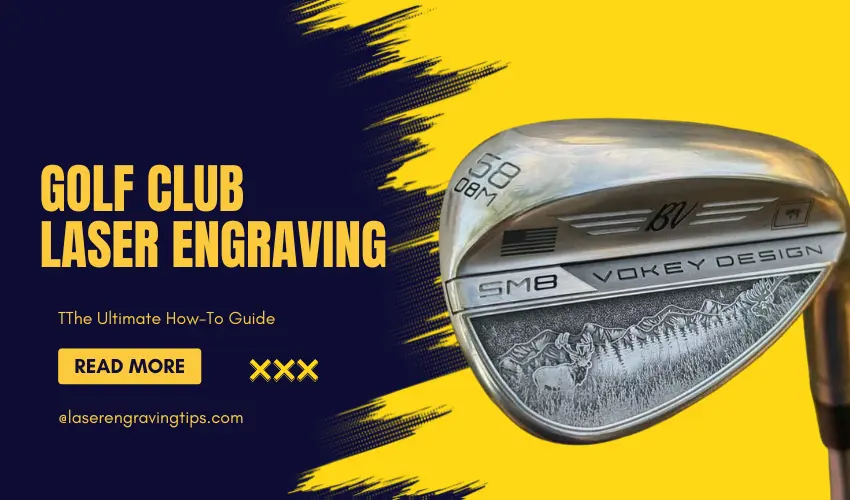
Using a focused laser beam, you can create permanent markings like:
- Names and initials
- Logos and artwork
- Inspirational quotes
- Team branding
- Tournaments and event engravings
Because the engraving is etched into the metal, it won’t wear off over time, even with regular use.
Main Materials Used in Golf Clubs
Golf clubs may look simple, but they’re made from a mix of carefully chosen materials designed for strength, weight control, and performance.
Understanding these materials helps you with everything from buying clubs to laser engraving them.
Material | Where It’s Used | Key Benefits | Engraving Difficulty |
|---|---|---|---|
Stainless Steel | Irons, wedges, putters | Durable, corrosion-resistant | Medium |
Carbon Steel | Wedges, premium irons | Softer feel, easy to shape | Easy–Medium |
Titanium | Drivers, woods | Lightweight, strong | Hard |
Aluminum | Some club heads | Lightweight, affordable | Easy |
Zinc Alloys | Budget clubs | Low cost, easy to cast | Easy |
Carbon Fiber | Driver crowns, shafts | Ultra-light, strong | Not engravable (laser) |
1. Stainless Steel (Most Common)
This is the most widely used material in golf clubs.
Where it’s used:
- Irons
- Wedges
- Putters
Why manufacturers use it:
- Very durable
- Resistant to rust
- Holds its shape well
For laser engraving:
- Works well with fiber or IR lasers
- Produces clean, consistent marks
2. Carbon Steel (Premium Feel)
Carbon steel is softer than stainless steel.
Where it’s used:
- High-end wedges
- Forged irons
Benefits:
- Better feel and feedback
- Easier to shape and customize
For engraving:
- Easier to engrave than stainless steel
- Great for deep engraving and paint fill
3. Titanium (Drivers and Woods)
Titanium is used in modern drivers for performance.
Where it’s used:
- Driver heads
- Fairway woods
Benefits:
- Extremely strong
- Very lightweight
- Allows larger club heads
For engraving:
- More difficult due to hardness
- Requires higher precision (fiber or IR laser)
4. Aluminum (Lightweight Option)
Less common in premium clubs.
Where it’s used:
- Some beginner or budget clubs
Benefits:
- Lightweight
- Easy to manufacture
For engraving:
- Very easy to mark
- Lower power required
5. Zinc Alloys (Budget Clubs)
Often used in entry-level clubs.
Where it’s used:
- Lower-cost club heads
Benefits:
- Cheap to produce
- Easy to mold
For engraving:
- Easy to engrave
- Not as durable as steel
6. Carbon Fiber (Modern Performance Material)
Carbon fiber is increasingly used in modern clubs.
Where it’s used:
- Driver crowns
- Shafts
Benefits:
- Extremely lightweight
- High strength-to-weight ratio
For engraving:
- Not suitable for standard laser engraving
- Can burn or damage easily
Why Material Matters for Laser Engraving
If you’re engraving golf clubs, material choice is critical.
- Steel (stainless/carbon) → best results
- Titanium → requires more precision
- Coated surfaces → easier for diode lasers
- Carbon fiber → avoid engraving
Machines like the Gweike G2 Max 50W Fiber Laser Engraver and xTool F2 Diode & Infrared Dual Laser Engraver handle metal much better than standard diode machines.
Quick Summary
- Most common: Stainless steel
- Best feel: Carbon steel
- Lightest: Titanium
- Budget option: Zinc alloys
- Advanced material: Carbon fiber
What Equipment Do You Need For Golf Club Laser Engraving?
To laser engrave golf clubs, you’ll need the following:
Laser Engraver
Choose a laser based on your needs and budget:
- Infrared Lasers (e.g., xTool F2): Ideal for hobbyists or small-scale engraving.
- Fiber Lasers (e.g., Gweike G2 50W Max Fiber Laser): Best for directly engraving raw stainless steel or titanium with high precision.
Rotary Attachment (Optional)
For curved or cylindrical clubs like putters or grips, a rotary tool helps maintain consistent engraving on rounded surfaces.
Design Software
Software like LightBurn, or xTool Creative Space lets you import or create vector/raster graphics to be engraved.
Safety Gear
- Laser safety goggles
- Proper ventilation or fume extractor
- Fire extinguisher nearby
Types of Lasers For Golf Club Engraving Comparison Table
Engraving golf clubs isn’t the same as working with wood or acrylic. Most club heads are made from metal, which means your laser choice matters a lot.
Here’s a clear breakdown of the main laser types used for golf club engraving, what they’re good at, and when to use them.
Laser Type | Works on Metal | Engraving Quality | Ease of Use | Best For |
|---|---|---|---|---|
Fiber Laser | Yes (direct) | Excellent | Medium | Deep engraving, pro work |
Infrared (IR) Laser | Yes (direct) | Very good | Easy–Medium | Logos, surface marking |
Diode Laser | Limited | Moderate | Easy | Coated surfaces, paint fill |
CO₂ Laser | Limited | Low–Moderate | Medium | Painted/coated clubs only |
Best Machine For Golf Club Laser Engraving
1. Gweike G2 Max 50W Fiber Laser Engraver

- INDUSTRIAL-GRADE ENGRAVING SPEED: The GWEIKE G2 Max 50W Fiber Laser Engraving Machine Is Equipped With A High-Speed Precision Galvanometer, Achieving An Engraving Speed Of Up To 15000 mm/s And An Accuracy Of 0.001 mm. Its Powerful Performance Significantly Enhances Work Efficiency. Supporting HD 8K Engraving Resolution, It Precisely Captures Every Detail, Delivering An Exceptional Engraving Experience.
If you’re serious about engraving golf clubs, the Gweike G2 Max 50W Fiber Laser Engraver is built for exactly that job.
Unlike diode or CO₂ machines, this is a true fiber laser, which means it can engrave directly on metals like stainless steel, carbon steel, and even titanium without coatings or workarounds.
What makes it an excellent option?
The biggest advantage is clean, permanent marking on raw metal. You don’t need paint, sprays, or extra steps. Just set your design and engrave.
It also handles:
- Deep engraving on wedges and putters
- Fine detail logos and text
- Consistent results across different club finishes
Real-world performance
On golf clubs, it delivers:
- Sharp, crisp engraving
- High contrast marks
- Fast processing compared to other laser types
This matters if you’re doing repeat jobs or selling custom clubs.
Things to consider
It’s not a beginner machine. You’ll need:
- Basic understanding of laser settings
- Proper setup and safety practices
- A higher upfront investment
But if you’re engraving metal regularly, it pays for itself in time and quality.
The Gweike G2 Max 50W Fiber Laser Engraver is one of the best choices for golf club engraving because it delivers direct, high-quality metal engraving without shortcuts.
If golf clubs are your focus, this is the tool that gets professional results every time.
Perfect for small business owners and serious hobbyists looking to engrave pro-quality metal clubs
2. xTool F2 Diode & Infrared Dual Laser Engraver
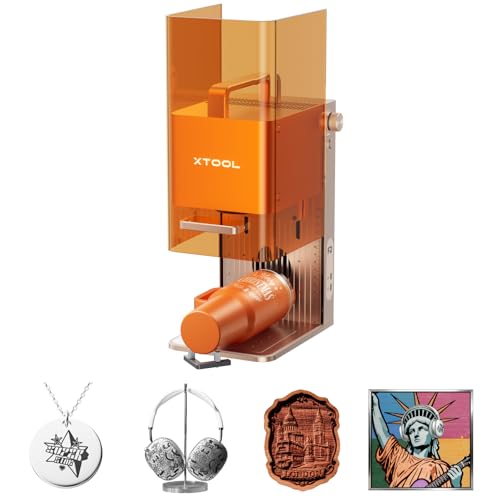
- Dual-Laser Versatility, Endless Creation: Our 15W Diode & 5W IR dual-laser combo makes this laser engraver truly versatile, unlocking more possibilities on 300+ materials. The 5W IR delivers deep, dark, vivid color marking on metal, while the 15W diode expertly handles 3D embossing and cutting through thick materials.

The xTool F2 Diode & Infrared Dual Laser Engraver is one of the most versatile options if you want to engrave golf clubs without jumping into full industrial machines.
With a dual-laser setup, you get:
- A diode laser for coatings, paint, and general materials
- An infrared (IR) laser for direct marking on metals
Real-world performance on golf clubs
The IR laser is the key feature here. It allows you to:
- Engrave directly on metal club heads
- Add clean logos, names, and markings
- Work on coated or raw surfaces with better results than standard diode lasers
You won’t get the same depth as a fiber laser, but for most customization work, it’s more than enough.
Why it’s a great choice
- No need for sprays or coatings in many cases
- Compact and easier to use than industrial machines
- Handles both metal and non-metal projects
This makes it ideal if you’re doing custom golf clubs plus other products.
Things to keep in mind
- Not as powerful as a dedicated fiber laser
- Deep engraving is limited
- Best suited for surface marking and light engraving
The xTool F2 Diode & Infrared Dual Laser Engraver hits a sweet spot. It gives you real metal engraving capability without the cost or complexity of a fiber laser.
If you want a flexible machine that can handle golf clubs and more, this is one of the best options available.
Excellent for hobbyists or mobile businesses engraving names or logos on putters and wedges
Golf Club Laser Engraving: Step-by-Step Guide
Step 1: Choose the Right Clubhead
Pick a clean, smooth clubhead, preferably stainless steel or aluminum. Clean the surface to remove dirt, oils, or coatings that could interfere with the engraving.
For shiny stainless steel, we recommend using Brilliance Laser Inks Marking Spray, available on Amazon, for improved contrast.
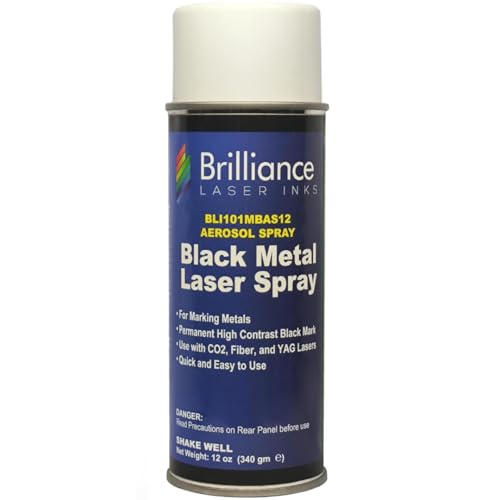
- 𝐌𝐄𝐓𝐀𝐋 𝐂𝐎𝐌𝐏𝐀𝐓𝐈𝐁𝐈𝐋𝐈𝐓𝐘: Our patented laser marking spray is formulated to revolutionize metal marking on uncoated metals like 𝐒𝐭𝐚𝐢𝐧𝐥𝐞𝐬𝐬 𝐒𝐭𝐞𝐞𝐥, 𝐁𝐫𝐚𝐬𝐬, 𝐂𝐨𝐩𝐩𝐞𝐫, 𝐏𝐞𝐰𝐭𝐞𝐫, and other metal surfaces
Pro tip: For shiny stainless steel, apply a laser marking spray to help the laser darken the design for better contrast
Step 2: Prepare Your Design
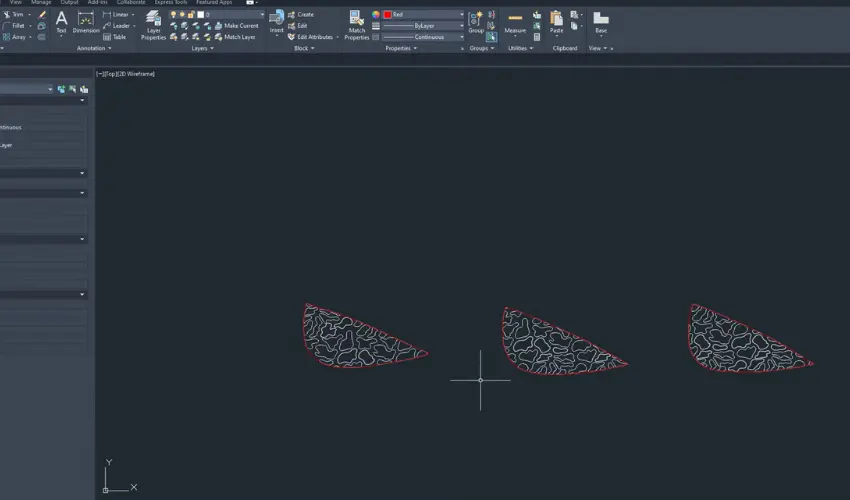
Use your preferred software to:
- Import logos, text, or artwork
- Resize it to fit the surface
- Adjust contrast if using a photo or grayscale image
Keep the design simple for small engraving areas.
Step 3: Set Up the Laser
- Position your clubhead on a flat surface or rotary jig.
- Focus the laser using autofocus or manual calibration.
- Use preview mode to align the design with the club’s engraving area.
Step 4: Adjust Laser Settings
Settings will depend on your laser type and material. For example:
Fiber Laser (Gweike G2 50W Max):
For stainless steel or titanium club heads, try the following starting settings:
- Power: 80–100%
- Speed: 600–1200 mm/s
- Frequency: 25–40 kHz
- Hatch: 0.03–0.05 mm (for deeper, cleaner engravings)
You may need to run a few test passes on scrap material or inconspicuous areas to dial in perfect settings.
Step 5: Start Engraving
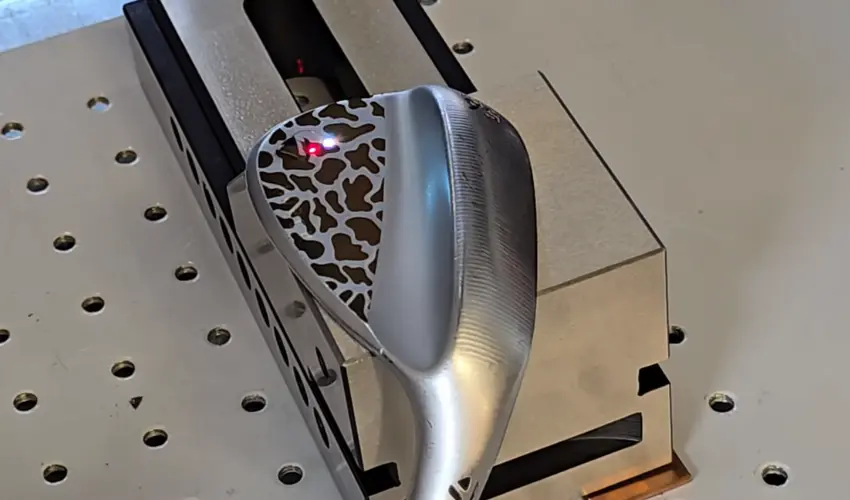
Once everything is set, hit start and monitor the process closely. After engraving, wipe off any residue with a microfiber cloth.
Pro Tips for Better Results
- Avoid reflective surfaces without coating to prevent laser misfire or damage.
- Use templates or jigs to hold clubheads in place for batch engraving.
- Check clubhead coatings—some paints or finishes might discolor with engraving.
- Engrave on the back or sole of the club for subtle personalization.
Popular Uses for Golf Club Laser Engraving
- Personalized gifts for weddings, Father’s Day, or birthdays
- Corporate giveaways with engraved logos
- Custom tournament clubs with event branding
- Small business products for golf lovers
Golf Club Laser Engraving Safety Considerations
- Always wear appropriate eye protection.
- Operate in a well-ventilated area.
- Avoid engraving near flammable materials.
- Keep a fire extinguisher handy.
Final Thoughts
Laser engraving golf clubs is not just a fun DIY project—it’s a great opportunity for creating personalized gifts, starting a small business, or making your own clubs truly unique.
With the right machine and a bit of creativity, you can achieve professional-quality results right at home.
Ready to get started? Grab a laser, load your design, and turn your golf clubs into personalized masterpieces.
Frequently Asked Questions
Can you laser engrave all parts of a golf club?
Technically, you can engrave different parts of a golf club, but most engravings are done on the clubhead, especially on flat areas like the back or sole. Shafts and grips are less commonly engraved because they are usually curved, coated, or made of non-laser-friendly materials like graphite or rubber. If you do engrave curved surfaces, using a rotary attachment is highly recommended.
What types of materials can be laser engraved on golf clubs?
Laser engraving works best on stainless steel, aluminum, and titanium clubheads. These metals respond well to fiber or infrared lasers and produce permanent, high-contrast engravings. If the clubhead has a protective coating or paint, you may need to remove it or apply a laser marking spray for better results.
What kind of laser engraver is best for engraving golf clubs?
For the best results:
Use a fiber laser (e.g., Gweike G2 50W Max) for raw metal like stainless steel and titanium—this delivers clean, deep, permanent engravings.
Infrared lasers (e.g., xTool F2) work well on anodized aluminum or coated surfaces and are more affordable for hobbyists.
CO₂ lasers are generally not suitable unless the metal is painted or pre-treated with laser marking spray.
Do I need special software to design and engrave on golf clubs?
Yes, you’ll need graphic design software to create or import your engraving design. Many laser machines come with free software like:
xTool Creative Space
EZCad
LightBurn
These programs let you adjust your design’s size, contrast, and placement before engraving.
Is it safe to laser engrave golf clubs at home?
Yes, as long as you follow proper safety precautions. Use the laser in a well-ventilated area, wear laser safety goggles, and never leave the machine unattended. Engraving metals can produce fumes and particles, so use an air purifier or exhaust fan when possible. Always keep a fire extinguisher nearby, especially when working with high-powered lasers.