
If you’ve ever wanted to personalize silicone products like watch bands, baby spoons, or tumblers with custom names or logos, laser engraving silicone rubber is the way to go.
It’s clean, efficient, and produces stunning, long-lasting designs.
But there’s one catch — silicone can be tricky to engrave without burning or staining. The good news? With the right settings and a bit of practice, you can achieve crisp, professional results every time.
Table of Contents
This beginner’s guide to laser engraving silicone walks you through everything you need to know — from choosing the right laser to dialing in perfect engraving settings.
Why Laser Engrave Silicone Rubber?
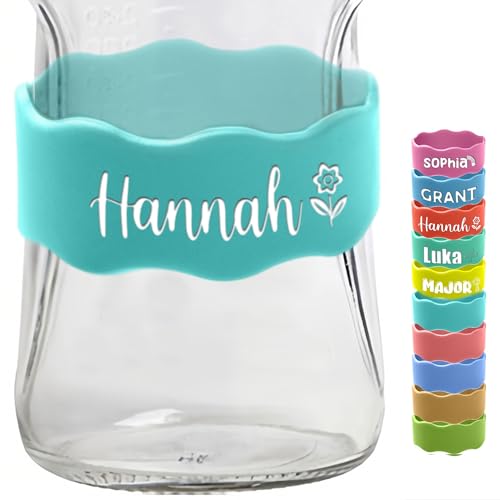
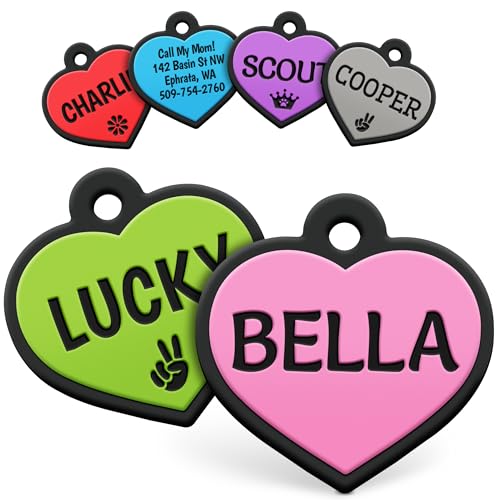
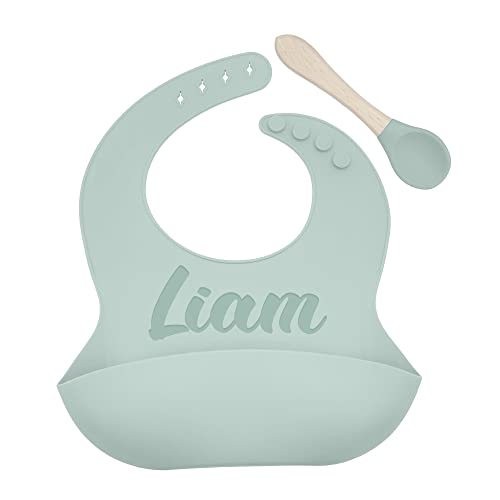
Silicone is flexible, waterproof, and heat-resistant — making it ideal for personalized products like:
- Baby bibs and spoons
- Smartwatch bands
- Kitchen tools and mats
- Drinkware sleeves
- Keychains and bracelets
Unlike printing or vinyl, laser engraving creates permanent, wear-resistant markings that won’t peel or fade. Whether you’re crafting gifts or running a small laser business, silicone engraving adds a sleek, professional finish.
Things to Consider Before Laser Engraving Silicone Rubber
Key Takeaways
- Understand the unique properties of silicone rubber before engraving
- Choose the right laser type and settings for best results
- Ensure proper ventilation to manage fumes safely
- Always test on a small piece before engraving your final design
- Follow safety practices to protect yourself and your workspace
Before you start engraving, it’s essential to know how these materials behave:
Material Type | Common Challenges | Engraving Tips & Solutions |
|---|---|---|
Medical Grade Silicone | Uneven depth or burning | Use low power (10–15%), moderate speed (300–400 mm/s), and ensure good ventilation. |
Food Grade Silicone | Sticky residue or uneven marks | Clean before engraving; use CO₂ laser with low power and slower speed. |
High-Temp Silicone | Material movement | Secure it firmly and use lower frequency to prevent shifting. |
Common Challenges in Laser Engraving Silicone Rubber
- Silicone movement: Because it’s flexible, silicone can shift slightly during engraving — causing blurry designs.
- Excess smoke with rubber: Rubber produces more fumes and debris, which can reduce engraving clarity.
- Overburning: Too much laser power causes dark marks and odors that are hard to clean.
Solution: Use low power, high speed, and clean your lens frequently for best results
Best Lasers for Engraving Silicone Rubber
Both CO₂ and diode lasers can engrave silicone — the best choice depends on what you’re engraving.
CO₂ Lasers (like xTool P2S)
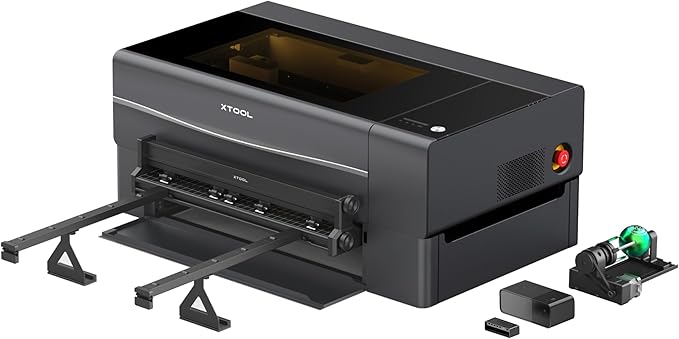
- Best for thick silicone and larger items
- Delivers consistent power for clean, deep engraving
- Ideal for businesses and makers needing precision
Diode Lasers (like xTool S1)

- Great for thinner silicone materials
- More affordable and beginner-friendly
- Easier to control for delicate engravings
Tip: If you’re new to laser engraving, start with a diode laser and work your way up to CO₂ once you’re confident
Why Proper Ventilation Matters For Laser Engraving Silicone Rubber
Both silicone rubbers can emit toxic fumes during engraving. Poor ventilation not only affects air quality but also damages your laser machine over time.
Ventilation Tips:
- Always use a fume extractor or external exhaust system.
- Clean your filters regularly.
- Work in an open or well-ventilated space.
Safety Tips for Laser Engraving Silicone Rubber
Safety should always come first in your laser workspace.
Follow these precautions:
- Wear protective eyewear and gloves.
- Keep a fire extinguisher nearby.
- Avoid engraving unknown rubber types that may release harmful gases.
Always Test Before Full Engraving
Before engraving your main piece, run a test on a small scrap of the same material. This helps you fine-tune power and speed settings.
Testing Steps:
- Cut a small piece of material.
- Apply your engraving design.
- Adjust settings based on the result.
Design Tips for Laser Engraving Silicone Rubber
When designing your image or text for silicone, simplicity and contrast are key.
Pro Tips:
- Use black-and-white vector images (SVG format works best).
- Avoid overly detailed or thin lines.
- Keep designs bold for better visibility.
- If using raster images, use 300 DPI resolution for crisp results.
Silicone Rubber Blanks For Laser Engraving
Morcheiong 12 Pieces Silicone Bracelets
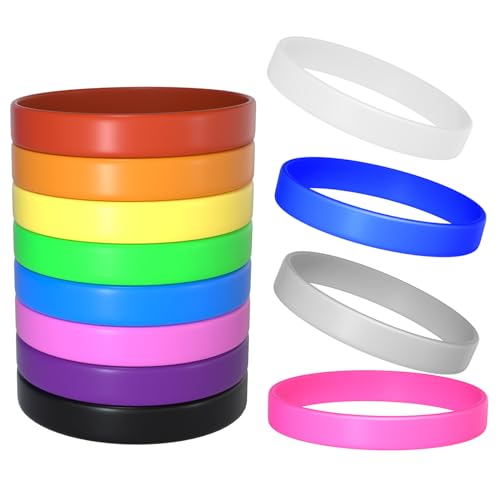
- Package Includes: 12pcs silicone wristbands in 12 bright colors
The Morcheiong Silicone Bracelets offer a simple, colorful, and affordable option for anyone looking to personalize silicone wristbands with laser engraving. With 12 vibrant colors in one set, these blanks are perfect for DIY projects, party favors, or small business customization.
Pros:
- Laser Engraving Ready:
The smooth, uniform surface makes these bracelets ideal for CO₂ or diode laser engraving, allowing clean, visible text or logo marks. - Durable and Flexible:
Made from high-quality silicone, these wristbands are elastic, tear-resistant, and comfortable to wear daily. - Versatile Use:
Perfect for custom team bands, event giveaways, fundraisers, or personalized gifts — especially when engraved with names, dates, or slogans. - Assorted Colors:
Comes with 12 bright colors, giving you variety for creative or themed engraving projects. - Universal Fit:
At 8 inches in circumference, these fit most teens and adults comfortably.
Cons:
- Limited Engraving Depth:
Since the material is soft and flexible, shallow engraving works best to avoid distortion. - Not Ideal for Small Text:
Fine or detailed designs may lose clarity on darker bands due to lower contrast.
The Morcheiong 12-Pack Silicone Bracelets are a top pick for anyone wanting affordable, engraver-friendly silicone blanks. Whether for personal projects or small-scale laser engraving businesses, they deliver great results, durability, and color variety.
Eascrozn Silicone Bibs Set of 3

- Best Affordable: Our 3-pack of silicone bibs will come with the best price in stylish color matching, highlighting the elegant look and bringing you the perfect shopping experience!
The Eascrozn Silicone Bib Set combines functionality, comfort, and engraver-friendly design — making it an excellent choice not only for parents but also for makers who personalize baby products with laser engraving. With three bibs per pack and adjustable sizing, they’re practical, durable, and stylish.
Pros:
- Laser Engraving Friendly:
Made from 100% food-grade silicone, these bibs engrave cleanly with a CO₂ or diode laser, perfect for adding custom names, logos, or designs for personalized gifts or small business sales. - High-Quality & Safe Material:
Completely BPA-free and non-toxic, ensuring baby safety while maintaining a soft, flexible texture. - Adjustable & Comfortable:
Features four adjustable neck sizes, fitting children from 6 months to 6 years securely and comfortably. - Easy to Clean:
Waterproof and hand washable — simply rinse or wipe after meals. Rolls up neatly for storage or travel. - Functional Design:
The large, sturdy pocket stays open to catch food, reducing mess during feeding.
Cons:
- Limited Engraving Space:
The curved design means you’ll need to carefully position engravings for best visibility. - Manual Cleaning Only:
Not dishwasher-safe, which may be a small inconvenience for busy parents.
The Eascrozn Silicone Bibs are a top option for both practical baby feeding and creative laser engraving projects. Whether customizing bibs for baby showers or selling engraved feeding sets, these bibs deliver durability, safety, and engraving precision at an affordable price.
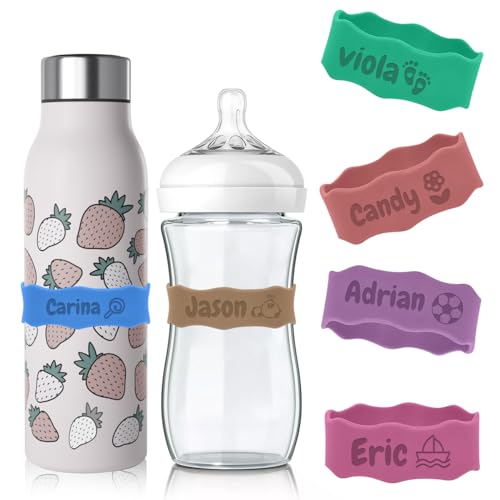
Silicone Baby Bottle Bands
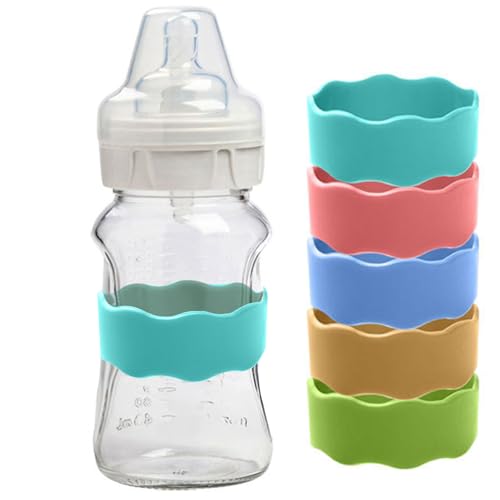
- Please ensure your bottle size is 5.5-6.5 cm ,2.1-2.5 in
The Silicone Baby Bottle Bands Writable Reusable 5PCS are a simple but practical option if you’re looking for an easy-to-use silicone material that can also work for light laser engraving projects.
These bands are soft, flexible, and designed to wrap securely around bottles, which makes them useful for labeling and grip. The engraveable surface is handy for quick identification, especially in daycare settings. They’re also durable enough to handle daily use, including washing, microwaving, and freezing.
From a laser engraving perspective, the silicone holds markings reasonably well for basic text or simple designs. It’s not meant for deep or highly detailed engraving, but it works fine for personalization or light customization.
Pros:
- Reusable and durable silicone material
- Waterproof, dishwasher- and microwave-safe
- Anti-slip design stays in place
- Writable surface for easy labeling
- Suitable for simple engraving customization
Cons:
- Limited engraving detail due to soft silicone
- Small size restricts design space
- Designed primarily for bottles, not engraving projects
Overall, these bands are a functional everyday product that can double as a basic engraving surface for simple personalization.
Step-by-Step: Laser Engraving Silicone Rubber
Step 1: Prepare Your Design
Open your laser software (like xTool Creative Space) and import or create your design.
For simple projects, text engravings like names or logos are a great starting point.
Resize the design to fit your blank — for example, the handle of a spoon or the center of a wristband.
Step 2: Position Your Material
Place your silicone item on the laser bed. Use the top-down camera in your software to align the design precisely.
In XCS, refresh the camera view to ensure accurate placement. Use the automatic measuring tool to detect the item’s height for perfect laser focus.
Step 3: Dial in the Right Laser Settings
Recommended Settings for CO₂ Laser (xTool P2 55W)
- Power: 40%
- Speed: 150 mm/s
- Passes: 1
- Lines per cm: 70
- Mode: Bilateral
Recommended Settings for Diode Laser (xTool S1 10W)
- Power: 15%
- Speed: 150 mm/s
- Passes: 2
- Lines per cm: 70
- Mode: Bilateral
Avoid using high power or multiple passes — they can melt or burn the silicone surface
Step 4: Engrave and Monitor Carefully
Once you start engraving, watch the process closely. If you see any smoke or flame, pause immediately and increase your speed.
If the engraving looks too light, slightly lower your speed or add one more pass — but don’t increase the power too much.
Step 5: Clean the Engraved Surface
After engraving, you might notice a white powdery residue — that’s just silicone dust.
Use a Q-tip dipped in rubbing alcohol or water to gently clean the area.
Flip to the clean side of the Q-tip and wipe again to reveal a smooth, clean finish.
Adjusting Your Settings Like a Pro
If your engraving:
- Burns or darkens: Increase speed or reduce power.
- Looks too faint: Try another pass instead of raising power.
- Leaves residue: Clean gently with alcohol or warm water.
The key is balance — engraving deep enough for visibility without overheating the silicone.
Save Your Settings
Once you find the sweet spot, save your engraving parameters in your software (like XCS).
Label them by item type — e.g., “Silicone Spoon” or “Watch Band” — so you can reuse them later without testing each time.
Laser Engraving Silicone Rubber Final Cleaning & Finishing Tips
- Avoid harsh scrubbing — it can stretch or warp the silicone.
- Rinse with mild soap and warm water if necessary.
- Store engraved silicone items in a dust-free environment to keep them looking sharp.
Creative Silicone Engraving Ideas
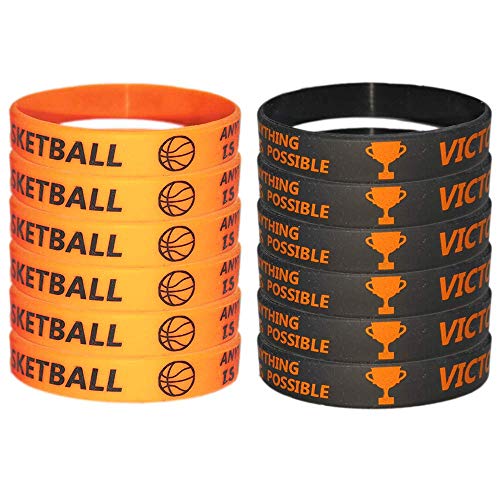
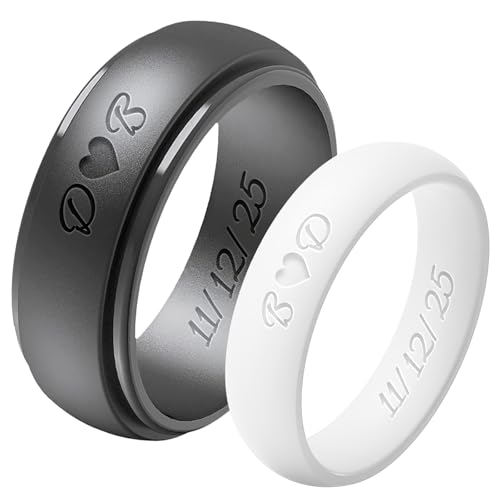
Here are some practical and creative ideas to try:
Custom Rubber Stamps
This is the most popular use.
Create:
- Logo stamps for branding
- Packaging stamps for small businesses
- Planner or journaling stamps
- Wedding or event stamps
Great for selling or personal use, and easy to batch produce.
Personalized Keychains
Engrave names, patterns, or logos onto silicone or rubber, then cut into shapes.
They’re lightweight, durable, and perfect for:
- Gifts
- Promotional items
- School or club merch
Non-Slip Pads & Grips
Rubber is naturally grippy, so you can make:
- Jar openers
- Tool grips
- Phone grip pads
- Desk anti-slip mats
You can add engraved patterns for both function and style.
Custom Coasters
Engrave designs into rubber or silicone to create:
- Bar coasters
- Branded business giveaways
- Minimalist home decor
They’re heat-resistant and practical.
Jewelry & Accessories
Rubber can be surprisingly stylish.
Try:
- Earrings
- Bracelets
- Pendant tags
Engrave textures or patterns for a unique look.
Industrial Labels & Tags
For more functional use, create:
- Machine labels
- Cable tags
- Equipment markers
Rubber holds up well in tough environments.
Kids’ Craft Tools
Make safe, reusable craft items like:
- Pattern stamps
- Learning aids (letters, numbers)
- Texture plates for clay
Leather Stamp Alternatives
Use engraved rubber as a stamp for:
- Leather projects
- Clay
- Wax seals (with proper setup)
Conclusion
Laser engraving silicone rubber doesn’t have to be intimidating. With the right tools, proper settings, and a little practice, you can achieve clean, professional results — without the burnt mess.
So grab your favorite laser engraver, set up your workspace, and start experimenting with silicone. Once you see how easy it is, you’ll want to engrave every silicone item in sight!
Frequently Asked Questions
Can you laser engrave silicone rubber?
Yes, silicone rubber can be laser engraved — but it requires the right settings to avoid burning or discoloration. A CO₂ laser or low-power diode laser works best. Use low power (around 30–40%), high speed (120–200 mm/s), and 1 pass to achieve clean, white or gray engravings without scorching.
Pro tip: Always test settings on a spare silicone blank first, as different silicone densities can produce slightly different results.
How do I prevent burning or melting when laser engraving silicone rubber?
To avoid burning silicone rubber:
Reduce laser power (start around 30–40%).
Increase speed (150–200 mm/s).
Use 1 pass only.
If you see smoke or black residue, your laser power is too high or your speed is too slow. Increase the speed or use compressed air to keep the engraving surface cool.
What are the best silicone blanks for laser engraving?
The best silicone blanks are flat, smooth, and light-colored surfaces that show contrast after engraving. Popular options include:
Silicone bracelets and wristbands
Baby bibs and feeding spoons
Pet ID tags
Watch bands
Cup sleeves and keychains
All these are widely available, and many are labeled as food-grade silicone, making them safe and easy to engrave.
How do you clean silicone after laser engraving?
After engraving, you might see a white powdery residue — that’s silicone dust. To clean:
Wipe with a soft cloth or Q-tip dipped in rubbing alcohol or soapy water.
Avoid abrasive scrubbing — it can dull your engraving.
Dry completely before handling or packaging.
This restores a clean finish and keeps your engraving crisp and professional.