
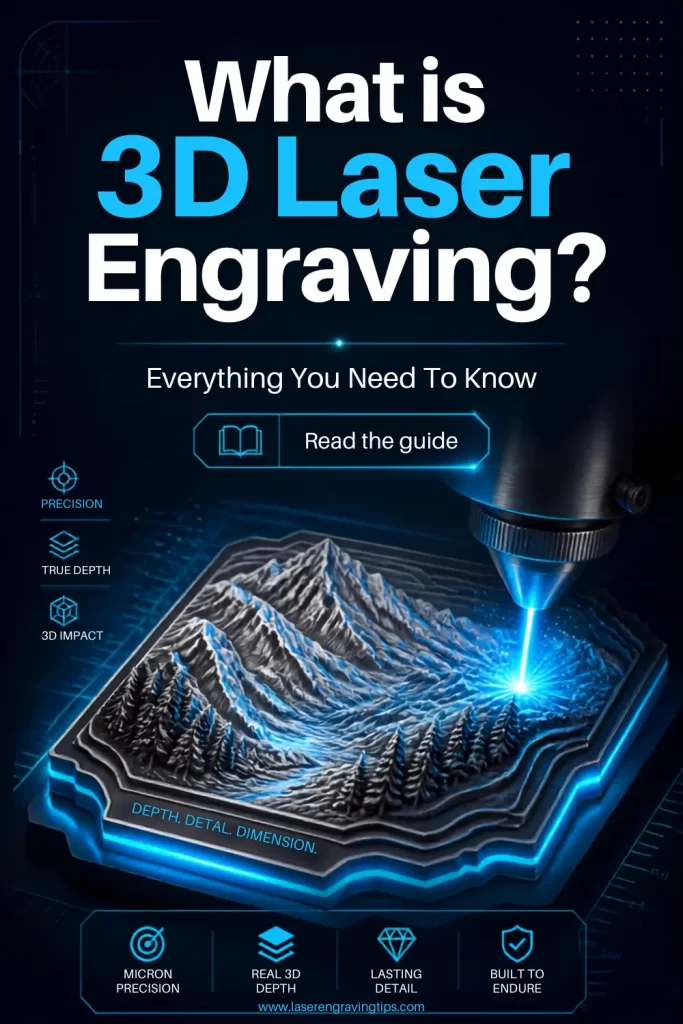
3D laser engraving is an advanced technology that uses lasers to create detailed, three-dimensional designs on various materials.
Unlike traditional engraving, which only etches the surface, 3D laser engraving allows for the creation of intricate depth and texture, giving the engraved design a more lifelike appearance.
Table of Contents
In this article, we’ll explore what 3D laser engraving is, how it works, its applications, the best laser machines for the job, and the benefits of using this innovative technique.
What Is 3D Laser Engraving?
3D laser engraving uses controlled laser power, speed, and multiple passes to remove material at different depths. The result is a design with height variation, shadows, and tactile detail, similar to relief carving.
Instead of engraving one uniform depth, the laser follows a depth map (often based on grayscale images), where darker areas are engraved deeper and lighter areas remain closer to the surface.
Key takeaway:
3D laser engraving adds depth and dimension, not just surface markings
How Does 3D laser engraving work?
3D laser engraving works by converting an image or 3D design into different engraving depths.
The laser software interprets lighter and darker areas of the artwork as different levels of depth. Depending on the workflow, darker areas may receive more laser energy and become deeper, while lighter areas receive less energy and remain closer to the original surface.
This creates a gradual transition between high and low areas.
For example, when engraving a grayscale portrait into wood, the software can use different shades of gray to determine how deeply the laser engraves each area.
Darker regions can be engraved deeper, while lighter regions remain shallower.
When viewed from an angle, these different depths create the appearance of a three-dimensional image.
The process can be summarized as:
Grayscale or 3D design → depth information → variable laser processing → multiple surface depths → 3D relief
3D Laser Engraving vs. Traditional Laser Engraving
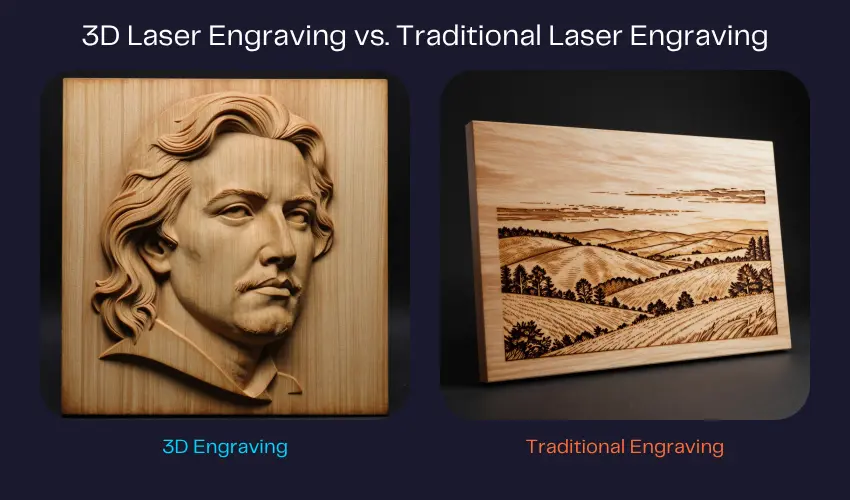
The biggest difference between standard and 3D laser engraving is depth control.
Traditional laser engraving typically creates a consistent surface mark. The goal might be to produce text, a logo, photograph, or graphic with a relatively uniform engraving depth.
3D engraving adds another dimension by intentionally varying the depth across the design.
For example, a standard engraving of a face might simply burn the outline and shading onto a piece of wood. A 3D engraving can remove more material from certain areas to create an actual raised or recessed facial structure.
This makes 3D engraving particularly useful for:
- Relief artwork
- Portraits
- Sculpted logos
- Topographic maps
- Medallions
- Decorative panels
- Architectural models
- Custom plaques
What Is Grayscale 3D Engraving?
Grayscale 3D engraving is one of the most common methods used by desktop laser engravers.
Instead of using a traditional 3D model, the laser software interprets grayscale values as depth information.
White typically represents the shallowest areas, while darker shades represent progressively deeper areas. The exact interpretation depends on the software and engraving workflow.
A simple example might look like this:
White → 0% depth
Light gray → shallow engraving
Medium gray → medium engraving
Dark gray → deep engraving
Black → maximum programmed depth
The laser then processes the image using different levels of power, speed, or exposure to reproduce those depth variations.
High-quality grayscale images generally produce better results because they contain smoother transitions between different depth levels.
What Is 3D Relief Laser Engraving?
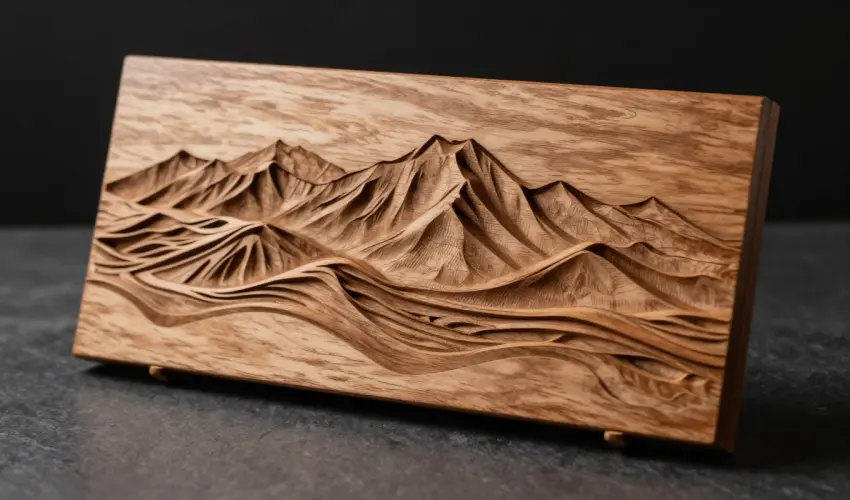
3D relief engraving creates a design that physically rises from or sinks into the surface.
Think of a traditional carved wooden plaque, except the laser performs the material removal automatically.
A relief engraving might contain a raised mountain range, a person’s face, an animal, a logo, or an intricate decorative pattern.
The final result can have significant visual depth, especially when viewed under directional lighting.
Relief engraving is particularly popular for:
Wood signs: Create detailed raised or recessed artwork.
Medallions: Produce coins and decorative pieces with sculpted features.
Portraits: Convert photographs into three-dimensional reliefs.
Topographic maps: Reproduce elevation changes across landscapes.
Decorative panels: Create detailed architectural and artistic designs.
Can a Diode Laser Do 3D Engraving?
Yes. Many modern diode laser engravers can perform 3D engraving.
A diode laser doesn’t necessarily need a dedicated “3D laser” to create depth. What matters is whether the machine and software can control the engraving process precisely enough to produce different depths.
A 10W, 20W, or 40W diode laser can be used for 3D engraving on suitable materials, particularly wood and other relatively easy-to-process materials.
However, deeper 3D reliefs can require multiple passes.
A higher-powered diode laser can generally remove material faster, making it more practical for larger or deeper relief projects.
Can a CO₂ Laser Do 3D Engraving?
Yes. CO₂ lasers are excellent for 3D engraving on many non-metal materials.
CO₂ lasers are particularly effective on:
- Wood
- Acrylic
- Leather
- Paper
- Cardboard
- Cork
- Some stone materials
- Certain coated materials
Their relatively high power makes them well suited to removing substantial amounts of material.
For businesses producing large 3D reliefs or detailed wooden artwork, a CO₂ laser can provide significantly faster material removal than many entry-level diode machines.
However, CO₂ lasers are generally not the first choice for directly engraving bare metals.
Can a Fiber Laser Do 3D Engraving?
Yes. Fiber lasers can perform 3D metal engraving, including deep engraving and relief-style work.
Fiber lasers are particularly useful for:
- Stainless steel
- Aluminum
- Brass
- Copper
- Titanium
- Tool steel
- Gold
- Silver
A fiber laser can repeatedly remove material from selected areas to create different depths.
This makes it possible to create engraved logos, serial numbers, molds, textures, reliefs, and other three-dimensional metal designs.
For metal applications, a fiber laser is generally much more suitable than a diode or CO₂ laser when substantial material removal is required.
What Is the Best Laser for 3D Engraving?
There isn’t one laser that is best for every 3D engraving application.
The best choice depends primarily on the material and the amount of depth you want to create.
Laser Type | Best Materials | 3D Engraving Capability | Best For |
|---|---|---|---|
Diode Laser | Wood, leather, coated materials | Good | Hobbyists and small projects |
CO₂ Laser | Wood, acrylic, leather, stone | Excellent | Large non-metal projects |
Fiber Laser | Stainless steel, aluminum, brass, titanium | Excellent | Deep metal engraving |
UV Laser | Glass, plastics, delicate materials | Excellent for fine surface work | Micro-detail and delicate applications |
For beginners working primarily with wood, a 10W or 20W diode laser can be an affordable way to experiment with 3D engraving.
For deeper metal reliefs, a fiber laser is the better choice.
Our Recommended Laser: xTool F2 Ultra 60W MOPA + 40W Diode
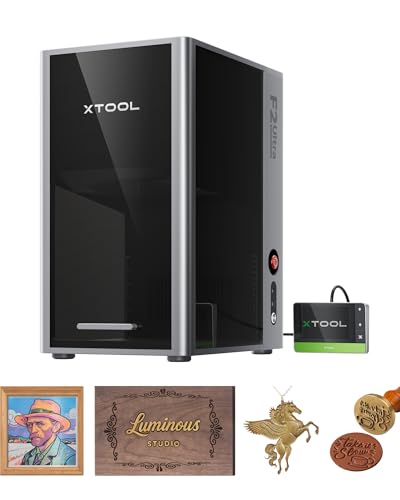
- Ultimate Dual-Laser Powerhouse: Equipped with a 60W MOPA fiber laser and a 40W diode laser, the xTool F2 Ultra masters all materials effortlessly—including all metals, wood, acrylic, leather, glass, rubber, fabric, and more. It delivers vibrant color engraving, precise 3D deep engraving, and cuts up to 2 mm metal, 20 mm acrylic, and 23 mm wood—one machine that does it all.
The xTool F2 Ultra is one of the best laser machines for 3D laser engraving thanks to its powerful dual-laser system and precision-focused design.
Combining a 60W MOPA fiber laser with a 40W diode laser, it delivers exceptional depth control, ultra-fine detail, and broad material compatibility—ideal for both surface and subsurface 3D engraving.
Why the xTool F2 Ultra Excels at 3D Engraving
- True 3D Depth Control (MOPA Technology): The 60W MOPA fiber laser allows precise pulse-width adjustment, enabling smooth grayscale gradients and layered depth, perfect for 3D reliefs, portraits, and textured metal engravings.
- Dual-Laser Versatility: Switch between fiber (metals) and diode (wood, leather, acrylic) to cover nearly all 3D engraving applications with one machine.
- Ultra-Fine Detail: Excellent spot size and stability produce crisp edges and realistic depth transitions, essential for professional 3D results.
- High-Speed Processing: Efficient engraving without sacrificing detail, ideal for small businesses and production workflows.
- Advanced Software Support: Optimized for grayscale and depth-map engraving, simplifying complex 3D projects.
Best Uses
- 3D metal engraving (stainless steel, aluminum, brass)
- Layered 3D reliefs on wood, leather, and acrylic
- Custom products: jewelry, plaques, awards, and branding
If you’re looking for a professional-grade laser engraver capable of true 3D engraving, the xTool F2 Ultra (60W MOPA + 40W Diode) is an excellent choice.
Its unmatched depth control, material flexibility, and precision make it one of the best all-in-one solutions for advanced 3D laser engraving.
Best Materials for 3D Laser Engraving
Wood
Wood is one of the most popular materials for 3D laser engraving.
Basswood, birch plywood, maple, walnut, and other suitable woods can produce excellent relief effects.
Different wood species react differently to laser energy, so testing is important. Dense hardwoods may require more passes than softer woods.
Wood is particularly good for:
- Portraits
- Maps
- Signs
- Wall art
- Decorative panels
- Logos
- Sculpted artwork
Acrylic
Acrylic can also be used for certain 3D engraving applications.
Clear acrylic is particularly interesting because engraving can create a frosted effect beneath the surface. With the right technique, depth and lighting can create impressive visual effects.
However, acrylic thickness, color, and composition all affect the result.
Always verify that the material is laser-safe before processing it.
Leather
Leather can be engraved with depth, although it is generally better suited to shallow 3D effects than deep relief carving.
Vegetable-tanned leather is particularly popular for laser engraving.
3D leather projects can include:
- Decorative patterns
- Logos
- Wallets
- Covers
- Premium gift items
Because leather can burn quickly, careful power and speed control is important.
Stone
Some stone and slate materials can be laser engraved to create textured or relief-like surfaces.
Stone engraving can produce a dramatic appearance, particularly when combined with grayscale images.
However, stone varies considerably in composition, so test pieces are recommended.
Metal

Metal 3D engraving is where fiber lasers become particularly valuable.
A fiber laser can repeatedly remove material to create deep engraving and dimensional relief.
This technique is often used for:
- Industrial parts
- Tools
- Jewelry
- Metal plaques
- Molds
- Decorative components
Deep metal engraving can require many passes, making appropriate laser power and efficient scanning strategies important.
What Software Is Used for 3D Laser Engraving?
The software you use depends on your laser and the type of 3D engraving you’re creating.
Many laser platforms can convert grayscale images into variable-depth engravings.
Common software options include:
LightBurn: Popular laser control software that supports image processing and advanced engraving workflows.

xTool Creative Space: Designed for xTool machines and provides beginner-friendly tools for image engraving and certain 3D workflows.
LaserGRBL: A popular option for compatible diode laser machines.
3D modeling software: Programs such as Blender, Fusion, or other 3D applications can be used to create or modify 3D models before converting them into a format suitable for laser processing.
The important thing is to determine whether your particular laser software supports variable-depth or 3D engraving.
How Deep Can a Laser Engrave?
There is no universal maximum depth.
The achievable depth depends on:
- Laser power
- Material
- Material density
- Lens and spot size
- Focus
- Speed
- Number of passes
- Air assist
- Cooling
- Scan strategy
- Desired surface quality
A diode laser might create a shallow 3D relief in wood relatively easily but struggle with very deep engraving.
A high-power CO₂ laser can remove substantially more wood or acrylic per pass.
A fiber laser can progressively remove metal and create deep metal engraving.
For deep projects, multiple passes are often preferable to trying to remove too much material in a single pass.
How to Get Better 3D Laser Engraving Results
The quality of a 3D engraving depends heavily on preparation and settings.
Start with a high-resolution grayscale image or a properly prepared 3D model. Poor source artwork will limit the final result regardless of how powerful your laser is.
Always run a small test before processing an expensive material.
Focus is also extremely important. If the laser is incorrectly focused, small details and depth transitions can become soft or inconsistent.
For deeper engraving, multiple passes can provide better control than simply increasing power.
Keeping the material flat is equally important. Uneven material can change the focus distance and create inconsistent engraving depth.
Cleaning the surface before engraving can also improve consistency.
How to Create 3D Laser Engraving From a Photo
Creating a 3D engraving from a photograph usually begins with converting the image into grayscale.
The photograph should have good contrast and clearly defined highlights and shadows.
The image can then be processed so that grayscale values correspond to different engraving depths.
For example, a lighter area of a face might remain relatively shallow, while darker areas around the hair or facial features are engraved deeper.
The software converts those tonal differences into laser movement and power information.
For the best results, avoid images with extremely compressed shadows or highlights because they can lose important depth information.
Why Does My 3D Engraving Look Flat?
A 3D engraving can look flat for several reasons.
The grayscale image may not contain enough contrast. The maximum engraving depth may also be too shallow to create noticeable dimensional differences.
Incorrect focus can reduce detail, while excessive power can destroy smaller features.
Another common problem is using a source image that wasn’t designed for depth engraving.
A good 3D engraving needs clear transitions between shallow and deep areas.
Lighting also matters. A relief can look dramatically different under directional lighting compared with flat overhead lighting.
How to Make 3D Laser Engraving Deeper
If you want more depth, don’t simply increase laser power immediately.
Instead, start by testing slower speeds, higher power, or additional passes depending on your machine and material.
Multiple passes often provide better control over deep engraving.
For example, rather than attempting to remove a large amount of material in one pass, several controlled passes can gradually build the desired depth.
However, excessive passes can increase charring, heat buildup, or edge distortion.
The goal is to find the best balance between depth, detail, speed, and surface quality.
3D Laser Engraving vs. 3D Laser Cutting
These terms are sometimes confused.
3D laser engraving removes controlled amounts of material to create depth and surface detail.
3D laser cutting generally refers to cutting complex three-dimensional objects or processing material along multiple axes.
A standard desktop laser can create impressive 3D relief engraving without necessarily having a true multi-axis cutting system.
For example, a grayscale portrait engraved into wood is 3D engraving even though the laser head may only move across the X and Y axes while depth is created by material removal.
Common 3D Laser Engraving Problems
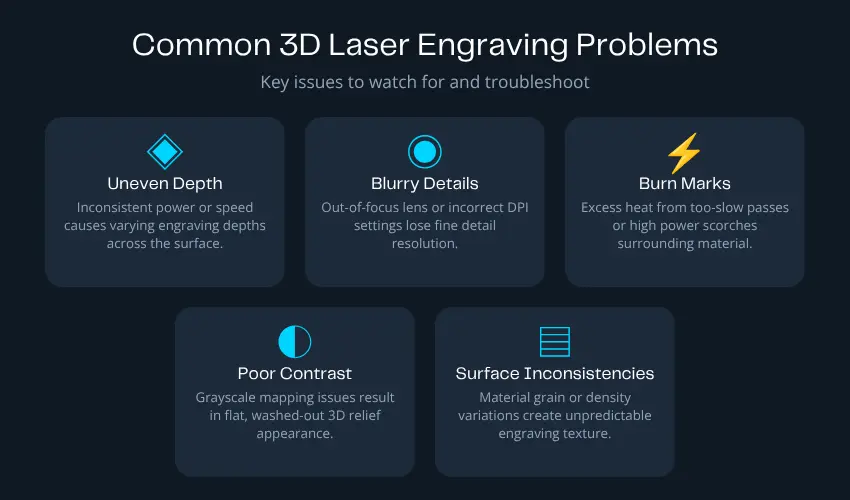
One of the most common problems is excessive burning.
This can happen when the laser moves too slowly or remains over the same area for too long.
Uneven depth can also occur if the material isn’t flat or the focus changes across the work area.
Low-resolution images can produce blurry details, while excessive image contrast can create harsh transitions.
Another problem is trying to engrave too deeply with a laser that doesn’t have enough power for the material.
Understanding your machine’s limitations is essential for achieving consistent results.
Is 3D Laser Engraving Worth It?
For many makers and businesses, absolutely.
3D laser engraving can transform relatively simple materials into premium-looking products.
A standard engraved wooden plaque might be attractive, but a detailed relief portrait or topographic map can have considerably higher perceived value.
The technique also opens the door to products that aren’t possible with basic 2D engraving alone.
For businesses, potential applications include custom awards, premium gifts, decorative signs, jewelry, personalized artwork, architectural models, and specialty industrial parts.
Conclusion
3D laser engraving is a cutting-edge technology that opens up a world of possibilities for creating detailed, durable, and customized designs.
Whether for personal use, business signage, or industrial applications, its ability to precisely engrave materials with depth and texture makes it a valuable tool across multiple industries.
By understanding how it works and the benefits it offers, you can make the most of this powerful technology.
Frequently Asked Questions
What is 3D laser engraving?
3D laser engraving is a technique that creates depth inside or on the surface of a material by engraving multiple layers at different depths. Unlike standard 2D engraving, which only marks the surface, 3D engraving produces realistic, three-dimensional designs such as portraits and logos.
What materials can be used for 3D laser engraving?
Common materials include wood, acrylic, leather, plastics, and some metals. Subsurface 3D engraving is most commonly done in crystal using UV lasers, while surface-based 3D effects are popular on wood and acrylic.
What type of laser is best for 3D laser engraving?
The best laser depends on the material:
Fiber lasers work well for 3D engraving on metals.
CO₂ lasers are suitable for 3D surface engraving on wood, leather, and acrylic.
Diode lasers can create shallow 3D effects on softer materials.
Is 3D laser engraving difficult to learn?
3D laser engraving requires more setup than 2D engraving, but it’s beginner-friendly with the right software and machine. Most difficulty comes from preparing depth maps, grayscale images, and choosing correct laser settings. Modern laser software makes the process much easier with built-in 3D and grayscale tools.
Can I do 3D laser engraving at home?
Yes, many desktop laser engravers support 3D engraving at home. However, proper ventilation, eye protection, and material safety are essential—especially when engraving acrylic or metals. UV, dual (fiber + diode) desktop lasers are popular choices for home studios and small businesses.