
Laser cutters are powerful tools capable of cutting, engraving, and marking a huge range of materials with incredible precision. Whether you use a diode laser, CO2 laser, fiber laser, or UV laser, safety should always come first.
Many beginners underestimate the risks of laser cutting and engraving. Laser cutters and engravers can cause eye injuries, fires, toxic fumes, electrical hazards, and serious damage if used improperly. Even small desktop laser engravers require proper safety procedures.
Table of Contents
This guide covers the most important laser engraver safety precautions, including eye protection, ventilation, fire prevention, material safety, and workspace setup.
Why Laser Cutter Safety Precautions Matter
Laser cutters and engravers use concentrated beams of light powerful enough to vaporize materials. During engraving and cutting, the machine also produces heat, smoke, fumes, sparks, and airborne particles.
Without proper safety precautions, users risk:
- Eye injuries
- Skin burns
- Fire hazards
- Toxic fume exposure
- Electrical accidents
- Machine damage
Following basic laser safety rules greatly reduces these risks and helps keep both users and equipment safe.
1. Always Wear Proper Laser Safety Glasses
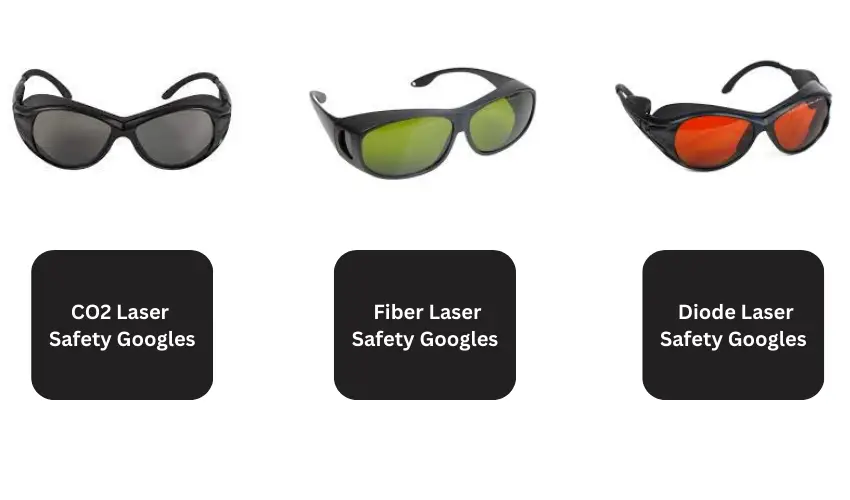
One of the most important laser safety rules is protecting your eyes.
Laser beams and reflected light can permanently damage your vision in seconds. Different laser types use different wavelengths, so you must use safety glasses specifically designed for your laser machine.
Laser Safety Glasses by Laser Type
Laser Type | Common Wavelength | Recommended Glasses |
|---|---|---|
Diode Laser | 445nm–455nm | Blue light laser safety glasses |
CO2 Laser | 10,600nm | CO2 infrared laser glasses |
Fiber Laser | 1064nm | Fiber laser safety glasses |
UV Laser | 355nm | UV laser protective eyewear |
Never rely on standard sunglasses or cheap generic safety glasses.
2. Never Leave Your Laser Engraver Unattended
One of the biggest causes of laser engraving fires is leaving the machine running unattended.
Wood, leather, cardboard, acrylic, fabric, and other materials can ignite unexpectedly during cutting or engraving. Even a small flare-up can quickly become dangerous if no one is watching the machine.
Always stay nearby while your laser is operating, especially during longer cutting jobs.
3. Keep a Fire Extinguisher Nearby
Every laser workspace should have a fire extinguisher within reach.
A small Class ABC fire extinguisher works well for most hobby laser setups because it handles:
- Wood fires
- Electrical fires
- Plastic fires
- Fabric fires
Knowing how to respond quickly to small flare-ups can prevent major accidents. We recommend keeping a fire extinguisher like the First Alert Fire Extinguisher within arm’s reach of your laser cutter.

- First Alert's HOME1 FE1A10GR Fire Extinguisher is UL rated 1-A: 10-B:C; it features durable all-metal construction with a commercial-grade metal valve and trigger to meet demanding needs

The First Alert HOME1 Fire Extinguisher is a smart and reliable safety addition for any laser cutting and engraving setup or small workshop. With a UL rating of 1-A:10-B: C, it’s designed to handle the most common laser engraving fire hazards, including wood, paper, plastics, flammable liquids, and electrical fires.
Its durable all-metal body and commercial-grade valve provide a sturdy, professional-quality feel, while the easy-to-read pressure gauge and simple instructions make it easy to use, even in emergencies. We also like that it weighs only 4.5 pounds, making it lightweight enough to grab quickly if a flare-up happens during engraving or cutting.
Another major advantage is the rechargeable design, which offers better long-term value compared to disposable extinguishers. The metal pull pin and tamper seal also help prevent accidental discharge around busy workspaces.
For laser cutter and engraver safety, the HOME1 strikes a great balance between affordability, reliability, and ease of use. Keeping one within reach of your laser machine is a simple step that can make a huge difference if an unexpected fire starts.
4. Use Proper Ventilation and Fume Extraction
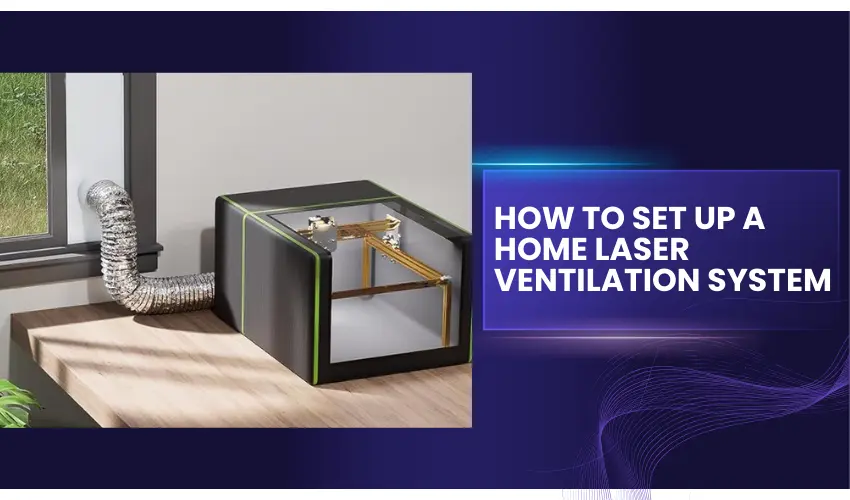
Laser cutting and engraving produce smoke, fumes, and airborne particles that should never be inhaled directly.
Some materials release especially dangerous chemicals when heated by a laser.
Why Ventilation Is Important
Good ventilation helps:
- Remove smoke
- Reduce toxic fume exposure
- Improve air quality
- Prevent residue buildup inside the machine
- Reduce lens contamination
A proper exhaust system or fume extractor is strongly recommended for indoor laser use.
Materials That Produce Toxic Fumes
Some materials should never be laser engraved because they release highly toxic gases.
Avoid laser cutting or engraving:
Material | Danger |
|---|---|
PVC / Vinyl | Releases chlorine gas |
ABS Plastic | Produces toxic smoke |
Teflon | Releases hazardous fumes |
Polycarbonate | Burns poorly and discolors |
Unknown plastics | May release dangerous chemicals |
Always confirm a material is laser-safe before engraving it.
5. Maintain Good Airflow Around the Machine
Airflow is important for both safety and engraving quality.
Air assist systems help remove smoke, reduce flare-ups, and improve cutting performance. Avoid blocking airflow with large clamps, weights, or bulky hold-downs.
Proper airflow also helps keep lenses cleaner and reduces soot buildup inside the machine.
6. Keep Your Workspace Clean
A cluttered laser workspace increases fire risks and makes accidents more likely.
Remove:
- Scrap materials
- Dust buildup
- Paper debris
- Loose fabric
- Flammable chemicals
Regular cleaning also improves airflow and keeps your laser machine operating efficiently.
7. Secure Your Materials Properly
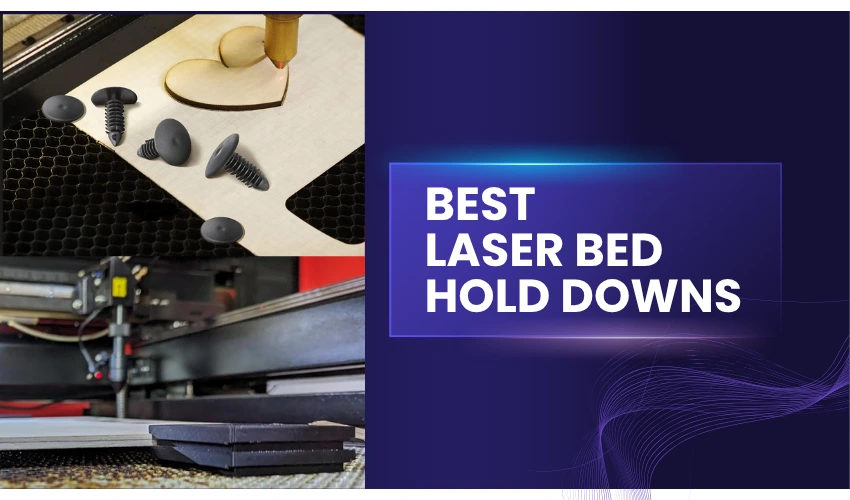
Unsecured materials can shift during engraving, causing ruined projects or dangerous collisions with the laser head.
Warped plywood, thin acrylic, leather, and lightweight materials are especially prone to movement.
Using magnets, honeycomb bed pins, clamps, or low-tack tape helps keep materials stable and improves engraving accuracy.
8. Check Your Laser Lens Regularly
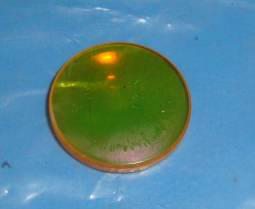
A dirty laser lens reduces power and increases heat buildup inside the laser head.
Smoke residue and debris can block the laser beam, reduce cutting performance, and potentially damage the lens permanently.
Clean your lens regularly using:
- 99% isopropyl alcohol
- Optical cleaning cloths
- Lens-safe cleaning tools
Never use paper towels or abrasive materials on laser optics.
9. Understand Laser Classes
Laser engravers are grouped into different safety classes based on power and exposure risk.
Laser Class | Description |
|---|---|
Class 1 | Fully enclosed and safer for normal use |
Class 4 | Open high-powered lasers requiring full safety precautions |
Most open-frame diode lasers and many fiber lasers are Class 4 machines, meaning direct exposure can be extremely dangerous.
10. Avoid Reflective Materials
Reflective metals can bounce laser light unpredictably.
Highly polished stainless steel, mirrors, chrome, and reflective surfaces increase the risk of stray laser reflections, especially with fiber lasers.
Always wear proper eye protection and use safe engraving angles when working with reflective materials.
11. Electrical Safety Tips
Laser engravers use high-voltage power supplies and moving electronic components.
To reduce electrical risks:
- Keep liquids away from the machine
- Avoid damaged cables
- Use grounded outlets
- Turn off the machine before maintenance
- Inspect wiring regularly
If something smells burnt or electrical, stop using the machine immediately.
12. Monitor Heat Build-Up
Long engraving jobs can generate significant heat.
Overheating may damage:
- Laser modules
- Lenses
- Motors
- Power supplies
Ensure cooling fans work properly and avoid blocking ventilation openings around the machine.
13. Protect Children and Pets
Laser cutters and engravers should never be operated around unsupervised children or pets.
Bright laser beams, smoke, heat, and moving parts all create serious safety hazards.
If possible, keep your laser engraver in a dedicated workshop or enclosed workspace.
14. Learn Your Machine’s Emergency Features
Before running your laser, familiarize yourself with:
- Emergency stop button
- Power switch
- Fire shutoff procedures
- Pause functions
- Software emergency controls
Quick response during an issue can prevent injuries and equipment damage.
Common Laser Engraver Safety Mistakes

Many laser accidents happen because users overlook basic precautions.
Common mistakes include:
- Running the machine unattended
- Using unsafe materials
- Skipping safety glasses
- Ignoring ventilation
- Using damaged wiring
- Allowing debris buildup
- Overpowering materials
- Blocking airflow
Developing good habits early makes laser engraving much safer long-term.
Conclusion
Laser engravers are incredibly useful tools, but they require responsible operation and proper safety procedures. Wearing laser safety glasses, using good ventilation, securing materials properly, monitoring for fires, and keeping your machine clean are some of the most important habits every laser user should follow.
Whether you use a diode, CO2, fiber, or UV laser, understanding laser safety helps protect your eyesight, your equipment, and your workspace while improving overall engraving performance.
With the right setup and precautions, laser engraving can be both safe and highly rewarding.
Frequently Asked Questions
Do I need protective eyewear when using a laser cutter?
Yes, appropriate laser safety glasses are essential, especially for diode and fiber lasers that may operate outside of enclosed systems. Even if your machine has a cover, it’s best to wear certified protective eyewear rated for your laser’s wavelength. CO₂ lasers typically use enclosures with built-in filtering, but open-frame or modified setups still require added protection.
What kind of fire extinguisher should I have for a laser cutter?
You should have a Class ABC fire extinguisher near your laser cutter. These extinguishers handle electrical fires, flammable solids like wood, and flammable liquids—common risks in laser cutting. Make sure it’s easily accessible, regularly inspected, and that you know how to use it before an emergency occurs.
How should I ventilate my laser cutter workspace?
Proper ventilation is crucial. You should either vent fumes outdoors using an exhaust hose or use a filtration system or smoke purifier. This prevents the inhalation of harmful particles and gases released when cutting materials like acrylic, MDF, or plastics. Never operate a laser cutter in an unventilated room.
Can I leave my laser cutter unattended while it’s running?
No. Never leave a laser cutter unattended while it’s in operation. Flare-ups and mechanical issues can happen quickly. Continuous supervision is your best defense against fires or damage. If you need to step away, pause the machine or shut it down completely.
Are all materials safe to cut with a laser cutter?
No. Not all materials are safe for laser cutting. Avoid PVC, vinyl, fiberglass, and certain plastics as they release toxic gases (like chlorine or cyanide) when burned. Always check your laser cutter’s material compatibility list or safety data sheets (SDS) before cutting something new.