
Stone engraving with laser is an excellent way to create personalized gifts, decorative pieces, memorial plaques, signs, and custom artwork.
Unlike traditional engraving methods that rely on physical tools, laser engraving uses a focused beam of light to mark the stone’s surface with detailed designs, text, photographs, and patterns.
Whether you are a hobbyist exploring a new craft or a business looking to expand into personalized products, laser engraving offers an efficient way to work with materials such as granite, marble, slate, and certain types of natural stone.
However, not all stones respond to laser engraving in the same way. The results depend on the stone’s composition, color, surface texture, and the type of laser you use.
Table of Contents
In this guide, we’ll explain how stone engraving with a laser works, which stones are suitable, what equipment you need, and how to achieve the best results.
We’ll also cover recommended settings, common problems, and practical tips for getting started.
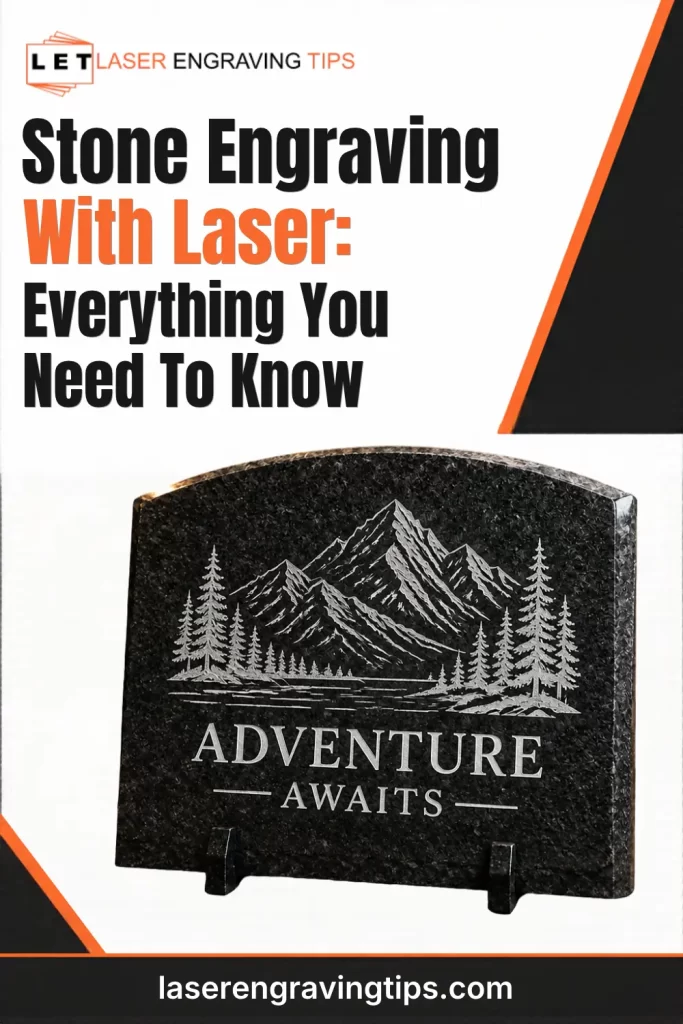
What Is Stone Engraving With Laser?
Laser stone engraving is a process that uses concentrated laser energy to create a visible mark on the surface of stone.
Depending on the material and laser settings, the beam can change the stone’s surface appearance through localized heating, surface alteration, or the removal of small amounts of material.
Unlike mechanical engraving, laser engraving does not require a cutting bit or direct physical contact with the stone. This makes it possible to reproduce intricate artwork, fine lettering, logos, and photographic images.
Laser engraving is commonly used on:
- Granite memorial plaques and headstones
- Slate coasters and serving boards
- Marble decorative tiles
- Stone signs and house numbers
- Personalized gifts and keepsakes
- Architectural and decorative stone products
- Custom awards and commemorative items
One of the biggest advantages is the ability to reproduce designs consistently. Once you have established suitable settings for a particular stone, you can use the same workflow to produce multiple customized items.
Which Stones Can Be Laser Engraved?
Several natural stones can be laser engraved, but the results vary significantly. Some produce a strong, contrasting mark, while others may show only subtle surface changes.
Here are some of the most popular stones for laser engraving.
1. Slate

Slate is one of the most popular materials for laser engraving because it often produces attractive, high-contrast results.
Its naturally dark surface can turn lighter where the laser interacts with the material, making engraved designs easy to see. This makes slate particularly suitable for personalized coasters, serving boards, signs, and decorative pieces.
We recommend this 24 piece set on Amazon, they are inexpensive and engrave beautifully:

- PERFECT FOR LASER ENGRAVING AND ETCHING: You can personalize each coaster to reflect your personality or match your décor. Whether it's a name, a special message, or a unique design, the possibilities are endless. You can also write on them with chalk, painting with acrylic paints, art-mosaics or other. This DIY feature adds a unique touch to the coasters, making them not just a functional item, but a piece of art.
Popular applications include:
- Personalized slate coasters
- Engraved serving boards
- House signs and address plaques
- Wedding and anniversary gifts
- Custom decorative tiles
Slate is an excellent material for beginners because it is relatively affordable and widely available. However, its natural texture and layered structure can cause variations in engraving results.
2. Granite
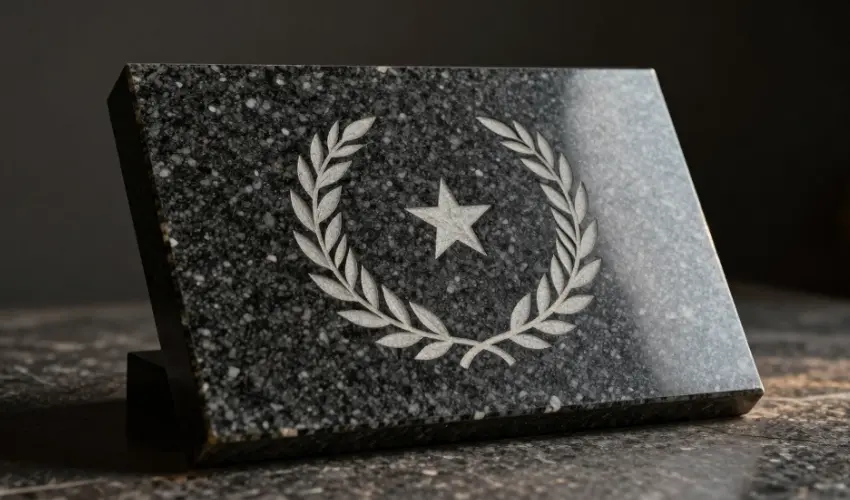
Granite is a durable natural stone commonly used for countertops, monuments, memorial plaques, and outdoor signs.
Laser engraving can create permanent-looking surface marks on suitable granite varieties. It is particularly popular for memorial products because it can reproduce names, dates, logos, and detailed photographs.
Black and dark-colored granite are frequently used because lighter engraving marks can provide good contrast against the surface.
Popular applications include:
- Memorial plaques and headstones
- Engraved photographs
- Outdoor signs
- Personalized nameplates
- Decorative granite tiles
Granite varies considerably in mineral composition and surface finish, so testing is essential before engraving a finished product.
3. Marble
Marble is another popular stone for decorative engraving. Its smooth surface and distinctive natural patterns make it suitable for personalized gifts, architectural details, and decorative products.
Laser engraving can produce subtle marks on marble, but the result depends on its mineral composition, color, and finish.
Popular applications include:
- Personalized marble tiles
- Decorative plaques
- Custom coasters
- Engraved awards
- Interior signs
Because marble can have different colors and mineral characteristics, test a small area before processing a complete item.
4. Limestone
Limestone is a softer sedimentary rock that can be used for decorative engraving and signage.
Its relatively soft structure can make it easier to mark than some harder stones, although the final appearance depends on its composition and surface condition.
Limestone is used for architectural lettering, decorative panels, garden signs, and customized stone products.
5. Sandstone
Sandstone is composed primarily of sand-sized mineral grains, often held together by natural cementing materials.
It can be engraved for decorative purposes, but its grain structure and porosity may produce uneven results. Some varieties are more suitable than others.
Always test the specific stone before committing to a design.
Which Laser Is Best for Stone Engraving?
The best laser for engraving stone depends on the material, the desired result, and the type of work you plan to produce.
CO₂ and diode lasers are commonly used for decorative stone engraving. UV and fiber lasers are more specialized options, and their suitability depends on the stone and the intended marking process.
1. CO₂ Laser
CO₂ lasers are widely used for engraving materials such as wood, acrylic, leather, glass, and certain types of stone.
They can produce attractive surface marks on slate, granite, and other suitable stones. Their relatively large working areas also make them useful for engraving signs, plaques, and larger decorative pieces.
A CO₂ laser is worth considering if you want to work with stone alongside other non-metallic materials. The CO₂ laser we recommend for stone engraving: xTool P2S 55W
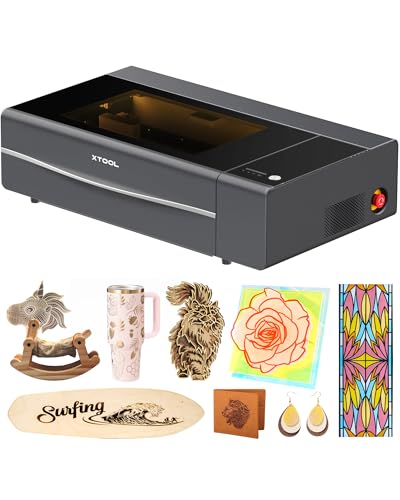
- Enhanced Performance: The xTool P2S provides stronger airflow with more powerful exhaust fans and a dual-cylinder air pump, delivering sharper, cleaner cuts and engravings. It offers optical path indicators, and easier daily maintenance. With upgraded hardware and software, making the best desktop CO2 laser cutter become better.
Advantages:
- Suitable for many decorative stone engraving applications
- Useful for larger projects and batch production
- Can also process wood, acrylic, leather, and other compatible materials
Limitations:
- Results vary significantly between stone types
- Some surfaces may produce low contrast
- Not every stone responds well to CO₂ laser energy
2. Diode Laser
Diode lasers are popular among hobbyists and small businesses because they are generally compact and relatively affordable.
They can engrave suitable stones, particularly slate and some darker stone surfaces. However, their performance depends on the laser’s actual optical output, wavelength, and the material being processed.
A diode laser can be a practical entry point for someone who wants to experiment with stone engraving without investing in a larger CO₂ system.
The Diode Laser we recommend for stone engraving: xTool S1 40W

- [Unbeatable Power & Productivity] With a powerful 40W (40,000mW) laser, this advanced laser cutter and engraver machine slices through 18mm cherry wood as easily as butter in a single pass. Engrave at blazing speeds up to 600mm/s on a spacious 23.93" x 15.16" bed—perfect for large projects like door signs or up to 119 dog tags in one go.
Advantages:
- Generally affordable entry-level equipment
- Compact machine options
- Suitable for many slate engraving projects
- Useful for personalized gifts and small decorative products
Limitations:
- Slower than many higher-powered systems
- Limited ability to process certain stone surfaces
- Results can be inconsistent on textured or light-colored materials
3. UV Laser
UV lasers use a shorter wavelength than conventional CO₂ and diode lasers. They are often selected for fine-detail marking on materials that require more controlled processing.
However, a UV laser is not automatically the best choice for every type of stone. Its performance depends on the stone’s composition and how it absorbs the laser energy.
UV systems are generally more specialized and may be a better fit for businesses working with a range of delicate materials rather than exclusively engraving stone.
4. Fiber Laser
Fiber lasers are primarily designed for metal marking and engraving. They are commonly used on stainless steel, aluminum, brass, and other compatible metals.
Although certain specialized laser processes can mark some non-metallic materials, a conventional fiber laser is generally not the first choice for decorative engraving on slate, marble, or granite.
For most stone engraving projects, a CO₂ or diode laser is a more practical starting point.
CO₂ vs. Diode Laser for Stone Engraving
If you are deciding between a CO₂ and diode laser, consider the type of stone you plan to engrave and the size of your projects.
Feature | CO₂ Laser | Diode Laser |
|---|---|---|
Slate engraving | Suitable | Suitable |
Granite engraving | Depends on stone and settings | Depends on stone and settings |
Marble engraving | Material-dependent | Material-dependent |
Large projects | Often better suited | Depends on machine size |
Processing speed | Generally faster on suitable machines | Generally slower |
Initial investment | Often higher | Often lower |
Other materials | Wood, acrylic, leather, glass and more | Wood, leather and compatible materials |
Best suited for | Workshops and production | Hobbyists and smaller projects |
Our recommendation: A diode laser is a reasonable starting point if you mainly want to engrave slate coasters and small decorative items. A CO₂ laser is worth considering if you need a larger working area, higher production capacity, and the ability to process a wider range of non-metallic materials.
What Do You Need to Start Stone Engraving With Laser?
Before starting your first project, make sure you have the right equipment and materials.
1. Laser Engraver
Choose a machine that is compatible with the type of stone you want to engrave.
For beginners, a diode laser can be a practical option for experimenting with slate. For larger production projects, a CO₂ laser may provide greater flexibility.
2. Suitable Stone Blanks
Start with inexpensive, flat stone blanks rather than expensive finished products.
Slate coasters are particularly useful for testing because they are relatively easy to source and provide a convenient surface for small designs.
Look for:
- Flat surfaces
- Consistent thickness
- Minimal cracks or chips
- Relatively uniform color
- Clean, dry material
3. Laser Design Software
You will need software to prepare your artwork and send the job to your laser machine.
Popular options include:
- xTool Creative Space
- LightBurn
- LaserGRBL
Software compatibility depends on the laser machine. Check which programs are supported before purchasing equipment.
4. Artwork and Images
Laser engraving can reproduce text, logos, vector graphics, and photographs.
For the best results, use high-resolution images with good contrast. Photographs may need to be converted into grayscale and adjusted using dithering or halftone techniques before engraving.
5. Safety Equipment and Ventilation
Stone engraving can generate fine dust and airborne particles. Depending on the stone and processing method, it may also produce smoke or other contaminants.
Use suitable extraction and filtration, follow the laser manufacturer’s safety instructions, and keep the machine’s enclosure closed during operation.
Never assume that a material is safe to engrave simply because it is natural stone.
How to Engrave Stone With a Laser: Step-by-Step Guide
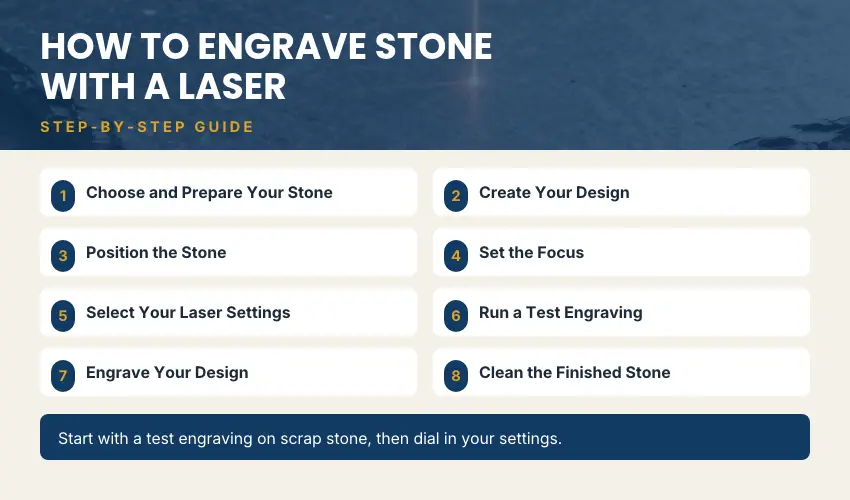
Once you have your laser machine and stone blanks ready, you can begin preparing your first project.
The following workflow is suitable for a basic slate engraving project. Settings and preparation may differ for granite, marble, and other stones.
Step 1: Choose and Prepare Your Stone
Select a flat, clean piece of stone with a relatively consistent surface.
Remove dust, dirt, fingerprints, and loose particles before placing the material in the machine. Make sure the stone is completely dry.
For your first test, slate coasters are a good option because they are small, affordable, and commonly used for laser engraving.
Step 2: Create Your Design
Open your laser software and create a new project.
Import your image, logo, text, or artwork. Resize it to fit the stone and check that important details are not too close to the edges.
For photographic engraving, prepare the image by:
- Converting it to grayscale
- Increasing contrast where necessary
- Removing unnecessary background details
- Adjusting brightness
- Applying a suitable dithering method
A high-contrast design usually produces more recognizable results than an image with too many subtle shades.
Step 3: Position the Stone
Place the stone securely on the machine’s work surface.
Use the machine’s camera positioning or framing function, if available, to align your design with the engraving area.
Make sure the stone cannot move during processing. Even slight movement can affect the final design.
Step 4: Set the Focus
Correct focus is essential for consistent engraving.
Follow the manufacturer’s instructions to set the correct distance between the laser and the stone surface.
If your machine includes autofocus or material-height measurement, use the appropriate function.
Step 5: Select Your Laser Settings
Choose the laser power, speed, resolution, and engraving mode.
There is no universal setting for stone engraving. A setting that works well on one slate coaster may produce poor results on another stone.
Start with a low-risk test pattern and gradually adjust the settings.
Step 6: Run a Test Engraving
Before processing your final design, engrave a small test area on a spare piece of the same stone.
Test different combinations of power and speed to determine which produces the best contrast and detail.
For photographic engraving, you may also need to experiment with image processing and line interval.
Step 7: Engrave Your Design
Once you have established suitable settings, run the engraving job.
Keep the machine under supervision throughout the process. Watch for unexpected smoke, flames, or changes in the material.
Stop the job if you notice unusual behavior or unsafe conditions.
Step 8: Clean the Finished Stone
After the job is complete and the machine is safe to open, allow the material to cool.
Remove loose dust and residue using a suitable soft brush or cloth. Follow the stone manufacturer’s care recommendations, particularly for porous or delicate materials.
Inspect the finished design to check for uneven engraving, missing details, or unwanted surface marks.
Recommended Laser Engraving Settings for Stone
One of the most common questions beginners ask is: What are the best laser settings for engraving stone?
Unfortunately, there is no single setting that works for every type of stone or laser machine.
The correct settings depend on:
- Laser type and optical output
- Stone composition and color
- Surface finish and texture
- Material thickness
- Engraving resolution
- Image processing method
- Desired contrast and depth
For this reason, it is better to use a material test grid than to rely on generic settings found online.
How to Find the Best Settings
Start by choosing a small test design and running several combinations of speed and power.
For example, you can create a test grid with:
- Several power levels
- Multiple engraving speeds
- Different line intervals
- Different dithering methods for photographs
Compare the results and select the combination that produces the clearest image without excessive surface damage.
Record your settings so you can reproduce the results with similar stone blanks.
Tip: Do not automatically use maximum laser power. Excessive energy can produce unwanted surface damage, uneven marks, or poor image detail.
Tips for Getting Better Stone Engraving With Laser Results
Stone engraving requires some experimentation, but a few practical techniques can help improve the final result.
1. Start With Dark-Colored Stone
Dark slate and suitable dark granite varieties often provide better visual contrast than lighter stones.
They are good starting materials for learning how different laser settings affect the finished engraving.
2. Use High-Contrast Artwork
Images with clear edges and strong contrast are generally easier to reproduce.
For photographs, adjust brightness and contrast before importing the image into your laser software.
3. Keep the Surface Clean
Dust, fingerprints, and loose particles can affect the appearance of an engraving.
Clean the stone before processing and remove loose residue afterward.
4. Test Different Dithering Methods
Photographs contain many shades of gray, but laser engravers generally reproduce images through patterns of engraved and unengraved areas.
Dithering converts grayscale images into patterns that can create the appearance of different tones.
Experiment with the dithering options supported by your software to find the most suitable method for the stone.
5. Use Consistent Stone Blanks
Natural stone is not manufactured to perfectly uniform specifications. Different pieces can vary in color, grain, porosity, and mineral composition.
If you are producing products for sale, buy blanks from a consistent supplier and test each new batch.
6. Avoid Excessive Heat
More power does not always mean better engraving.
Excessive heat can create unwanted surface damage and reduce image quality. Use test grids to find a suitable balance between power and speed.
7. Consider the Final Application
A decorative coaster, an indoor plaque, and an outdoor memorial may require different finishes and levels of durability.
Think about how the finished product will be used before choosing the stone, design, and engraving method.
Common Stone Engraving With Laser Problems and How to Fix Them

Even with the right equipment, you may encounter problems when engraving stone. Here are some common issues and possible solutions.
Problem | Possible Cause | How to Fix It |
|---|---|---|
Weak engraving contrast | Unsuitable stone or laser settings | Test another stone and adjust power and speed |
Uneven engraving | Irregular stone surface | Use flatter blanks and check focus |
Blurry photographs | Poor image preparation or incorrect focus | Improve contrast and test dithering methods |
Excessive surface damage | Too much laser energy | Reduce power or increase speed |
Missing fine details | Low image resolution or unsuitable settings | Use higher-quality artwork and test line intervals |
Inconsistent results | Natural variations in stone | Test each batch and use consistent suppliers |
Excessive dust | Material processing and poor extraction | Improve extraction and clean the work area safely |
Is Laser Engraving Stone a Profitable Business?
Laser engraving stone can be a promising business opportunity because customized stone products are popular for gifts, home décor, memorials, and promotional items.
Products such as slate coasters, personalized plaques, house signs, and engraved tiles can be sold through online stores, craft marketplaces, gift shops, and local businesses.
Popular Stone Products to Sell
Some ideas include:
- Personalized slate coasters
- Custom house number plaques
- Engraved memorial stones
- Wedding and anniversary keepsakes
- Personalized garden signs
- Engraved stone photo gifts
- Decorative wall tiles
- Business and office signs
Why Stone Engraving Can Be Attractive
Personalization: Customers often pay more for products featuring names, dates, photographs, or custom messages.
Product variety: You can offer different stone types, sizes, shapes, and designs.
Small-batch production: Many personalized products can be produced individually or in small batches.
Gift market: Engraved stone products are suitable for birthdays, weddings, anniversaries, housewarming gifts, and memorial occasions.
Before starting, calculate the cost of your machine, stone blanks, packaging, labor, ventilation, maintenance, and marketing. Test demand with a small product range before investing heavily in materials or equipment.
Final Thoughts
Stone engraving with a laser is a versatile way to create personalized gifts, decorative products, signs, and memorial pieces.
Materials such as slate, granite, and marble offer different appearances and engraving characteristics, giving makers plenty of opportunities to experiment.
For beginners, slate is an excellent starting point because it is widely available and can produce attractive results.
A diode laser can be suitable for smaller projects, while a CO₂ laser offers greater flexibility for users who also want to process other non-metallic materials.
The key to successful stone engraving is choosing the right material, preparing your artwork properly, and testing different laser settings before starting a finished product.
With the right machine, a consistent supply of stone blanks, and a little experimentation, laser engraving can become both a rewarding creative hobby and a potential small-business opportunity.
Frequently Asked Questions
Can you engrave stone with a laser?
Yes. Many types of stone can be laser engraved, including slate, granite, marble, limestone, and sandstone. However, results vary depending on the stone’s composition, surface finish, and laser settings.
What is the best laser for engraving stone?
CO₂ and diode lasers are common choices for decorative stone engraving. A diode laser can be a practical option for slate coasters and smaller projects, while a CO₂ laser may be better suited to larger work and broader material-processing needs.
Can a diode laser engrave granite?
A diode laser may mark certain granite surfaces, but results vary considerably. The stone’s color, mineral composition, and finish all affect the outcome. Always test a sample before engraving a finished product.
Can a CO₂ laser engrave marble?
A CO₂ laser can mark some marble surfaces, but the results depend on the particular stone. Test different settings on a spare piece to determine whether the desired contrast and detail are achievable.
What is the easiest stone to laser engrave?
Slate is often a good starting material because it is widely available and can produce attractive light-colored marks against its darker surface.
Do you need to coat stone before laser engraving?
Not always. Many slate and granite projects can be engraved without a special coating. However, some materials and processes may benefit from specific preparation. Test the stone first and follow the laser manufacturer’s recommendations.
Can you laser engrave photographs on stone?
Yes. Photographs can be engraved on suitable stones, particularly slate and dark granite. For good results, prepare the image in grayscale, adjust contrast, and experiment with dithering settings.
Is laser engraving stone permanent?
Laser engraving generally creates a lasting surface mark, but durability depends on the stone and the engraving process. Outdoor products may also be affected by weathering, abrasion, and surface treatments.
Can you cut stone with a laser engraver?
Most desktop laser engravers are not designed to cut solid natural stone. Laser engraving is generally used to create surface marks rather than cut through stone. For stone cutting, specialized equipment such as diamond saws or waterjet systems is typically more appropriate.
Is stone laser engraving safe?
It can be performed safely when the correct equipment, material checks, extraction, and protective measures are used. Stone processing can generate fine airborne particles, so proper ventilation and filtration are essential. Never engrave unknown materials or operate a laser without supervision.