
Do you have a laser engraver but find it creates a lot of heat and fumes, and you’re wondering how to solve this problem? If so, you should consider purchasing a laser engraver exhaust fan to help rid the heat and fumes.
When using a laser engraver, proper ventilation is crucial to remove fumes, smoke, and debris. A high-quality exhaust fan enhances safety, improves air quality, and ensures optimal engraving performance.
We’ll also provide a buying guide to make sure you get the best deal on your exhaust fan. So, whether you’re a beginner or an experienced laser engraver, read on for all the information you need to make the best decision possible.
Table of Contents
Why Use a Laser Engraver Exhaust Fan?
Laser engraving is a powerful and precise method for cutting and etching various materials, but it produces fumes, smoke, and fine particulate matter that can be harmful to both your health and your equipment.
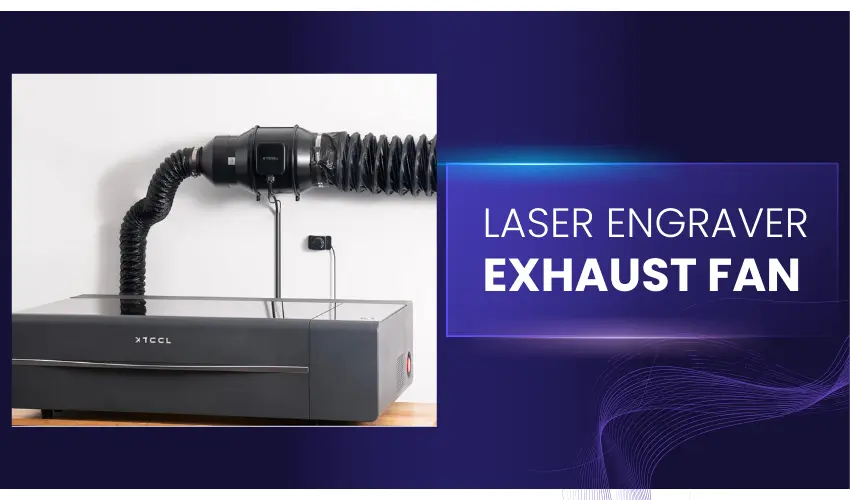
An exhaust fan is a crucial component for maintaining a safe and efficient engraving workspace. Here’s why you should always use an exhaust fan with your laser engraver.
Health and Safety Protection
When a laser engraver burns through materials like wood, acrylic, leather, or plastics, it releases toxic fumes and fine dust particles.
Inhaling these pollutants can lead to respiratory issues, eye irritation, and other health problems. An exhaust fan helps to quickly remove harmful substances from the air, ensuring a safer environment for you and those around you.
Improved Air Quality
Proper ventilation with an exhaust fan helps maintain clean air in your workspace. Whether you’re operating in a home workshop or a commercial setting, poor air quality can cause discomfort, fatigue, and long-term health risks. A high-quality exhaust fan ensures continuous airflow, keeping your working area fresh and breathable.
Protecting Your Laser Engraver
Smoke, dust, and debris can accumulate inside your laser engraver, affecting its performance and longevity. Excessive buildup on lenses, mirrors, and other components can lead to reduced laser efficiency, inconsistent engraving results, and frequent maintenance requirements.
Using an exhaust fan minimizes debris accumulation, preserving the functionality and lifespan of your machine.
Enhancing Engraving Quality
Smoke and particles generated during engraving can interfere with the laser beam, resulting in lower engraving quality. By using an exhaust fan to remove contaminants in real-time, you ensure clean and precise cuts without residue buildup on the material surface.
Compliance With Safety Regulations
Many workspaces and commercial setups require proper ventilation for operating laser engraving equipment. Local safety codes and workplace regulations may mandate the use of an exhaust system to control hazardous emissions. An exhaust fan helps you comply with these requirements while creating a safer working environment.
Odor Control
Certain materials, such as acrylic and leather, produce strong odors when engraved. Without proper ventilation, these smells can linger and make your workspace uncomfortable. An exhaust fan effectively removes odors, ensuring a more pleasant work environment.
Fire Hazard Reduction
Laser engraving generates heat, and excessive smoke buildup can increase the risk of fire hazards. An exhaust fan helps dissipate heat and remove flammable particles from the workspace, reducing the risk of accidental fires.
Best Laser Engraver Exhaust Fan Options – Comparison Table
Exhaust Fan | Duct Size | Airflow (CFM) | Noise Level | Motor Type | Speed Control | Key Advantage |
|---|---|---|---|---|---|---|
AC Infinity CLOUDLINE PRO S6 | 6″ | 402 CFM | 32 dBA | EC Motor | 10-Speed Controller | Extremely powerful yet quiet |
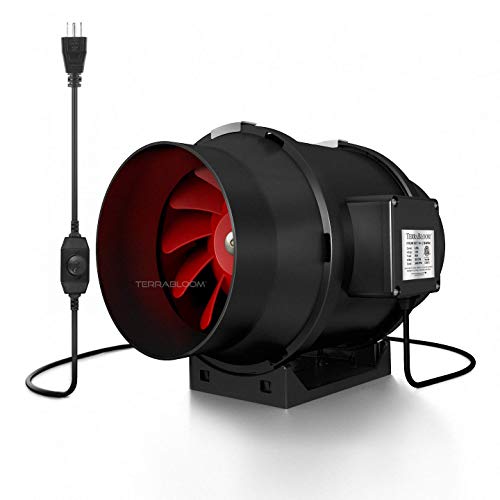
TerraBloom 6″ Inline Fan (TB-MFIF-6) | 6″ | 395 CFM | 70 dBA | AC Motor | Variable (60–100%) | Strong suction at lower cost |
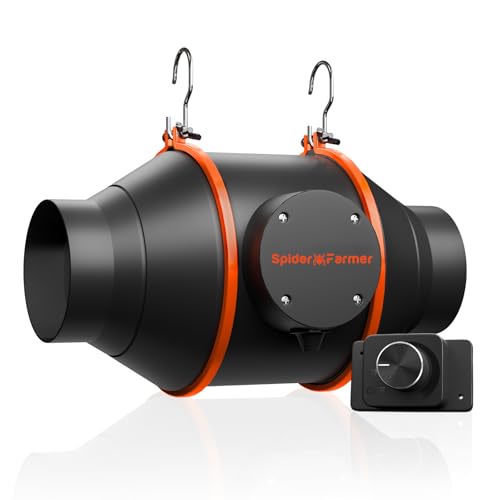
Spider Farmer 4″ Inline Fan | 4″ | 205 CFM | 26.8 dBA | EC Motor | RJ12 Smart Controller | Ultra-quiet and energy efficient |
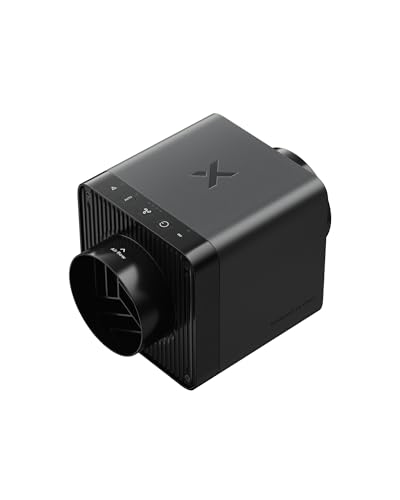
xTool SafetyPro IF2 2.0 | 3″ | 140 CFM | 56 dBA | Smart EC Motor | Auto-Sync (Wireless) | Laser-specific design with auto control |
POLISI3D 3″ Inline Duct Fan | 3″ | 118 CFM | ~30 dBA | Copper AC Motor | Manual Speed Control | Compact, budget-friendly option |


How to Choose the Right Laser Engraver Exhaust Fan (Quick Guide)
- High-power CO₂ and Diode lasers/acrylic and wood cutting → AC Infinity S6 or TerraBloom 6″
- Quiet home or office setup → Spider Farmer 4″
- xTool users wanting plug-and-play automation → xTool SafetyPro IF2 2.0
- Small desktop engravers or enclosures → POLISI3D 3″
- Long ducting or carbon filter setups → 6-inch fans: AC Infinity S6 or TerraBloom 6″ recommended
Top 5 Laser Engraver Exhaust Fan Options Reviews
1. AC Infinity CLOUDLINE PRO S6, Quiet 6” Inline Duct Fan
The AC Infinity CLOUDLINE PRO S6 is a powerful and quiet 6-inch inline duct fan that has become a favorite exhaust solution for laser engravers.
Originally designed for grow tents and ventilation systems, its high airflow, low noise, and precise speed control make it an excellent choice for clearing laser engraving smoke and fumes—especially for CO₂ and high-power diode lasers.
Pros
- Strong airflow (402 CFM) – Easily removes dense smoke from wood, acrylic, and leather
- Exceptionally quiet – Only 32 dBA, far quieter than most built-in laser fans
- 10-speed controller included – Fine control based on material and job intensity
- EC motor efficiency – Low power consumption with minimal heat output
- Handles resistance well – Mixed-flow design maintains airflow through long ducts
- Widely proven by users – Popular with Glowforge, xTool, OMTech, and similar lasers
- Flexible installation – Works with 4″–6″ ducting using adapters
Cons
- Larger than laser-specific fans – Requires more installation space
- No laser auto-sync – Manual speed control only
- Overkill for small diode lasers – More power than necessary for light engraving
The AC Infinity CLOUDLINE PRO S6 is one of the best all-around laser engraver exhaust fans if you want maximum airflow with minimal noise.
It’s ideal for CO₂ and Diode lasers, acrylic cutting, and long duct runs, and its reliability and user approval make it a top pick for serious hobbyists and small businesses alike.
2. TerraBloom 6-Inch (150mm) Inline Fan
The TerraBloom 6-inch inline fan is a high-airflow, mixed-flow exhaust fan that works exceptionally well as a laser engraver ventilation upgrade, especially for CO₂ and high-power diode lasers.
While originally designed for grow tents, its strong suction, compact size, and built-in speed control make it a reliable choice for removing laser smoke and odors.
Pros
- High airflow (395 CFM) – Easily clears dense smoke from wood, acrylic, and leather
- Mixed-flow design – Maintains strong airflow even with duct resistance
- Built-in speed controller – Adjustable from 60%–100% for flexible control
- Compact and lightweight – Easy to install in tight workshop spaces
- ETL listed & pre-wired – Safe, plug-and-play setup with grounded power cord
- Carbon filter compatible – Excellent odor control when paired with charcoal filters
- Service-friendly design – Removable center assembly for easy cleaning
Cons
- Not ultra-quiet – Louder than premium EC-motor fans at high speeds
- No smart or auto-sync features – Manual control only
- Speed can’t go below ~50–60% – Limited fine tuning at very low airflow
- Requires good duct planning – Elbows and turns reduce airflow significantly
The TerraBloom TB-MFIF-6 is a powerful and dependable laser engraver exhaust fan for users who need serious airflow without a premium price tag. It’s an excellent match for CO₂ and Diode laser cutters, acrylic work, and longer duct runs, especially when paired with a carbon filter for odor control.
3. Spider Farmer 4-Inch Inline Duct Fan

The Spider Farmer 4-inch inline duct fan is a quiet, energy-efficient exhaust solution that works extremely well for desktop laser engravers and enclosed diode or small CO₂ laser setups.
Although designed for grow tents, its EC motor, low noise output, and steady airflow make it a great option for laser smoke and fume extraction.
Pros
- Very quiet operation – Only 26.8 dB, ideal for home workshops and offices
- Efficient EC motor – Delivers 205 CFM airflow at just 27W
- Adjustable speed control – Easily fine-tune airflow based on material and job
- RJ12 smart compatibility – Works with Spider Farmer controllers and app automation
- Compact and lightweight – Easy to install inside laser enclosures
- Durable build – IP42-rated ABS housing resists dust and moisture
- Proven for laser use – Users confirm excellent fume removal with much less noise
Cons
- 4-inch duct size limits max airflow – Not ideal for large CO₂ lasers or thick acrylic cutting
- Not suited for long duct runs – Performance drops with excessive bends or length
The Spider Farmer 4-inch inline duct fan is an excellent exhaust fan for laser engravers prioritizing quiet operation and efficiency.
It’s best suited for small to mid-power diode lasers, enclosed desktop setups, and light CO₂ systems, offering reliable ventilation with minimal noise and power draw.
4. SafetyPro™ IF2 2.0 Hyper Flow Inline Duct Fan
Check Amazon Price Below
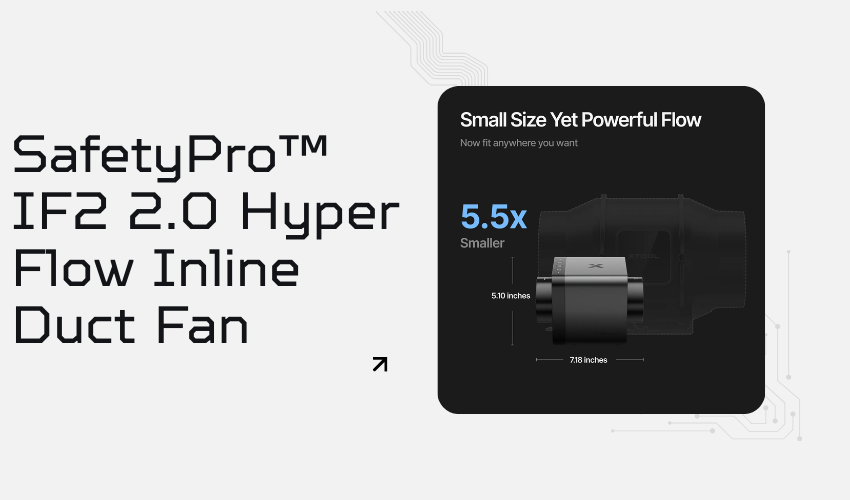
The xTool SafetyPro IF2 2.0 is a purpose-built laser engraver exhaust fan designed to move smoke fast and efficiently while staying compact and quiet.
With dual 14,000 RPM fans, a smart EC motor, and auto-sync control with xTool lasers, it delivers strong suction in a clean, plug-and-play package that’s clearly optimized for laser cutting and engraving.
Pros
- Strong suction for its size – Dual fans and up to 1300 Pa pressure handle dense smoke effectively
- Auto-sync with xTool lasers – Adjusts airflow automatically based on material and job
- Compact 5-inch design – Easy to install in small workshops or desktop setups
- Quiet operation – Built-in sound-absorbing materials reduce noise
- Washable & easy maintenance – IP55-rated housing and removable parts simplify cleaning
- Laser-specific optimization – Outperforms generic inline fans for engraving smoke
Cons
- 140 CFM airflow may be limiting for large CO₂ lasers or long duct runs
- Best experience with xTool machines – Smart features are less useful with other brands
- Exposed wiring not waterproof – Care needed in humid environments
- Premium price compared to standard inline duct fans
If you use an xTool laser engraver and want a smart, compact, and quiet exhaust fan designed specifically for laser smoke, the xTool SafetyPro IF2 2.0 is one of the best options available.
It’s ideal for desktop lasers, home workshops, and light-to-medium engraving, where clean air and ease of use matter more than raw industrial airflow.
5. POLISI3D 3 Inch Inline Exhaust Fan
The POLISI3D 3-inch inline duct fan is a compact, budget-friendly exhaust solution for small laser engravers and enclosures.
Designed for 3D printer and resin setups, it translates well to desktop laser engraving where space is limited and moderate smoke extraction is enough.
Pros
- Compact and lightweight – Easy to fit inside small laser enclosures
- Good airflow for its size – ~118 CFM (200 m³/h) handles light-to-moderate smoke
- Low power consumption – Only 25W, energy-efficient for long jobs
- Speed controller included – Allows airflow adjustment based on material
- Affordable option – Excellent value for small diode laser setups
- Positive real-world feedback – Users report strong pull and better performance than some entry-level fume extractors
Cons
- Limited power for heavy cutting – Not ideal for thick acrylic or large CO₂ lasers
- 3-inch ducting only – Restricts airflow over longer duct runs
- Basic controls – No smart features or auto-sync
- Plastic construction – Not as durable as premium inline fans
The POLISI3D 3-inch inline duct fan is a solid exhaust fan for small laser engravers, diode lasers, and enclosed desktop setups. If you’re working with light materials like wood, leather, or thin acrylic and want an affordable, compact smoke extraction solution, this fan delivers strong performance for its size.
Factors to Consider When Buying a Laser Engraver Exhaust Fan

When it comes to choosing an exhaust fan, there are a few factors you need to take into account. These include:
Airflow Capacity (CFM – Cubic Feet per Minute)
The fan’s airflow capacity determines how efficiently it can remove smoke and fumes. A higher CFM is needed for larger engraving setups or enclosed workspaces. Look for at least 100-350 CFM for small to medium laser engravers and 350-450+ CFM for high power CO₂ and Diode Laser setups.
The required airflow depends on your laser type and materials:
- Desktop diode lasers: 100–200 CFM
- Enclosed lasers & small CO₂ machines: 200–350 CFM
- High-power CO₂ lasers (55W–100W+): 350–450+ CFM
Long duct runs or carbon filters require higher CFM to maintain strong suction.
Size of the Fan
The exhaust fan you choose should be the right size for the space you’re trying to ventilate. If the fan is too small, it won’t be effective at removing all the air contaminants.
On the other hand, if the fan is too large, it will use more energy than necessary. You need to make sure that the fan you choose is powerful enough to remove all the airborne contaminants in that location.
- Ensure the exhaust fan fits your engraver’s exhaust port size.
- Common sizes include 3-inch, 4-inch, 6-inch, and 8-inch inline duct fans.
- Check if the fan can be easily mounted or connected to existing ventilation.
Type of Fan
There are two main types of exhaust fans: axial and centrifugal. Axial fans work by moving air in a straight line, while centrifugal fans use blades to draw the air in. Centrifugal fans are more powerful than axial fans, so they’re better at removing contaminants from large spaces.
Noise Level
You also need to consider the noise level of the exhaust fan. Some fans are very quiet, while others can be quite loud.
If you’re using the fan in a space where people will be present, such as a bedroom or office, you’ll want to choose a quiet fan. If you are in an outdoor setting, the noise level may not be as much of a concern.
- Some exhaust fans can be quite noisy, especially high-powered models.
- Look for models with quiet operation (under 50 dB) to maintain a comfortable work environment.
- Fans with EC motors and PWM control tend to be quieter and more energy-efficient.
Filtration and Air Quality Control
Some fans come with built-in carbon filters to absorb harmful fumes and odors. HEPA filters can further improve air quality by capturing fine particles.
Ensure easy replacement of filters for long-term use.
Energy Efficiency
Go for EC motor (Electronically Commutated) fans, which consume less power and provide better speed control.
Energy-efficient fans reduce operating costs, especially for long engraving sessions.
Durability and Build Quality
Choose a fan made from high-quality metal or industrial-grade plastic to withstand continuous operation.
Dual ball-bearing motors ensure longer lifespan and less maintenance.
Look for corrosion-resistant coatings if using in humid conditions.
Speed Control and Customization
Fans with adjustable speed controllers allow you to fine-tune airflow as needed.
Some models come with smart controllers that adjust airflow automatically based on temperature or air quality.
Installation
Another factor you need to consider when buying an exhaust fan is the installation. Some fans are easy to install, while others require a professional.
If you’re not comfortable installing the fan yourself, you should choose a model that comes with installation instructions or that can be installed by a professional.
- Consider how easy it is to install and mount the fan.
- Inline duct fans are ideal for permanent setups, while portable exhaust fans offer flexibility.
- Check for plug-and-play options if you prefer hassle-free installation.
Price & Warranty
Finally, you need to consider the price of the exhaust fan. Some fans are very expensive, while others are quite affordable.
You need to find a balance between quality and price that fits your budget. This means finding a fan that fits your budget while still effectively removing air contaminants.
- Compare prices and ensure the fan provides good value for money.
- A longer warranty (at least 1-2 years) indicates better durability and reliability.
- Trusted brands like AC Infinity, xTool, TerraBloom, and Spider Farmer offer quality exhaust fans.
Final Thoughts
An exhaust fan is a vital addition to any laser engraving setup. It protects your health, improves air quality, enhances engraving precision, and extends the life of your machine.
Investing in a high-quality laser engraver exhaust fan will ensure a safer, cleaner, and more efficient workspace, allowing you to focus on creating high-quality engravings without the risks of poor ventilation.
Frequently Asked Questions
What is the best ventilation for a laser engraver?
The best ventilation for a laser engraver includes an inline exhaust fan with ducting to vent fumes outside, paired with an air assist system and a filtration unit (such as a carbon or HEPA filter) for indoor use.
How much CFM do I need for a laser engraver?
For a laser engraver, you typically need an exhaust fan with 100–400 CFM, depending on the machine size and enclosure. Larger engravers or heavy use may require 400+ CFM for optimal fume extraction.
Why is ventilation necessary for lasers?
Ventilation is necessary for lasers to remove smoke, fumes, and particulate matter produced during engraving or cutting, ensuring a safe working environment and preventing damage to the machine.
Do I really need a laser engraver exhaust fan?
Yes. Laser engraving and cutting produce smoke, toxic fumes, and fine particles, especially when working with wood, acrylic, leather, or plastics. A proper exhaust fan protects your health, prevents smoke stains on materials, improves engraving quality, and extends the life of your laser machine.
Is a grow tent inline fan safe to use with a laser engraver?
Yes. Many inline duct fans designed for grow tents (like AC Infinity or TerraBloom) work very well for laser engravers. They offer strong airflow, quiet operation, and compatibility with ducting and carbon filters. While not laser-specific, they are a popular and proven choice among laser users.
What duct size is best for laser engraving ventilation?
3″–4″ ducting: Small desktop lasers and compact enclosures
5″–6″ ducting: CO₂ lasers, acrylic cutting, long duct runs
Larger ducts reduce air resistance, improve airflow efficiency, and lower noise levels.
Can I use a carbon filter with my laser engraver exhaust fan?
Yes. Carbon filters help neutralize odors and trap harmful gases, especially for indoor setups. For best performance:
Use a high-CFM fan
Place the fan directly after the carbon filter
Minimize duct bends (each bend reduces airflow by ~10–12%)