
From garments like jackets to stationery and novelty items, leather is a material that adds a touch of finesse and class. But nothing adds sophistication to your leather items than adding a personalized laser engraved image or quote.
Laser engravers deliver clean, highly precise results on leather that traditional engraving methods simply can’t match. With laser engraving, you can create a wide range of personalized leather products, including wallets, bags, belts, hat patches, keychains, and journals, all with sharp detail and consistent quality.
Engraving leather results in a debossed effect and produces a clean contrast on the leather surface. Engraving on darker leather results in more contrast while it produces less color contrast on light-colored leathers.
Results are dependent on the leather you are working with as well as the laser you have; i.e. its speed, power, and frequency settings. You may want to test your laser machine with different parameters until you achieve your desired results.
Table of Contents
With a laser machine you can easily “burn“ image files into leather and then color them to achieve a chic look and feel. To facilitate subsequent coloring of the lasered surface, a film may be glued which burns during the laser process.
Before the film is peeled off, the leather can then be colored in the recesses without coloring un-lasered areas. Also, leather with hair and fur can be patterned by laser. This technique is usually applied to cowhide leather.
Best Types of Leather for Laser Engraving
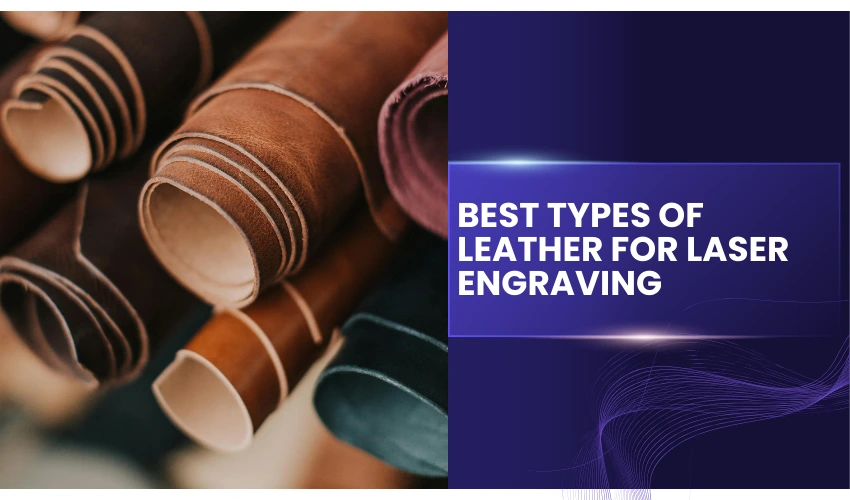
Vegetable-Tanned Leather (Best Choice)
Vegetable-tanned leather is the safest and best option for laser engraving.
Why it’s ideal:
- Produces dark, high-contrast engravings
- Contains no harmful chromium chemicals
- Minimal odor compared to treated leathers
- Consistent engraving depth
Common uses: wallets, belts, patches, keychains, bags
Chrome-Tanned Leather (Use With Caution)
Chrome-tanned leather is widely used in commercial products but not recommended for laser engraving.
Risks include:
- Releases toxic chromium compounds when burned
- Strong chemical odors
- Inconsistent engraving results
If you must engrave chrome-tanned leather, ensure proper ventilation and filtration
Faux Leather
Some faux leathers engrave well, but many contain PVC, which releases toxic chlorine gas when lasered.
Tip: Always check material safety data or test a small area first
Examples of leather products you can laser engrave on
Laser engraving on leather is an excellent way to add personalization, intricate designs, or branding to a wide variety of leather products.
The precision of laser technology allows for detailed and durable engravings that can transform everyday items into custom creations.
Here are some examples of leather products that are perfect for laser engraving:
Laser Engrave Leather Wallets
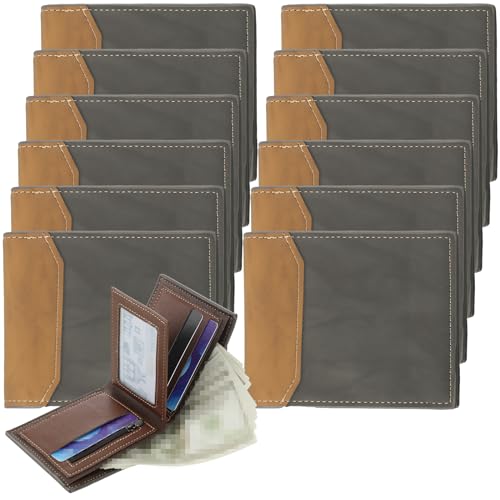
- Abundant Quantity for Sharing: the package includes 12 pieces of photo wallets for dad, providing a sufficient amount for personal use and sharing with beloved ones; With such a sufficient quantity, you can gift these wallets to multiple family members or use them for various purposes
Leather wallets are a popular choice for laser engraving, offering a sleek and personalized look.
Whether it’s adding initials, a name, a company logo, or an intricate pattern, laser-engraved wallets make great gifts or promotional items.
The engravings can range from subtle monograms to bold designs that cover the entire surface.
Laser Engrave Leather Belts
Leather belts are another common item for engraving. You can engrave a name, quote, or custom design along the length of the belt or focus on specific areas like the buckle end. Laser engraving adds a touch of uniqueness, making the belt stand out as a personal or branded accessory.
Laser Engrave Leather Bags and Purses
From handbags to briefcases, laser engraving can elevate leather bags by adding a touch of luxury. Logos, initials, or custom artwork can be engraved to create a one-of-a-kind piece. Engraving can be placed on various parts of the bag, including straps, flaps, or even the main body of the leather.
Laser Engrave Leather Journals and Notebooks

- 24 Pack A5 Journal Set: you will receive 24 pieces of A5 PU leather journals in 12 Morandi cover colors, 2 pieces of each color; Each notebook includes 64 sheets, 128 pages, offering enough quantity for daily writing, office use, school supplies, group gifts, retreats, holiday gifts, and DIY craft projects
Leather-bound journals and notebooks offer a large, flat surface that is ideal for laser engraving. These products are perfect for engraving inspirational quotes, personal names, or logos. Customized journals are great gifts for writers, professionals, or students, and they add a timeless appeal to any collection.
Laser Engrave Leather Phone Cases
For tech enthusiasts, leather phone cases can be beautifully customized using laser engraving. Whether it’s a sleek design, initials, or artwork, engraved phone cases offer a stylish way to personalize everyday gadgets. They provide a sophisticated look while offering protection for your devices.
Laser Engrave Leather Shoes and Boots
Laser engraving is an innovative way to add unique details to leather shoes and boots. Whether it’s a small logo near the heel, a monogram on the side, or intricate patterns, engraving can turn standard footwear into a fashion statement. This technique is particularly popular for custom-made shoes or limited-edition releases.
Laser Engrave Leather Bracelets and Jewelry
Leather bracelets are often personalized with engraved names, symbols, or meaningful quotes. Laser engraving can add fine details to small surfaces, making bracelets and other leather jewelry pieces more personal and meaningful. These items are popular for gifts and souvenirs.
Laser Engrave Leather Keychains
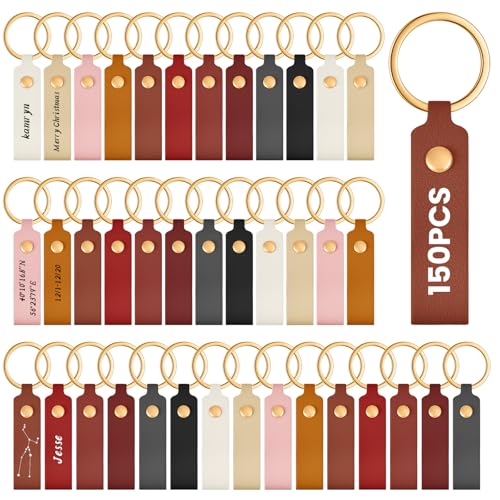
- Versatile Package: each package includes 100 multicolor PU leather key chains for men and women, measuring approximately 0.7 x 3.7 inches, a total of 10 colors, 10 units for each color, with this enough quantity, you can meet your handmade needs and even share them with friends and family, ideal for those who enjoy DIY crafts or want to create instinct gifts
Leather keychains offer a simple but stylish canvas for laser engraving. Personalizing keychains with names, initials, or logos makes them perfect for gifts, promotional giveaways, or personal use. Engraved leather keychains are small, functional, and add a personal touch to everyday essentials.
Laser Engrave Leather Coasters
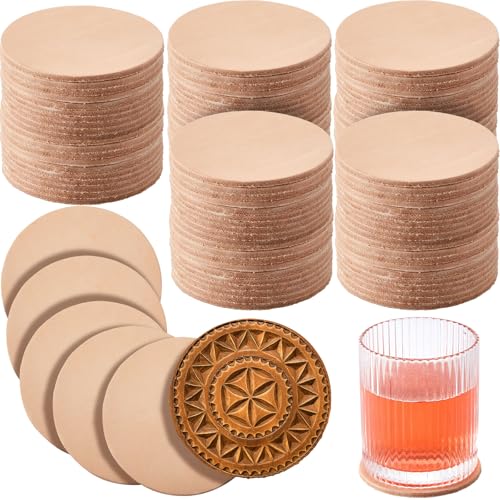
- Product Package: this package includes 50 circular vegetable tan leathers, suitable for sharing with friends or working collaboratively on projects; Whether you're engaged in professional work or just exploring a hobby, this set will meet all your needs
Leather coasters are practical and stylish items that can be easily engraved with decorative patterns, company logos, or personalized designs. These make great gifts for special events or corporate branding. Engraving on coasters adds a touch of class to any table setting.
Laser Engrave Leather Furniture
For a luxurious touch, laser engraving can be used to add logos, patterns, or custom designs to leather furniture like chairs and couches. Whether it’s a decorative detail on an armrest or an engraved logo on a headrest, laser engraving enhances the aesthetic appeal of high-end leather furniture pieces.
Laser Engrave Leather Passport Covers
Passport covers are frequently engraved with initials or full names to add a personal touch. Engraving designs or artwork can also give passport holders a unique, customized look, perfect for travelers who want to stand out while keeping their documents safe.
Laser Engrave Leather Dog Collars
Laser engraving on leather dog collars is a practical and stylish way to add your pet’s name or your contact information. These personalized collars not only look great but also serve an important purpose, ensuring your pet can be identified easily.
Which Laser Is Best for Engraving Leather?
1. Diode Lasers (Most Common)
- Ideal for leather engraving
- Affordable and widely available
- Produces dark, detailed results
- Typical power: 10W–40W
We endorse the xTool S1 Diode Laser as the best for engraving leather.

The xTool S1 Diode Laser is widely considered one of the best laser engravers for leather because it combines the right laser wavelength, power options, safety features, and workflow tools that leather engraving specifically benefits from.
Here’s a clear breakdown of why the xTool S1 is excellent for engraving leather—especially for hobbyists, small businesses, and makers.
Diode Laser Wavelength Is Ideal for Leather
Leather—especially vegetable-tanned leather—absorbs blue diode laser wavelengths (≈455nm) extremely well.
What this means for engraving:
- Deep, dark, high-contrast marks
- Clean edges without excessive charring
- Consistent results across different leather thicknesses
The xTool S1 uses a high-quality diode laser that produces rich, professional-looking engravings without damaging the material.
Multiple Power Options = Perfect Control
The xTool S1 is available in 10W, 20W, and 40W configurations, which is ideal for leather work.
Why power flexibility matters:
- 10W–20W: Excellent for detailed logos, text, and light engraving
- 40W: Faster engraving and clean cutting of thick leather
You can engrave fine details at lower power or increase speed and throughput for production work—something many entry-level lasers can’t do well.
Exceptional Contrast Without Chemicals or Coatings
Unlike metal engraving, leather does not require marking sprays or coatings.
The xTool S1 naturally produces:
- Dark burn marks
- Sharp edges
- Long-lasting engravings
This makes it:
- Faster to work with
- Cheaper per project
- Safer (no chemicals involved)
For leather patches, wallets, and belts, contrast quality is one of the biggest selling points—and the S1 delivers it consistently.
Enclosed Design = Safer Leather Engraving
Leather engraving produces smoke, odor, and flare-ups if done incorrectly.
The xTool S1’s fully enclosed design offers major advantages:
- Built-in flame detection
- Emergency stop button
- Contained smoke and debris
- Safer for home workshops and studios
This is especially important when engraving leather, which can ignite if left unattended.
Excellent Smoke Control & Air Assist
Leather smoke can stain materials and reduce engraving quality.
The xTool S1 features:
- Adjustable air assist to control charring
- Strong exhaust options
- Compatibility with xTool smoke purifiers
Turning air assist off or low produces darker marks, while higher airflow keeps cuts cleaner—giving you full control depending on the project.
Precision & Consistency for Small Business Production
The S1 excels at repeatable, production-level leather engraving, making it ideal for:
- Leather patches
- Keychains
- Coasters
- Branding runs
Features that help:
- Accurate framing and positioning
- Camera support for alignment
- Reliable focus control
- Consistent power output
This reduces wasted material—critical when working with premium leather.
Works Perfectly With Popular Leather Projects
The xTool S1 handles common leather thicknesses effortlessly:
- 2–3 oz (0.8–1.2mm): Fine detail engraving
- 4–6 oz (1.6–2.4mm): Patches and wallets
- 8–10 oz (3–4mm): Belts and straps (cutting possible with 20W–40W)
Few diode lasers handle this range as reliably.
Beginner-Friendly Software & Workflow
Leather engraving often involves:
- Logos
- Text placement
- Batch production
xTool’s software ecosystem offers:
- Simple setup and calibration
- Import of SVG, PNG, DXF files
- Easy power/speed control
- LightBurn compatibility (advanced users)
This makes the S1 accessible for beginners but powerful enough for professionals.
Lower Operating Costs Than CO₂ Lasers
Compared to CO₂ lasers, the xTool S1:
- Requires no mirrors or tubes
- Uses less power
- Needs less maintenance
- Has a smaller footprint
For leather engraving, a diode laser like the S1 delivers nearly the same visual quality as CO₂ at a fraction of the cost.
Proven Results in the Leather-Making Community
The xTool S1 is widely used by:
- Leather crafters
- Etsy sellers
- Patch and hat makers
- Small branding studios
Its consistent results, safety features, and reliability make it one of the most trusted leather engraving lasers on the market.
2. CO₂ Lasers (Professional Results)
- Excellent contrast and speed
- Minimal charring when properly tuned
- Preferred for commercial production
Things to remember when laser engraving leather
Laser engraving leather can add a personal, artistic touch to various products, from wallets to belts and bags. However, working with leather using a laser requires attention to detail and understanding the material to ensure the best results. Here are essential things to keep in mind when laser engraving leather:
Type of Leather Matters
Not all leather is the same, and the type of leather you choose affects the outcome of your engraving. Full-grain and top-grain leather are the best for laser engraving because they are durable and provide a clean surface for detailed work.
Lower-quality leathers, like genuine leather, may not engrave as cleanly, and suede or nubuck may produce more muted results due to their softer texture.
Key Tip: Test the laser settings on a small piece of leather to see how it reacts, especially if you’re working with a new or unfamiliar type of leather
Proper Laser Settings
Getting the laser settings right is crucial for achieving sharp, clean engravings on leather. Using the correct power, speed, and frequency settings ensures that the laser doesn’t burn or damage the leather. Start with low power and increase gradually to prevent scorching or uneven marks.
Key Tip: Always start with lower power settings to avoid burning or damaging the leather. Adjust the speed and frequency settings for finer details
Ventilation is Important
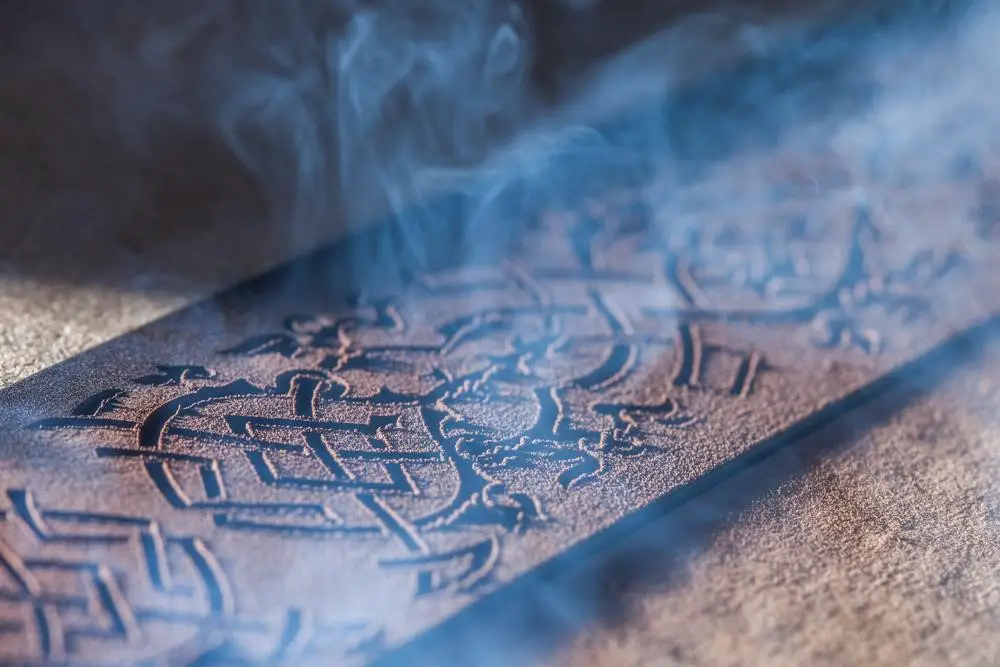
Leather contains natural oils and produces fumes when it is engraved, which can be harmful if inhaled.
Proper ventilation or a good exhaust system is necessary when laser engraving leather to ensure that the workspace stays safe and odor-free.
Key Tip: Make sure your laser engraver is equipped with an exhaust system or work in a well-ventilated area to reduce exposure to fumes
Our Buying Guides Can Be Found Here:
1. Top 5 Laser Engraver Exhaust Fan Options: Best Quality!
2. Best Fume Extractors for Laser Engravers: 5 Quality Options!
3. Laser Engraver Enclosure Options: You Need The Best Quality
Avoid Synthetic Leathers
Synthetic leathers, like bonded leather, may not engrave as well as natural leathers. They can melt, produce harmful fumes, and generally yield poor engraving results. Stick to natural leather types for the best results when laser engraving.
Key Tip: Verify that the leather you’re using is natural, as synthetic leathers can produce hazardous fumes and give unsatisfactory engraving results
Clean the Leather Before Engraving
Leather often contains oils, dust, or debris that can interfere with the engraving process. Wipe down the leather with a soft, damp cloth before engraving to ensure the laser interacts directly with the surface, not contaminants.
Key Tip: Clean the leather surface with a cloth before engraving to remove any dust, dirt, or oils that may affect the final result
Test Before Full Engraving
Laser settings vary depending on the type of leather, the design, and the desired depth of the engraving. Testing your settings on a scrap piece of leather before engraving your final product helps ensure that the design comes out as expected.
Key Tip: Run a test engraving on a sample piece of the same leather to ensure you have the correct settings before starting your main project
Engraving Depth and Design
Leather can be engraved to different depths depending on the effect you want. A shallow engraving will add a subtle touch, while a deeper engraving creates a more pronounced design. Be cautious with extremely intricate designs, as leather may not hold very fine details as well as other materials.
Key Tip: Adjust the engraving depth depending on the leather’s thickness and texture. Avoid overly detailed designs if you are engraving on textured leather like suede
Post-Engraving Care
After engraving leather, it’s important to finish it properly to maintain the quality of both the engraving and the leather itself. Applying a leather conditioner or protective sealant can help preserve the engraved design and keep the leather supple.
Key Tip: Use a leather conditioner or sealant after engraving to protect both the design and the material
Pay Attention to Grain and Texture
The grain and texture of leather can impact the engraving outcome. Full-grain leather has natural marks that may add character to the engraving, but they can also distort fine details. Plan your design with the leather’s grain in mind.
Key Tip: Choose a leather with a consistent grain for projects requiring detailed designs, and factor in the texture for larger, more straightforward engravings
Customization Possibilities
One of the key benefits of laser engraving leather is the ability to personalize products. Whether for gifts or branding, leather engraving offers endless possibilities for logos, names, and intricate designs, making each product unique.
Key Tip: Consider adding personalized elements like initials, logos, or custom artwork to make your leather engraving projects more unique and valuable
Recommended Laser Settings for Leather
Always test settings on scrap leather first
Starting point (diode laser):
- Power: 15–30%
- Speed: 2,000–4,000 mm/min
- Passes: 1
- Air assist: OFF or very low
CO₂ laser starting point:
- Power: 10–25%
- Speed: Medium-fast
- DPI: 300–400
Laser Engrave Leather Common Problems & Solutions
Burn Marks Too Dark
- Reduce power
- Increase speed
- Disable air assist
Light or Faded Engraving
- Slow down speed
- Increase power slightly
- Use veg-tan leather
Uneven Results
- Leather thickness varies
- Flatten material using magnets or honeycomb bed
Final Thoughts
Laser engraving leather offers endless creative possibilities, but the key to achieving professional results lies in understanding the material, proper machine settings, and post-engraving care.
Always test your settings, ensure proper ventilation, and choose the right type of leather for the best results.
Whether you’re crafting a personalized gift or a unique leather product, keeping these factors in mind will help you create stunning engraved designs.
Frequently Asked Questions
Can you laser engrave leather with a diode laser?
Yes, diode lasers are excellent for engraving leather.
A diode laser (such as a 10W–40W unit):
Creates clean, sharp engravings
Provides strong contrast
Requires no marking sprays or coatings
Diode lasers are one of the most cost-effective and reliable options for leather engraving.
Does laser engraving damage leather?
When done correctly, laser engraving does not weaken leather.
To avoid damage:
Use proper power and speed settings
Avoid over-burning the same area
Use light air assist or turn it off for darker results
Overpowering the laser can cause brittleness or excessive charring, so testing is always recommended.
Is laser-engraved leather safe to use and sell?
Yes—laser-engraved vegetable-tanned leather is safe for personal use and resale.
Safety tips:
Ventilate properly to remove smoke and odor
Never engrave unknown or chrome-tanned leather
Wear laser safety glasses if your machine is open-frame
Laser engraving does not add chemicals to the leather, making it ideal for handmade goods and small businesses.